





Description
Key Technical Specifications
| Parameter | Value |
| Model Designation | PNI800 (Module only) / PNI800K01 (Interface Kit) |
| Processor | MCF5475 ColdFire running at 256 MHz |
| Memory Capacity | 64 MB DRAM, 4 MB Flash ROM |
| Network Speed | 100 Mbps (Fast Ethernet) |
| Line Redundancy | Yes, IEC 62439 Parallel Redundancy Protocol (PRP) compliant |
| Workstation Interface | Harmony API (based on Ethernet TCP/IP) |
| Client Capacity | Up to 10 S+ Engineering (SPE) or HMI client connections |
| Tag Capacity | Up to 30,000 HMI active databases/tags |
| Module Base Support | MB805 module base (requires 2x RJ45 ports) |
| Power Requirements | 24 V DC (\pm10% auxiliary), 200 mA current draw |
| Diagnostics Connection | 1x mini-USB port on the faceplate |
| Module Dimensions | 59 mm (W) x 186 mm (H) x 127 mm (D) |
Product Introduction
The ABB PNI800 is a high-speed, real-time communication server designed for the Symphony Plus SD Series distributed control system (DCS). Functioning as the primary hardware gateway between the PN800 Plant Network (control ring) and upper-level operator applications, the PNI800 allows PC workstations running S+ Engineering, Symphony Plus Operations (SPO), 800xA, or third-party Harmony OPC servers to read and write runtime controller variables continuously.
By acting as a Parallel Redundancy Protocol (PRP) Dual Attached Node (DANP) under IEC 62439 specifications, the PNI800 connects simultaneously to both the PN800A and PN800B networks. It processes duplicate data streams to ensure seamless, zero-millisecond switchover if a physical network link breaks. This module offloads heavy polling overhead from the SD series controllers, preserving CPU cycles for process execution while maintaining data delivery across the control room.
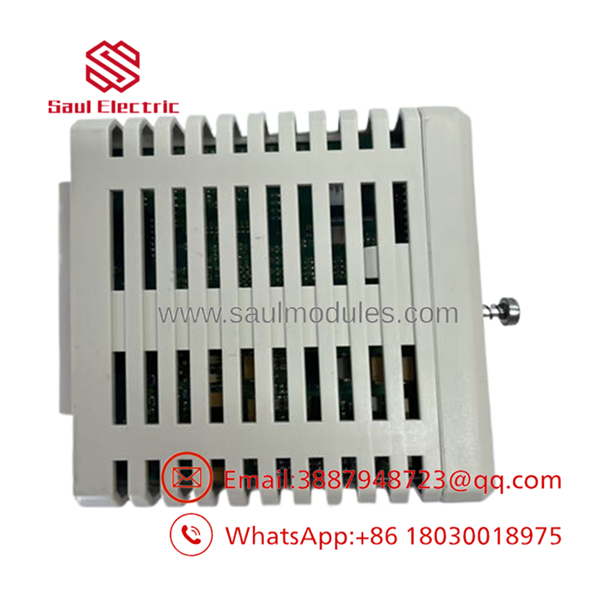
- PNI800
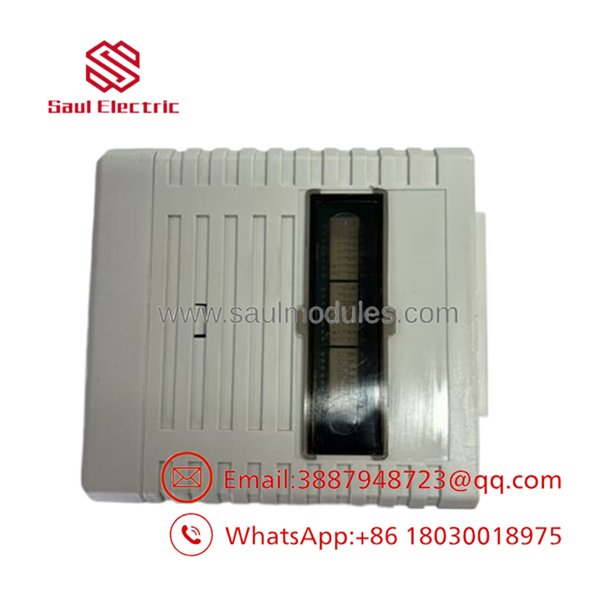
- PNI800
Installation & Configuration Guide
Stage 1: Pre-Installation Preparation
- Estimated Time: 15 minutes
- ⚠️ Safety First: Adding or replacing a node interrupts data transfer to associated operator consoles. Ensure your plant is in a steady, monitored state, and coordinate with the control room staff. Ensure alternative operator interface terminals are available to maintain a view of the process during the swap.
- Tools Required: ESD-safe wrist strap, small slotted screwdriver, engineering PC with S+ Engineering, and a mini-USB utility cable.
- Licensing Check: Ensure you have the required
PNI800SWLIC-01software license key ready for activation on the recipient workstation.
Stage 2: Removing the Old Module
- Estimated Time: 5 minutes
- Steps:
- Wear your grounded ESD wrist strap and attach it to the bare metal cabinet rail.
- Locate the target slot on the MB805 base plate.
- Unplug the redundant network cables from the base plate RJ45 ports if swapping the base assembly itself. If only replacing the plug-in module, leave the base cabling intact.
- Loosen the upper and lower captive mounting screws on the front faceplate.
- Pull the module straight forward from the MB805 base to clear the electrical backplane connections.
Stage 3: Installing the New Module
- Estimated Time: 10 minutes
- Steps:
- Carefully unpack the replacement module on an anti-static work mat.
- Inspect the rear pin connections to ensure they are straight and free of particulate debris.
- Align the card edge guide with the physical channels on the MB805 base.
- Push the module firmly back into the slot until the backplane connector locks flush against the base receiver.
- Tighten the upper and lower captive faceplate screws to secure the physical assembly.
- Self-Checklist:
- [ ] Module fully seated against the backplane interface
- [ ] Captive screws hand-tightened to prevent vibration loss
- [ ] Dual RJ45 Ethernet cables connected to the corresponding PN800A and B lines on the MB805 base
Stage 4: Power-On & Testing
- Estimated Time: 15 minutes
- Pre-Power Check: Verify the 24 V DC auxiliary feed to the MB805 base terminal block reads within normal parameters.
- Power-On Steps:
- Apply power to the system rack.
- Monitor the front status LEDs:
- POWER LED: Should light up solid green.
- STATUS/RUN LED: Will flash during diagnostic boot routines and switch to green once communications initialize.
- Plug your mini-USB cable into the front diagnostics port and connect it to your PC.
- Use S+ Engineering tools to verify the module’s diagnostic logs, load the appropriate network IP address parameters, and check the current firmware build level.
- Run an online ping loop test from your workstation PC to verify that data packets are routing reliably over both network channels.
- ⚠️ Troubleshooting Note: If your HMI console displays communication errors post-installation, verify that the workstation’s IP configuration falls within the exact subnet of the new . Also, ensure the network switch ports connected to the are configured for 100 Mbps full-duplex operation.
Frequently Asked Questions (FAQ)
What is the difference between the physical hardware and Virtual PNI (vPNI) software?
The physical is dedicated communication hardware mounted inside the DCS cabinet that interfaces directly with the network and handles client queries. The vPNI is a software utility that virtualizes this communication stack directly inside the PC workstation’s operating system using standard network interface cards (NICs). While vPNI reduces hardware footprint, the physical module provides isolated, hardware-level processing and greater diagnostic immunity to host-operating system issues.
Can the be hot-swapped while the DCS is running?
Yes. The supports live hot-swapping. When you slide a new module into an energized base plate, it will run self-diagnostics and initialize. However, the associated HMI workstations will lose communication with the controllers for the duration of the swap (typically 2-3 minutes) until the new module is fully initialized and online.
Why do I need a separate license key (PNI800SWLIC-01) for this module?
The physical module functions as a server. For an HMI console or an engineering PC workstation to establish an API connection and exchange real-time tag data with the module, the workstation must have a valid ABB software license key (PNI800SWLIC-01) installed and activated. Without this license, the PC will be blocked from initializing the communication channel.
How does Parallel Redundancy Protocol (PRP) work on this module?
The is a Dual Attached Node (DANP). It connects to two completely independent local area networks (PN800A and PN800B) that run identical topologies. For every packet the transmits, it sends an identical copy over both networks simultaneously. The receiving node accepts the packet that arrives first and discards the duplicate. If one network fails, the other continues to deliver data without any lag or failover delays.
What should I check if the fails to establish a link on the RJ45 ports?
First, check the network switch configuration. The operates at a fixed speed of 100 Mbps. If your industrial Ethernet switches are set to auto-negotiate or locked to gigabit speeds, the link may fail to initialize. Manually lock the corresponding network switch ports to 100 Mbps / Full-Duplex and verify that you are using high-quality, shielded Cat5e (or better) cables with correct grounding shields.


 Start Chat


