





Description
Product Introduction
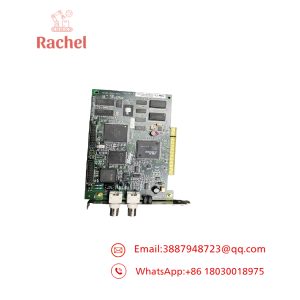
The ADLINK cPCI-3840 is a 3U CompactPCI single-board computer built on the Intel Pentium M / Celeron M processor family. It slots into a PICMG 2.0 / 2.3 backplane as the system’s CPU blade — the host that runs the OS, the application software, and the slot controllers downstream of it. Its biggest installed base by far is semiconductor capital equipment: you’ll find cPCI-3840AM-branded variants of this exact board inside Applied Materials process tools and metrology systems.
The board’s appeal was power efficiency and I/O in a small envelope: low-power Pentium M silicon (up to 2 MB L2 cache), up to 2 GB of PC2700 DDR-SDRAM, dual Gigabit Ethernet, USB 2.0, and multiple storage options. In a semiconductor tool, that CPU blade is what hosts the tool control software — and when it dies, the tool goes down hard. To be honest, a Pentium M board sounds ancient in 2026, but the machine it lives in is a multi-million-dollar tool, and a like-for-like blade swap is a one-day repair versus a months-long platform migration that AMAT hasn’t asked for anyway. That’s the entire reason this page exists.
Key Technical Specifications
| Parameter | Value |
|---|---|
| Form Factor | 3U CompactPCI blade, PICMG 2.0 compliant (hot-swap per PICMG 2.3 capable configurations) |
| Processor | Intel Pentium M / Celeron M, up to 2 MB L2 cache |
| Power Profile | Low power consumption design |
| System Memory | Up to 2 GB PC2700 DDR-SDRAM |
| Ethernet | Dual Gigabit Ethernet ports |
| USB | USB 2.0 ports |
| Storage | Multiple onboard storage options (CF / IDE configurations per variant) |
| Video / Graphics | Integrated graphics per variant (verify against datasheet) |
| OS Support | Windows and Linux variants of the era (verify against tool’s validated build) |
| OEM Variants | CPCI-3840AM (Applied Materials configuration), e.g. CPCI-3840AM/PM16/M512(L)-1121 |
| Country of Origin | Taiwan |
Verify processor stepping, memory configuration, and BIOS revision against the official ADLINK cPCI-3840 datasheet and your tool’s configuration record before ordering.
Application Scenarios & The “Trench” Experience
It’s a Saturday in the fab. A 300 mm etch tool’s host PC locks up mid-lot. The process engineer can’t connect, the wafer in the chamber has to be cleared by hand, and the equipment engineer pulls the cPCI-3840AM blade to find it won’t POST — no video, no boot, blinking status. Production planning moves the lot queue, and the fab’s throughput numbers start bleeding. AMAT’s service channel quotes the board with a lead time measured in weeks, and the tool sits in a “down” state on the fab dashboard the whole time. We’ve supported this exact scenario more times than we can count — semiconductor spares are the backbone of our CompactPCI business.
- Semiconductor Manufacturing — Applied Materials process tool host — The cPCI-3840AM variant is the validated host controller for AMAT platforms; a like-for-like replacement is the only swap that doesn’t trigger a tool requalification.
- Metrology & Inspection Equipment — Wafer inspection tool control — The blade hosts inspection software that streams camera and sensor data over dual GbE to upstream processing modules; losing one Ethernet path degrades throughput immediately.
- Industrial Test & Measurement — Rack-based test systems — 3U CompactPCI test racks use the 3840 as the system master controlling timing, digitizer, and switch cards on the same backplane.
- Defense / Rugged COTS Systems — VME-adjacent COTS platforms — Low-power Pentium M silicon made this blade popular in convection-cooled COTS racks where heat budgets ruled out faster, hungrier CPUs.
Field case (fictionalized, plausible): A PVD tool at a memory fab lost its host blade on a Sunday night — tool down, estimated at $85,000 per day of lost wafer output at that node. The official channel offered a 6-week board replacement. A tested cPCI-3840AM shipped overnight, arrived Monday morning, and the equipment engineer — after matching BIOS settings to the tool’s configuration record — had the tool running qualification wafers by Monday evening. Total downtime: under 24 hours. The board cost less than 1% of the downtime it eliminated. That’s the entire economics of semiconductor spares.
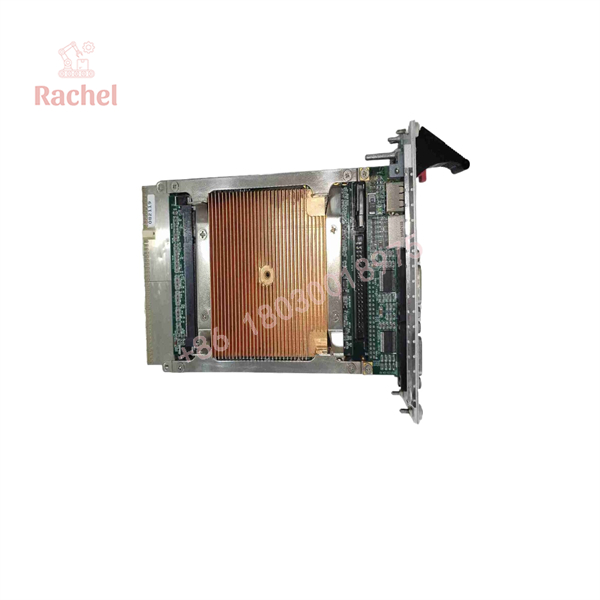
CPCI-3840
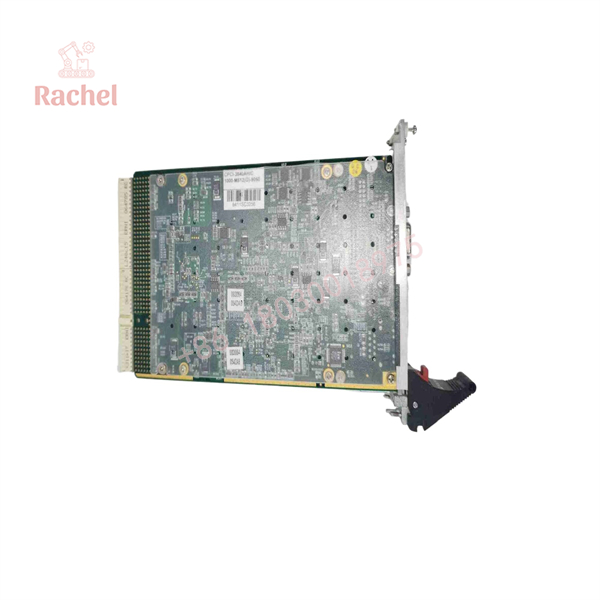
CPCI-3840
Transparency SOP: Quality Assurance & Testing
We don’t just ship boxes; we test them on actual CompactPCI hardware.
- Inbound Inspection — Full part number including OEM suffix (3840 vs. 3840AM) verified, serial and board revision logged, anti-counterfeit screening with OEM label and PCB marking comparison.
- Live Rig Testing — Full POST test in a 3U CompactPCI backplane with known-good RAM and storage, confirming boot to OS, memory training, and PCI enumeration across the backplane slots.
- I/O Verification — Both Gigabit Ethernet ports exercised with a traffic generator, USB ports checked, and storage interfaces validated — dead NICs and flaky IDE/CF interfaces are the most common latent failures on blades of this age.
- Memory Stress Testing — Extended memory test run on the SODIMM/board memory; RAM is a top age-related failure point on Pentium M-era boards, and a marginal stick will pass a quick boot and fail in the field.
- Firmware/BIOS Verification — Exact BIOS revision logged and included in shipment documentation so your team can validate it against the tool’s configuration baseline before install.
- Final QC & Packaging — ESD-safe handling throughout, connector pins inspected, front panel and ejectors checked, then sealed in anti-static packaging with foam protection.
The Veteran’s Tech Trap Guide
- ⚠️ The suffix is everything on this board. A cPCI-3840 and a cPCI-3840AM are not the same purchase. The AM variant carries Applied Materials-specific configuration, BIOS, and build details matched to the tool. Installing the wrong variant in an AMAT tool can mean a board that boots but fails tool startup checks. Read the label on the failed blade and match it exactly — or photograph it and send it to us before ordering.
- ❗ Match the BIOS revision before you swap. Semiconductor tools often validate software against a specific BIOS build. A replacement blade with a different BIOS revision can shift interrupt routing or ACPI behavior just enough to break the tool’s startup sequence. We log and ship the exact BIOS revision; verify it against your tool’s records, and be deliberate about whether you match the old one or follow the tool’s documented baseline.
- ⚠️ The CMOS battery — check it during the install. A board that has sat in storage for years may have a dead or weak coin cell. The blade will boot, then lose its settings on every power cycle and confuse the daylights out of whoever’s diagnosing the tool. Replace or verify the battery while the blade is out on the bench. Trust me, ten cents of prevention here saves a very embarrassing service call.
- ❗ Don’t seat it on a live backplane unless your system is truly PICMG 2.3 hot-swap qualified. Many deployed tools support hot-swap hardware but the tool’s software was never written to expect the host being pulled. The safe rule: controlled shutdown of the tool, then swap. Also — ESD discipline matters double here; a Pentium M-era northbridge is unforgiving, and a static-damaged board can pass a bench test and fail in the tool weeks later.
Frequently Asked Questions (FAQ for Conversion)
Q1: Is the cPCI-3840 hot-swappable?
Physically, in a PICMG 2.3 hot-swap backplane, the hardware supports it. Practically — no, don’t. This blade is the system host; pulling it live takes the entire tool down anyway, and uncontrolled shutdowns risk software corruption. Shut down the tool properly, then swap. The hardware capability is not the same as the tool’s software tolerating it.
Q2: Is this board still made by ADLINK?
No. The Pentium M generation is long retired; ADLINK’s current CompactPCI Serial platforms use modern Intel Core and Xeon processors. The cPCI-3840 lives on only in the surplus and spares market — which is where we come in, with tested genuine boards sourced from OEM overstock, tool decommissioning, and distributor inventories.
Q3: I need the CPCI-3840AM for an Applied Materials tool — is this the right one?
Tell us the exact label on your failed board — including the full suffix string (e.g., CPCI-3840AM/PM16/M512(L)-1121) — and we’ll match it against our stock before quoting. AMAT variants can differ in BIOS and configuration from the standard ADLINK build, and we don’t guess on semiconductor spares. Verify before ordering; it’s a two-minute conversation that prevents a six-figure mistake.
Q4: Does the BIOS need to match my old board?
Ideally yes, or match your tool’s documented baseline. We log the exact BIOS revision of every board we ship, in writing, so your equipment engineers can validate it before the board ever reaches the tool. If a specific revision is required, tell us — matching stock to documented requirements is exactly the kind of request we handle daily.
Q5: Why is a 20-year-old CPU board so expensive in the surplus market?
Because the alternative isn’t a cheaper Pentium M board — it’s a multi-million-dollar tool sitting down, or a platform migration nobody has qualified. Spares for discontinued semiconductor equipment are priced by the value of the downtime they prevent, not by their component cost. We price fairly against the genuine market, and every board is fully tested before it ships.
Q6: Is this genuine ADLINK? Is it refurbished?
Genuine ADLINK, condition honestly listed per unit: factory-sealed new surplus where available, or fully tested pulls from decommissioned tools and OEM stock. Every board passes the full rig test — POST, memory stress, dual-NIC verification — with documentation. We’re an independent supplier, not an authorized distributor, and we say so plainly.
Q7: What’s the warranty?
12 months from delivery covering functional failure under normal operating conditions. A board that passes our extended memory and I/O stress testing has already survived the failure modes that matter; a year of coverage on top of that makes this about as low-risk as legacy semiconductor spares get.

 Start Chat


