





Description
Key Technical Specifications
- Product Type: Fiber optic modem / communication module.
- ABB Type Designation: DSTC454.
- Spare Part Number: 5751017-F.
- Function: LDB optical modem.
- Data Rate: 2 Mbit/s.
- Connector: FSMA-1/905.
- Fiber Support: 2 x 50/125 µm or 2 x 62.5/125 µm cable.
- Use Case: ABB Advant Master and related process control systems.
- Isolation: Optical isolation.
- Availability: Limited, legacy spare.
Product Introduction
The ABB DSTC454 is an LDB fiber optic modem used in ABB process control systems to carry communication over optical cable. Available source material identifies it as spare part 5751017-F and lists a 2 Mbit/s link rate with FSMA-1/905 connector support.
This is a legacy communication spare, so the real priority is exact link compatibility, not just physical fit. Before installation, verify the target ABB system, fiber type, and modem revision so you do not end up with a link that looks correct but never comes up.
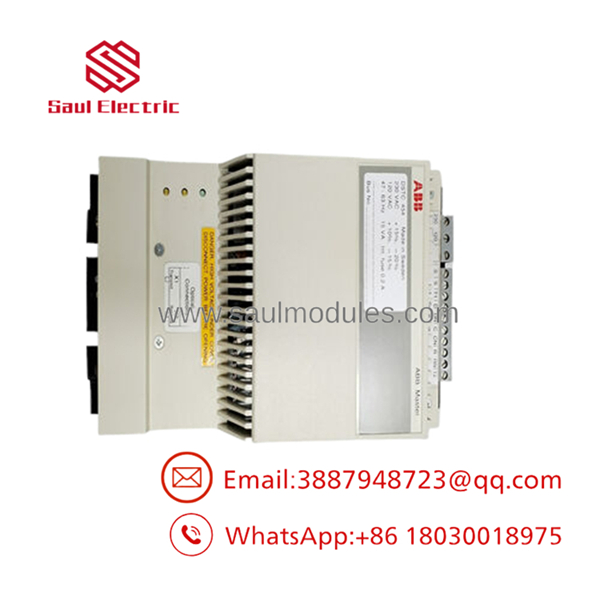
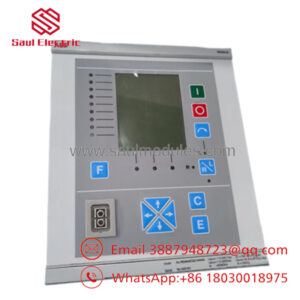
- DSTC454
Installation & Configuration Guide
Stage 1: Pre-Installation Preparation
Time estimate: 5-8 minutes.
- ⚠️ Safety First: Notify operations of downtime, verify safe state, lock out/tag out power, and wait at least 5 minutes for capacitor discharge.
- Gather tools: ESD strap, PH1 screwdriver, multimeter, fiber cleaning kit, and a smartphone for photos.
- Back up the communication configuration, document the fiber routing, and photograph the connector orientation and any label tags.
- Verify the replacement part is the exact DSTC454 / 5751017-F version before opening the package.
Stage 2: Removing the Old Module
Time estimate: 5 minutes.
- Remove the access cover or communication panel.
- Disconnect the fiber cables carefully and cap both ends immediately to keep dust out.
- Release the modem from its mounting position and pull it straight out.
- Inspect the connectors, fiber ends, and mounting area for dust, scratches, or heat damage.
- ⚠️ Note: Keep the old module until the replacement link is fully stable.
Stage 3: Installing the New Module
Time estimate: 8-10 minutes.
- Put on the ESD strap and confirm the model and spare part number match the removed unit.
- Configuration clone is critical: copy the exact fiber routing, connector orientation, and site-specific settings from the old photos.
- Seat the modem fully and lock it into place.
- Reconnect the fiber cables using clean, labeled, and capped ends only.
- Check the self-list: [] settings match, [] fibers clean, [] module seated, [] connectors locked.
Stage 4: Power-On & Testing
Time estimate: 8-12 minutes.
- Pre-power check: inspect fibers for end-face contamination and confirm the cabinet supply is correct.
- Power up the control cabinet first, not the field devices.
- Verify the status indicators if present.
- Confirm the ABB system recognizes the optical link and that traffic passes normally.
- Run a communication test between the linked control nodes or I/O sections.
- ⚠️ Troubleshooting Note: If the link does not establish, clean and reseat the fiber ends first, then verify the exact modem version and system compatibility.
Frequently Asked Questions
Can this modem be hot-swapped under power?
No. Treat it as a powered-down replacement unless the exact ABB documentation says otherwise. Fiber hardware is easy to damage if you pull it live without a very good reason.
Is the DSTC454 obsolete?
Yes, it is a legacy ABB spare with limited stock availability. In practice, that means surplus or refurbished units are the normal buying path.
What is the direct replacement if this modem is unavailable?
There is no safe generic substitute. The replacement has to match the same ABB link type, connector standard, and 2 Mbit/s communication behavior. Verify that before buying.
Will I lose my programming when I replace the unit?
Usually no, because this is a communication modem rather than the main controller. The real risk is a link mismatch, so back up the system and verify node communication after installation.
Why is your price lower than ABB list price?
Because this part is usually sourced from surplus channels or refurbished inventory instead of fresh OEM production. That is normal for discontinued industrial hardware, but condition and warranty still matter.
What condition should I expect?
Most available stock is new surplus or refurbished tested. Ask for photos, test status, and packaging details before you commit.
What is the most common installation mistake?
Skipping the fiber cleaning step. A dirty connector can look fine and still break the link immediately.

 Start Chat


