





Description
Product Introduction
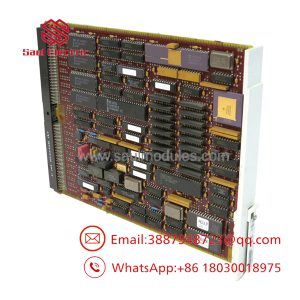
The Alcatel-Lucent CPU7-2 (Part Number 3EH73092AB) is the central processing engine for the Alcatel-Lucent Enterprise OmniPCX Enterprise (OXE) IP-PBX communication platform. Built to drive large-scale corporate telephony networks, mission-critical call centers, and industrial voice backbones, this main processor board runs the Linux-based OXE operating system software, handling call signaling, IP domain routing, system database management, and media gateway control.
Featuring integrated hard drive/flash storage and enhanced onboard memory over older CPU platforms (like CPU5 or CPU7), the CPU7-2 module delivers the processing power needed to run complex SIP trunks, VoIP encryption, and multi-tenant telephony architectures without bottlenecking. If you are managing legacy OXE hardware in a hospital, airport, or manufacturing facility, maintaining a pre-configured, tested CPU7-2 spare is critical to avoiding total communication blackouts.
Key Technical Specifications
| Parameter | Specification / Value |
| Model Code | CPU7-2 |
| Manufacturing Part Number | 3EH73092AB / 3EH73092AA |
| Platform Compatibility | Alcatel-Lucent OmniPCX Enterprise (OXE) Media Gateway / Common Hardware |
| Module Type | Central Controller / Main CPU Board |
| Operating System | Linux (Alcatel-Lucent OXE Telephony Software Release) |
| Storage Engine | Onboard IDE/SATA Hard Disk Drive or Industrial Flash Drive Assembly |
| Network Interfaces | 2x RJ45 Ethernet Ports (LAN/WAN Redundancy or Local Management) |
| Serial Interfaces | 1x RS-232 Console Port (V.24 / VT100 Terminal Interface) |
| Operating Voltage | Standard Backplane Power Feeds (+5V / +12V DC) |
| Form Factor | Single-Slot OmniPCX Shelf Controller Board |
| Status Indicators | LED (Power, CPU Boot, HDD Access, Ethernet Link/Act, System Alarm) |
Application Scenarios & The “Trench” Experience
It is 4:10 AM when the main PBX controller in a 24/7 industrial complex dies. The primary CPU card experiences a fatal hard drive crash or RAM corruption. Instantly, hundreds of IP phones, analog emergency call boxes, and paging systems go offline. The standby CPU takes over if configured in a main/standby pair, but running on a single CPU leaves your voice infrastructure without a safety net. If that secondary card takes a power surge, the whole facility goes completely silent. Sourcing a tested CPU7-2 board with a healthy drive image allows you to rebuild system redundancy before morning shift traffic hits.
Target Applications
- Enterprise IP-PBX Telephony: Running call control, SIP trunking, and voicemail services for corporate offices.
- Hospitality & Healthcare Voice Backbones: Processing high-density analog extension cards, nurse call integrations, and guest management systems.
- Airport & Transportation Infrastructure: Maintaining critical ground-to-tower voice, emergency paging systems, and administrative phone networks.
- Industrial Plant Safety Networks: Hosting PBX call processing across harsh manufacturing facilities and offshore platforms.
Field Case Study
An international logistics hub suffered a sudden drive failure on its primary -2 card inside an OmniPCX Enterprise rack during a storm-induced power flicker. Call processing halted across two shipping terminals. The local vendor quoted weeks for a complete server migration. We dispatched a bench-tested, pre-id (3EH73092AB) replacement board overnight. The site engineer inserted the board, restored the backup database via the serial console interface, and brought all 1,200 extension lines back online in under 30 minutes.
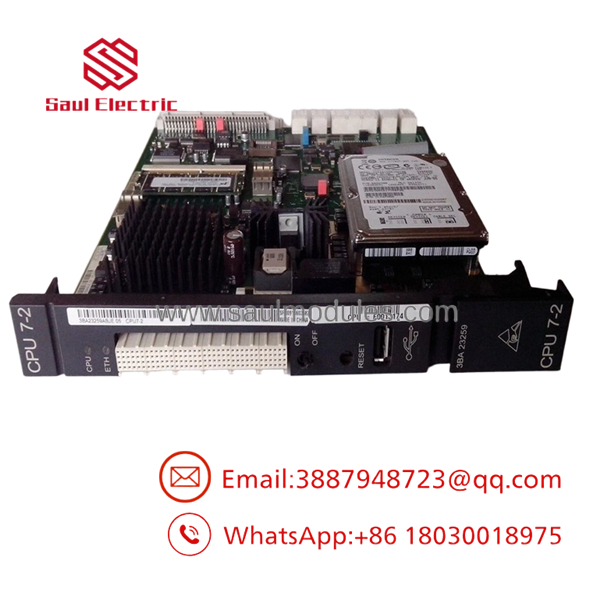
CPU7-2
Transparency SOP: Quality Assurance & Testing
CPU boards carry the entire software stack of a PBX platform. We test y module rigorously before shipping:
- Inbound Visual & Pin Inspection: Inspection of the PCB, capacitor tops, SATA/IDE hard drive connections, faceplate ports, and backplane gold fingers for physical wear or thermal discoloration.
- Chassis Live-Rig Boot Test: The board is installed into a live Alcatel-Lucent OmniPCX Enterprise shelf to test BIOS POST routines, Linux kernel initialization, and system hardware identification.
- Hard Drive / Flash Health Diagnostic: Storage media undergoes surface diagnostics to verify zero bad sectors, stable read/write IOPS, and clean partition structures.
- Interface Verification: Testing serial console communication, dual Ethernet LAN ports, and backplane bus synchronization under simulated call loads.
- ESD-Safe Packaging: Cleaned with static-neutral solution, vacuum-sealed in anti-static shielding bags, and packed with custom high-density foam for safe shipping.
The Veteran’s Tech Trap Guide (Crucial Value-Add)
⚠️ 1. Keep Track of Your OXE Software Version & Hard Drive Image
Do not expect to plug a k board into an OXE chassis and have it work out of the box. The board requires a specific OXE Linux software release image loaded onto its internal drive that matches your system database version. If the release numbers do not match your license key (CPU Dongle / FlexLM license profile), the system will enter an unlicensed emergency reboot loop.
❗ 2. Protect the CPU Security Dongle / Hardware Key
If your legacy OXE system relies on a physical security key or software license tied to the CPU board ID, do not forget to transfer the key from your old card to the new one! Without the proper software license files or physical security donglee will boot up in restricted mode and shut down voice channels after a demo grace period.
⚠️ 3. Always Keep a Fresh Backup of dbdump
Before pulling a degraded CPU board, always connect to the console via SSH or VT100 serial terminal and run a fresh dbdump command to export your extension mapping, routing tables, and trunk configs. Having a fresh database file on a USB stick makes restoring thw board effortless.
❗ 4. Mind the Console Port Pinout (RS-232)
When connecting te front panel serial port for local maintenance, ensure you are using the correct Alcatel-Lucent serial cable pinout (RJ45 or DB9 depending on front adapter). Plugging in a standard Cisco console cable might not map the pins correctly, leaving you with a blank terminal screen.
Frequently Asked Questions (FAQ)
Q: Can I hot-swae main controller board?
A: If your OmniPCX Enterprise shelf is configured with a CPU redundancy pair (Main/Standby), you can pull the inactive/failed CPU without dropping active calls. However, if you only have a single CPU board in the shelf, pulling it will immediately shut down all phone services across the switch.
Q: What is the difference betweend ?
A:e is an updated hardware revision featuring improved onboard processor clock speeds, expanded RAM capacity, and updated drive controller interfaces, making it better suited for higher software releases (OXE R9.0 and above) compared to first-generation7 boards.
Q: Does this card come pre-loaded with software?
A: Our surplus units are typically wiped and formatted with a clean baseline OXE system image or BIOS diagnostic image. You will need to restore your site’s specific software release image and dbdump database backup during installation.
Q: Are these genuine Alcatel-Lucent Enterprise boards?
A: Yes. All our boards undergo physical silk-screen validation, internal EEPROM readout, and serial number verification to guarantee 100% OEM authenticity. We never sell third-party clones.
Q: What warranty is included withs board?
A: Every board comes backed by a 12-month advance replacement warranty. If the unit experiences a hardware defect or drive failure under normal operation, we ship out a replacement unit immediately.

 Start Chat


