





Description
Product Introduction & Engineering Value
The Alcatel-Lucent OmniPCX 63-IP is intended for enterprise telecommunications rather than conventional industrial networking. It sits at the center of a PBX installation, handling communications between supported endpoints, trunks, and IP-based services. Secondary-market documentation identifies the 63-IP with OmniPCX systems and IP communication functions.
The important replacement question is not simply whether another 63-IP chassis powers up. Verify the installed OmniPCX software release, database/configuration backup, licensing, connected interface cards, network configuration, and telephone/trunk architecture before scheduling the cutover. OmniPCX Enterprise documentation specifically contains hardware/software compatibility considerations, so version matching matters.
Technical Specifications
| Parameter | Specification |
|---|---|
| Manufacturer | Alcatel-Lucent |
| Model | OmniPCX 63-IP |
| Product Type | PBX / IP Communication Server |
| System Family | OmniPCX |
| Primary Application | Enterprise voice communications |
| IP Communications | Supported |
| System Architecture | Modular / platform dependent |
| Telephone Integration | System and configuration dependent |
| Trunk Integration | Configuration dependent |
| Software | OmniPCX release dependent |
| Licensing | System/software dependent |
| Expansion | Dependent on installed interface architecture |
Compatibility note
Do not treat generic descriptions of the 63-IP as a complete hardware specification. Available references differ in how they describe the platform, and the exact configuration can depend on installed boards, software, licenses, and connected equipment.
Field Application & the “Trench” Experience
A PBX replacement can become a much larger job than expected when the original system configuration is poorly documented.
Consider an office running an older OmniPCX installation. The 63-IP hardware fails, but the site still depends on existing extensions, trunks, voicemail, operator functions, and IP phones. Installing another chassis is only the hardware portion of the repair. The real work is restoring the system configuration and confirming that the replacement hardware, software release, licenses, and endpoint configuration agree.
That is why the old system database and licensing information should be secured before the failed server is removed whenever possible.
Specific application scenarios
- Enterprise PBX replacement where an existing OmniPCX installation must remain operational.
- Multi-extension corporate telephone systems combining IP and legacy telephone endpoints.
- Legacy OmniPCX maintenance projects where an existing communication server is retained rather than replacing the entire telephony infrastructure.
OmniPCX systems are documented as supporting a range of telephone-system and TAPI-related integrations, reinforcing the importance of checking the surrounding endpoint architecture during replacement.
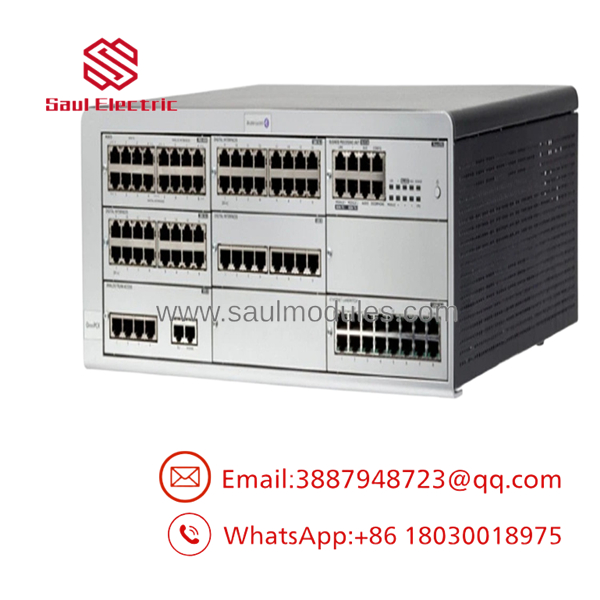
OmniPCX 63-IP
Transparency SOP: QA & Testing
For New Surplus OmniPCX 63-IP hardware, I recommend a staged acceptance test:
1. Physical identification
Confirm the 63-IP designation and photograph all labels, serial information, and installed hardware.
2. Chassis inspection
Check the enclosure, connectors, cooling components, power supply, mounting hardware, and expansion positions.
3. Power-on test
Verify normal startup and observe system indicators.
4. Hardware recognition
Confirm that installed boards and system components are recognized correctly.
5. Software verification
Check the OmniPCX software release against the customer’s existing system requirements.
6. Configuration restoration
Where applicable, restore the approved system database/configuration.
7. Communications test
Verify representative extensions, IP endpoints, trunks, call routing, alarms, and other site-critical functions.
A simple boot test is not enough for a PBX server. The meaningful test is system-level operation.
The Veteran’s Tech Trap Guide
⚠️ Trap #1 — Forgetting the software release
OmniPCX hardware compatibility is tied to the software environment. Do not assume that an older database can simply be moved to any replacement hardware revision. Alcatel-Lucent documentation explicitly addresses hardware/software compatibility.
⚠️ Trap #2 — Treating licenses as part of the chassis
The physical 63-IP unit and the customer’s software licensing are separate procurement considerations. Confirm license status before the maintenance window.
PRO TIP: Back up the OmniPCX configuration/database and preserve licensing information before replacing the hardware whenever the existing system is accessible.
⚠️ Trap #3 — Forgetting the interface cards
The chassis alone does not describe the complete PBX installation. Inventory the installed interface cards and connected trunks/extensions before ordering.
Dynamic FAQ
What is Alcatel-Lucent OmniPCX 63-IP?
It is an OmniPCX enterprise PBX/IP communications platform used for business telephone and IP communications services.
Is the 63-IP a standalone IP phone system?
It is better understood as a PBX/communications-server platform. The actual services available at a site depend on its installed hardware, software, licenses, and connected endpoints.
Can I replace an existing 63-IP with another 63-IP?
Potentially, but verify the hardware revision, installed boards, software release, configuration database, licensing, and connected telephone/trunk architecture first.
Does the replacement include the customer’s PBX configuration?
Not automatically. Treat the replacement as hardware unless the supplier explicitly confirms that the required system software, database, licenses, and configuration are included.
What should I verify before purchasing New Surplus 63-IP hardware?
Request photographs of the actual chassis, identification labels, installed boards, power supply, and hardware revisions. Also confirm the software version and whether the unit has undergone functional testing.
Can New Surplus hardware be used for a production PBX?
Yes, provided its exact hardware configuration is compatible with the installed OmniPCX system and it passes appropriate system-level testing. Condition should be documented as New Surplus, Used, or Refurbished rather than simply described as “tested.”
What warranty should I request?
Specify the warranty period, hardware condition, serial-number traceability, functional-test scope, software status, and return terms. For a PBX replacement, ask specifically whether the unit was tested only for power-up or tested with an operational OmniPCX environment.





 Start Chat


