





Description
Key Technical Specifications
- Manufacturer: ABB
- Model: PP835A
- Ordering Information: 3BSE042234R2
- Series: Panel 800
- Display Size: 6.5 in
- Display Type: TFT-LCD, 640 x 480 pixels, 64K colors
- Touch Screen: Polyester on glass
- Power Supply: 24 V DC, 20 to 30 V DC
- Power Consumption: 0.4 A normal, 0.9 A max
- Front Panel Seal: IP66
- Rear Panel Seal: IP20
- Mounting Depth: 56 mm
- Front Panel Dimensions: 219 mm x 154 mm x 6 mm
- Weight: 1.2 kg
- Ports: RS422/RS485, RS232C, Ethernet, USB, CF slot
- Flash Memory: 12 MB
- Operating Temperature: 0 to +50 C vertical, 0 to +40 C horizontal
- Storage Temperature: -20 to +70 C
- Compatibility: Verify exact Panel 800 version and firmware before installation
Product Introduction
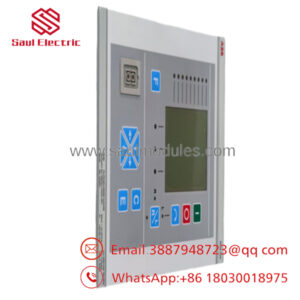
ABB PP835A 3BSE042234R2 is a Panel 800 HMI touch panel used for operator control, monitoring, alarm handling, and process visualization in ABB automation systems. It uses a 6.5-inch 640 x 480 TFT display and 24 V DC supply, with front-panel protection suited for industrial cabinets.
This unit is a common replacement for legacy ABB operator stations, so fit and software version matter. Check the exact part number, panel cutout, communication ports, and target system before ordering, because a visually similar Panel 800 unit can still be wrong for the site.
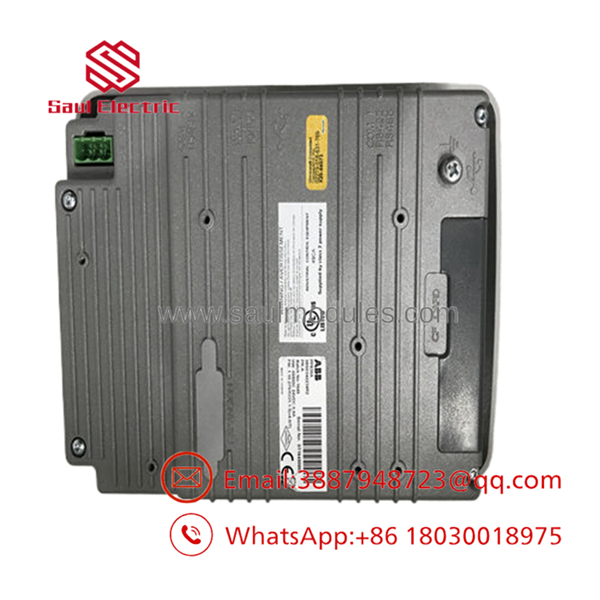
- PP835A
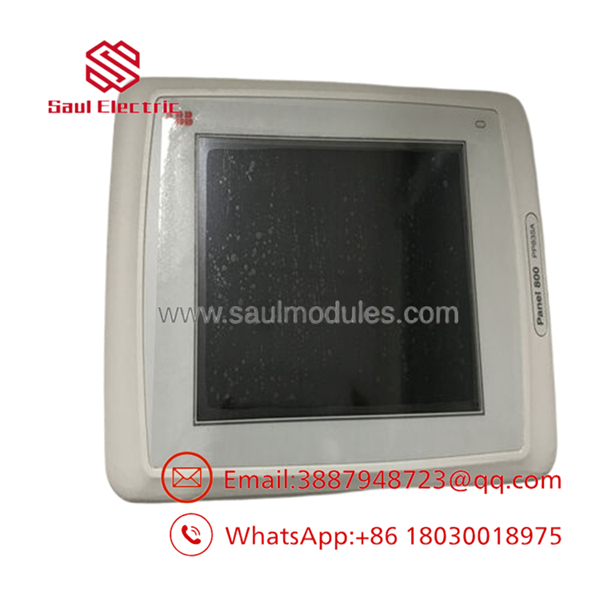
- PP835A
Troubleshooting Quick Reference
| Symptom | Possible Cause | Relevance to This Part | Quick Check Method | Recommendation |
|---|---|---|---|---|
| Panel will not power up | Missing 24 V DC supply or blown internal fuse | ✅ High | Measure 24 V DC at the power terminals and check the fuse | Verify supply first, then replace the panel if power is present |
| Screen is blank but power LED is on | Backlight or display failure | ✅ High | Check startup screen and backlight visibility in a dark room | If the panel powers but shows nothing, replacement is likely |
| Touch input does not respond | Touch overlay wear or calibration issue | ✅ High | Test touch in multiple areas and run calibration if available | Recalibrate first, then replace if the fault remains |
| HMI cannot talk to PLC | Cable, protocol, or port mismatch | ✅ High | Verify Ethernet, RS232, or RS485 link status and node settings | Recheck cabling and protocol parameters before blaming the panel |
| Random reboots | Power instability or aging internal hardware | ✅ Medium | Monitor supply voltage under load | Fix the 24 V DC source before replacing the unit |
| Display is dim or flickering | Backlight aging or power issue | ✅ Medium | Observe brightness over several minutes | Replace if the backlight is worn out and the supply is stable |
| Alarm pages freeze | Firmware or application corruption | ✅ Medium | Confirm whether the problem follows the application upload | Reload the project before swapping hardware |
If you get stuck, send photos of the nameplate, the cutout, the cable connections, and the alarm log to technical support before ordering a replacement.
Frequently Asked Questions
What is ABB PP835A?
It is a Panel 800 HMI operator panel used for monitoring and control in ABB automation systems. ABB’s hardware documents describe it as a 6.5-inch touch panel with TFT display and industrial sealing.
Is 3BSE042234R2 the same as PP835A?
Yes, 3BSE042234R2 is the ordering information tied to the panel. Always match the label on the old unit before buying.
What systems does it work with?
It is part of ABB Panel 800 / 800xA-style operator interface hardware. Confirm the software version and communication setup before installation.
Is it hot-swappable?
No. Shut down the panel power circuit before removal or installation, then verify safe voltage.
Why is it sold as new surplus or used?
Because this is a legacy HMI platform part, and market stock often comes from unused inventory, pulled equipment, or refurbished units rather than current factory production.
What should I check before ordering?
Match the full part number, display size, cutout dimensions, port types, and target automation system. That is the fastest way to avoid a no-fit or no-comm issue at the panel swap.

 Start Chat


