



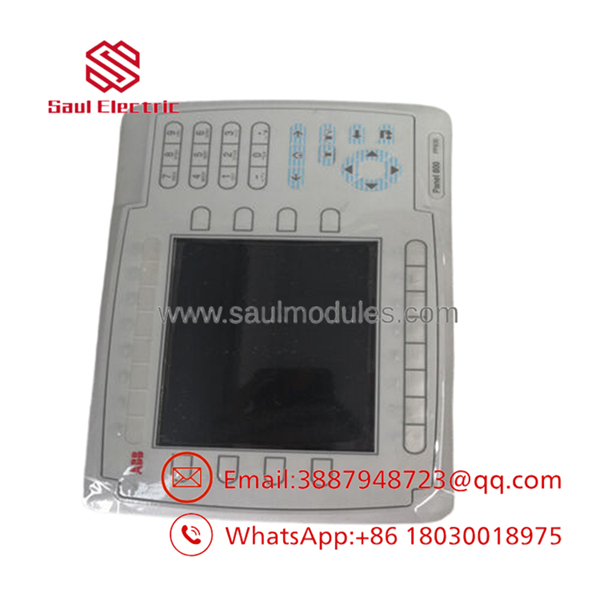
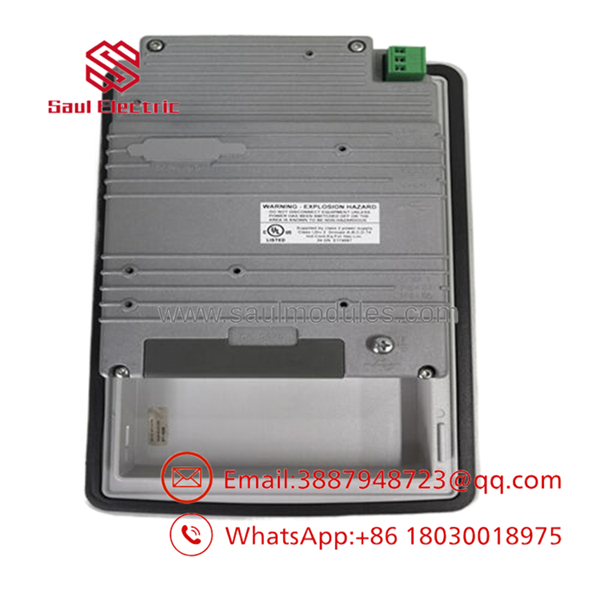


Description
Key Technical Specifications
| Parameter | Value |
|---|---|
| Manufacturer | ABB |
| Model | PP836 |
| Order Number | 3BSE042237R1 |
| Product Family | Panel 800 |
| Product Type | Industrial Operator Panel / HMI |
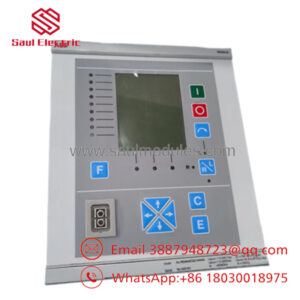
| Display Type | 6.5″ TFT LCD, 64K colors |
| Display Resolution | 640 × 480 pixels |
| User Interface | Function keys / operator buttons |
| Function Keys | 16 two-color LED keys |
| CPU | 416 MHz RISC CPU (Intel XScale) |
| Flash Memory | 32 MB |
| RAM Memory | 64 MB |
| Application Memory | 4 MB expandable |
| Power Supply | 24 V DC |
| Ethernet Interface | 10/100 Mbit/s RJ45 |
| Serial Interfaces | RS422/RS485 and RS232C |
| USB Interface | USB Host Type A / Device Type B |
| Front Protection | IP66 |
| Rear Protection | IP20 |
| Mounting | Panel mount |
| Dimensions | 285 × 177 × 6 mm front panel |
| Weight | Approx. 1.3–1.4 kg |
| Operating Temperature | 0 to +50 °C |
Product Introduction & Supply Chain Strategy
The ABB PP836 3BSE042237R1 is a Panel 800 operator panel designed for industrial human-machine interface applications. It provides process visualization, alarm handling, operator commands, and communication with ABB automation systems through Ethernet and serial interfaces. The unit is commonly integrated with ABB AC 800M and process control environments.
Maintaining PP836 units as New Original / New Surplus inventory supports long-term operation of installed HMI systems. Since operator panels can become difficult to source after lifecycle changes, holding 1 spare unit as buffer stock reduces production interruption risk, controls emergency purchasing costs, and improves Total Cost of Ownership (TCO).
Installation & Configuration Guide
Stage 1 – Pre-Installation (Prep & Safety)
- Apply Lock-Out/Tag-Out procedures before opening the control cabinet.
- Confirm replacement model: ABB PP836 3BSE042237R1.
- Wear a grounded ESD wrist strap.
- Back up the existing Panel Builder 800 project.
- Record:
- IP address settings
- Communication driver configuration
- HMI application version
- Alarm and trend settings
- Photograph all Ethernet, serial, and power wiring.
Stage 2 – Removal
- Switch off the 24 V DC supply.
- Verify no voltage remains at the HMI terminals.
- Disconnect Ethernet and serial communication cables.
- Remove rear mounting clips carefully.
- Extract the PP836 from the panel cutout.
- Inspect wiring terminals and connectors for damage.
Stage 3 – Installation (Clone & Seat)
- Verify the replacement nameplate and order number.
- Install the PP836 into the existing panel opening.
- Secure mounting clips evenly.
- Reconnect:
- 24 V DC power
- Ethernet cable
- Serial communication cable
- Restore original network parameters.
- Load the approved HMI project.
Stage 4 – Power-On & Testing
- Verify correct 24 V DC polarity.
- Power on the operator panel.
- Confirm startup diagnostics complete normally.
- Check communication with the PLC/DCS controller.
- Verify:
- Alarm display
- Process graphics
- Trends
- Operator commands
- Confirm all screens operate before returning equipment to service.
Firmware/Software Versions & Upgrade Notes
- Configuration Software: ABB Panel Builder 800.
- Application Transfer: HMI projects are downloaded from engineering software and stored in panel memory.
- Memory Storage: Application storage uses internal flash memory and optional CompactFlash expansion.
Compatibility Notes:
- Verify Panel Builder 800 version compatibility before loading an existing project.
- Confirm communication drivers match the connected ABB controller.
- Maintain backups of HMI application files before replacement.
Upgrade Risks:
- A newer HMI software version may require project conversion.
- Driver changes can affect PLC communication.
- Downgrading software may create unsupported application configurations.
Frequently Asked Questions (FAQ)
1. Is ABB supplied as a genuine new product?
Yes. The unit is supplied as New Original / New Surplus. It is not refurbished, repaired, or removed from a running production system.
2. Why is New Surplus more expensive than refurbished panels?
New Surplus provides unused OEM condition and predictable service life. Refurbished panels may contain aged displays, key switches, or electronic components with unknown operating history.
3. Is ABB an obsolete HMI?
belongs to the earlier Panel 800 generation. Plants operating existing ABB systems should evaluate lifecycle planning and consider a Last-time-buy strategy for critical operator interfaces.
4. Can be replaced while the machine is running?
No. Disconnecting an active HMI can interrupt operator visibility and control functions. Follow site shutdown procedures before replacement.
5. Will replacing delete the HMI application?
The replacement panel requires the correct Panel Builder 800 project to be downloaded. Always keep a current backup of the HMI application.
6. What quality checks are performed before shipment?
New Original / New Surplus units are verified through:
- OEM part number inspection
- Serial label verification
- Display condition check
- Connector inspection
- Power-up testing where applicable
- ESD-safe packaging
7. What warranty is recommended for ABB ?
A 12-month warranty is commonly recommended for industrial HMI spare parts. Maintaining replacement availability reduces downtime exposure for production systems.

 Start Chat


