





Description
Key Technical Specifications
| Parameter | Value |
| Model Number | PP886H |
| ABB Part Number | 3BSE069297R1 |
| Display Size / Type | 15.4-inch TFT-LCD with LED backlight |
| Aspect Ratio / Resolution | 16:10 / Widescreen high-resolution |
| Processor | Intel Atom high-performance industrial processor |
| Touch Interaction | Resistive touch screen, polyester on glass (minimum 5 million operations) |
| Input Voltage (Nominal) | 24 V DC |
| Casing Material | Powder-coated die-cast aluminum frame and rear housing |
| Ingress Protection (Front) | IP65, NEMA 4X / 12 and UL Type 4X / 12 (when correctly flush-mounted) |
| Ingress Protection (Rear) | IP20 |
| Ethernet Interfaces | 1 x 10/100 Base-T (Shielded RJ45), 1 x 10/100/1000 Base-T (Shielded RJ45) |
| Serial Interfacing | COM1: RS-232 (9-pin D-sub female), COM2: RS-422 / RS-485 |
| USB Ports | 3 x USB Host 2.0 (maximum 500 mA output current per port) |
| Operating Temperature | −30 to +70 °C (−22 to +158 °F) extended rugged baseline |
| Storage Temperature | −40 to +85 °C (−40 to +185 °F) |
| Physical Outer Dimensions | 410 mm x 286 mm x 83 mm (including front bezel thickness) |
| Panel Cut-Out Dimensions | 394 mm ± 1 mm x 270 mm ± 1 mm |
| Net Weight | 4.54 kg (10.01 lbs) |
Product Introduction
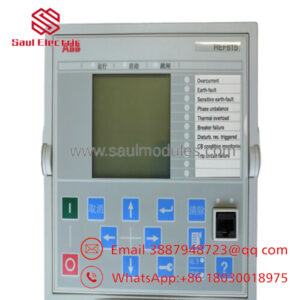
The ABB PP886H (3BSE069297R1) is a high-performance, rugged operator panel belonging to the Panel 800 Version 6 family. Engineered specifically for extreme industrial environments, this 15.4-inch widescreen HMI utilizes a resilient resistive touch screen housed inside a robust powder-coated die-cast aluminum chassis. Driven by an Intel Atom processor, the unit delivers fast screen response times, rendering vector-based graphics, real-time alarm tables, historic trending curves, and recipe manipulation screens directly to plant operators.
Unlike standard commercial panels, the PP886H is constructed for high-vibration, wide-temperature deployments, operating reliably across an extended thermal window of −30 to +70 °C. It interfaces directly with System 800xA, Compact Product Suite, or independent third-party PLCs using its dual onboard industrial Ethernet ports and comprehensive serial protocol sets. Configured via ABB’s Panel Builder tool, it provides an open architecture, multi-brand platform capable of managing complex operations in marine, chemical, oil and gas, and wastewater handling systems.
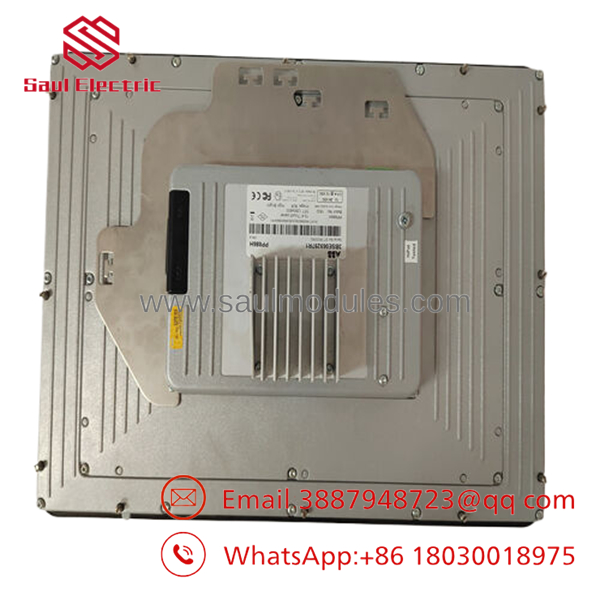
- PP886H 3BSE069297R1
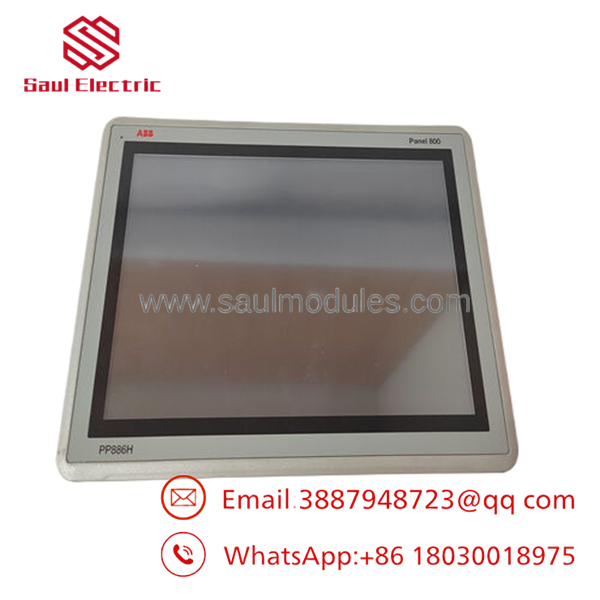
- PP886H 3BSE069297R1
Comprehensive SOP Quality Control & Testing
To ensure instant field synchronization and maintain absolute structural integrity, every surplus or stock PP886H terminal is subjected to our comprehensive engineering quality control pipeline before dispatch.
1. Inbound Inspection & Traceability
- Source Validation: We match factory labels and serial tracking codes with original customs paperwork and OEM source records to prevent unverified inventory entry.
- Anti-Counterfeit Check: Inspection includes verification of genuine ABB factory markings, part number molding clarity, and internal mainboard component-level branding labels.
- Visual Frame Audit: The HMI is examined under intense lighting to verify zero micro-fractures in the powder coating, no display scratches, non-degraded front overlay seals, and intact mounting screw threads.
- Accessory Inventory Check: Technicians verify the presence of the original rear mounting clips, specialized watertight sealing gaskets, and terminal power plug inserts.
2. Live Functional Testing
- Test Bench Environment: Testing is conducted on a purpose-built HMI validation bench running Panel Builder 800 communication runtimes.
- Power-On Self-Test (POST): The panel is wired to an external 24 V DC supply to watch the system boot cycle, checking for BIOS stability and operating system loading behavior.
- Display & Touch Calibration Verification: We initiate a matrix grid test to check for dead pixels or uneven backlight distribution. The resistive overlay is completely mapped via pointer touch points to ensure accurate spatial coordinate registration.
- Communication Port Validation: Both Ethernet ports (10/100 and Gigabit lines) are subjected to continuous packet loopback data transfers. Serial ports COM1 and COM2 are linked to active controllers to confirm RS-232 and RS-485 transceiver function.
- Peripheral Stress Test: USB host ports are evaluated under full 500 mA loads using USB diagnostics to ensure solid storage drive reading and power delivery.
- Report Generation: Test results, firmware levels, and calibration parameters are compiled into an official serialized QC certificate.
3. Electrical Parameter Testing
- Insulation Resistance Testing: A 500 V DC potential is applied between the 24 V power connection lugs and the grounding chassis plate with a Fluke 1507 insulation tester to verify insulation integrity is above 10 MΩ.
- Ground Resistance Audit: We check the physical ground continuity from the frame grounding lug to internal common paths using a Fluke 115 multimeter, targeting a reading under 0.1 Ω.
4. Firmware & Configuration Verification
- Image Configuration: We verify the embedded OS image version. If your application project files mandate a specific runtime patch level, our technicians can flash the matching Panel 800 runtime profile before shipping.
- Clock & Real-Time Battery Check: The onboard real-time clock is synchronized, and the status of the internal memory retention battery is checked under isolated power downs.
5. Final QC & ESD Packaging
- Authorization Sign-off: The inspecting engineer prints and affixes the unique tracking QC tag.
- ESD Safe Bagging: The entire display face is layered with non-marring scratch-protective film and sealed into an extra-large anti-static shielding bag.
- Custom Double-Wall Cushioning: The heavy unit (4.54 kg) is nested within precision-cut foam blocks inside a rigid, high-test corrugated shipping box to neutralize impact forces during transport.
- Tamper Seal: We close the outer container with security tape displaying the final packaging date.
Technical Pitfall & HMI Replacement Survival Guide
Replacing an industrial operator terminal requires attention to physical tolerances, firmware baselines, and panel sealing details. Review these five common field replacement errors to protect your hardware and eliminate installation issues.
1. Panel Cut-Out and Flatness Tolerances
- ❗ The Risk: The is a heavy, rigid unit (4.54 kg). If the sheet metal panel cutout exceeds the specified 394 mm x 270 mm dimension by even a few millimeters, the integrated mounting clips will fail to clamp effectively. If the mounting surface sheet metal is warped or un-flat (>1 mm variance), tightening the clips will twist the aluminum frame, cracking the inner glass substrate of the resistive touch layer over time.
- 🛠| Mitigation: Use a caliper or manual template to check the existing opening before attempting installation. File down any uneven edges, burs, or rust. Ensure the sheet metal panel maintains flatness parameters under 0.05 mm/mm across the installation face.
2. Failure to Replace the Front Bezel Gasket
- ❗ The Risk: Reusing an old, compressed, or dry-rotted rubber sealing gasket during an HMI swap undermines the IP65 and NEMA 4X moisture barrier. Washdown fluids, oil mist, or moisture will migrate behind the front panel bezel, dripping directly onto the rear terminal blocks and creating short circuits.
- 🛠| Mitigation: Never reuse an old seal. The ships with a fresh, model-specific front panel gasket. Ensure it is perfectly seated in the machined bezel channel without twists, overlaps, or gaps before tightening the mounting clamps.
3. Panel Builder 800 Project Firmware Mismatch
- ❗ The Risk: If you upload an older HMI application built in Panel Builder 800 v5.x onto a Version 6 panel running a newer embedded image, specific graphic objects, scripts, or communication driver paths may fail to execute correctly. The screen may boot, but it will throw driver errors when trying to read PLC registers.
- 🛠| Mitigation: Open your original project backup file inside your Panel Builder tool and check the target hardware selection. Convert the target model profile to match the Version 6 system specifications, verify driver compatibility, and perform a full compile and project verification before deploying the code to the panel.
4. Grounding Loops via Shielded Ethernet/Serial
- ❗ The Risk: The features fully shielded RJ45 and D-sub connectors. If your control cabinet ground potential differs from the remote PLC cabinet ground, connecting a shielded communication cable will create a ground loop. This electrical noise can manifest as erratic touch response, fluctuating display brightness, or serial communication drops.
- 🛠| Mitigation: Ensure your control cabinet shares a common ground reference with all connected devices. Check ground potentials with a multimeter prior to hooking up communication links. If differences persist, resolve the grounding issues before final installation.
5. Over-Torqueing the Rear Mounting Brackets
- ❗ The Risk: Technicians frequently over-tighten the rear fastening screws using electric drivers, thinking tighter is better. Over-torqueing distorts the outer frame assembly, causing ghost touch inputs where the resistive overlay detects permanent false contact pressure.
- 🛠| Mitigation: Tighten the mounting screws evenly in a crisscross pattern using a hand screwdriver. The maximum specified tightening torque for the mounting clips is 0.4 N·m. Hand-tighten until the gasket compresses evenly against the panel surface.
Frequently Asked Questions (FAQ)
Can I clean the display surface while the machine is operating?
No. The utilizes an analog resistive touch screen that registers physical compression pressure. Wiping down the display while energized will trigger random touch coordinates, which can accidentally start motors, open valves, or clear active plant alarms. Always navigate to a dedicated cleaning screen that deactivates touch areas, or completely switch off control power before wiping down the front overlay with an approved industrial cleaning cloth.
What chemicals can the front face of the withstand?
The outer front foil of the consists of Autoflex EB polyester sheet over glass. It is chemically resilient and rated to withstand exposure to common industrial agents without cosmetic or structural degradation, including 10% acetic acid, industrial detergents, diesel fuel, lubricating oils, and common solvents like isopropyl alcohol. Avoid exposure to high-concentration concentrated mineral acids or strong bases, which can etch the outer layer.
My original part number is a standard PP886. Can I drop this straight in?
Yes, with minor configuration checks. The “H” suffix denotes the ruggedized variant within the Panel 800 Version 6 hierarchy, offering an extended operating temperature span (−30 to +70 °C) and a high-performance Intel Atom processor. The panel cutout dimensions (394 x 270 mm) match standard layouts exactly. You will need to import your existing application file into Panel Builder 800, verify the communication driver setup, and download the compiled runtime files directly to the new terminal over an Ethernet connection.
Does the retain its user application files if the internal battery dies?
Yes. The compiled user HMI application, screen templates, bitmaps, and communication drivers are written directly to non-volatile internal SSD flash storage. The internal battery is dedicated strictly to running the Real-Time Clock (RTC) chip and tracking active time-stamped alarm histories while main power is isolated. If the battery fails, your core HMI application will boot up normally, but the system clock will reset to its factory baseline.
Why is your pricing on this high-end panel more competitive than direct OEM quotes?
We operate as an independent supplier specializing in new surplus and project-overstock industrial automation assets. Because we purchase large inventory packages from canceled engineering contracts, plant modernizations, and distributor excess clearouts, we can pass substantial cost savings directly to your maintenance team while keeping inventory ready for immediate shipment, bypassing lengthy factory production queues.

 Start Chat


