





Description
Key Technical Specifications
| Parameter | Value |
|---|---|
| Manufacturer | ABB |
| Part Number | SPIET800 |
| Product Name | Ethernet CIU Transfer Module / IET800 |
| System Family | Symphony Plus / Harmony |
| Network Role | INFI-NET to Ethernet bridge |
| Communication | TCP/IP over Ethernet |
| Speed | 10/100 Mbps auto-negotiation |
| Power | 24 V DC, 1.5 A typical / about 20 W |
| Mounting | Occupies one slot in an MMU |
| Dimensions | 144 x 80 x 35 mm or 88.9 x 215.9 x 139.7 mm depending on listing format |
| Weight | 0.1 kg to 0.3 kg depending on listing format |
| License Note | Does not include license key SSBIET80000000 or SSBIET800A0000 |
Product Introduction & Supply Chain Strategy
ABB SPIET800 is an Ethernet CIU transfer module used to connect ABB control networks to Ethernet host systems. ABB’s catalog identifies it as an IET800 module, and the application manual plus market listings show it as a communications bridge for Symphony Plus environments.
From a supply-chain perspective, this is a good candidate for controlled buffer stock. The module is license-dependent and tied to legacy control architecture, so a New Surplus position helps reduce stock-out risk, protects TCO, and avoids the procurement penalty of chasing scarce replacements at the last minute.
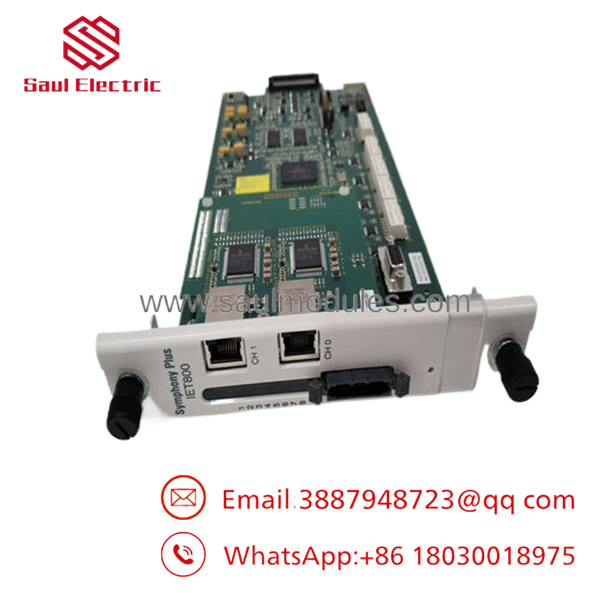
- SPIET800
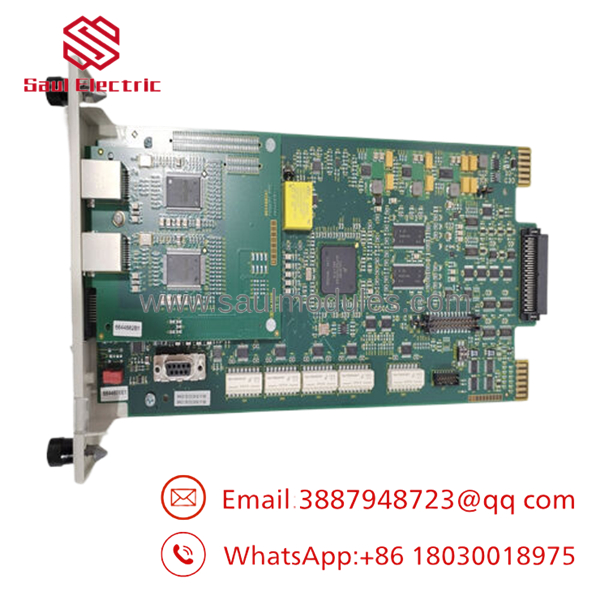
- SPIET800
Installation & Configuration Guide
Stage 1: Pre-Installation
- Apply lock-out/tag-out and verify the cabinet is safe.
- Use an ESD strap and document all cable positions and module labels.
- Confirm whether the required license key is already available.
- Record the existing network settings and host interface details.
Stage 2: Removal
- Remove power and verify discharge.
- Release the module from the MMU slot.
- Pull it straight out to avoid connector damage.
- Inspect the slot and adjacent network connectors for wear or contamination.
Stage 3: Installation
- Verify the replacement is the exact SPIET800 module.
- Install any required license key or confirm it is available separately.
- Seat the module fully in the MMU slot.
- Reconnect Ethernet and control-network cabling exactly as documented.
Stage 4: Power-On & Testing
- Check supply rails for shorts before energizing.
- Confirm link and activity LEDs after power-up.
- Verify communication between INFI-NET and the Ethernet host.
- Validate data exchange and alarm reporting before returning to service.
Firmware/Software Versions & Upgrade Notes
ABB notes that SPIET800 does not include the license key, so licensing must be confirmed before deployment.
A vulnerability notice exists for and PNI800, which means you should treat firmware and network exposure as maintenance items, not afterthoughts.
Avoid changing firmware during a swap unless the site documentation explicitly requires it, because version drift or missing licensing can stop communication or block startup.
Frequently Asked Questions (FAQ)
Is this really new? Public listings describe it as brand new or original inventory, which is the right condition target for a critical communications spare.
Why is it cheaper than OEM new but higher than a low-trust offer? New Surplus usually sits between OEM list pricing and lower-trust inventory because it preserves genuine OEM condition while avoiding full factory pricing.
Is this part obsolete or EOL? It appears mainly in spare-part channels and ABB documentation references rather than active broad-market sales, so treat it as lifecycle-sensitive.
Can I hot-swap it? Do not assume hot-swap capability. Isolate power first and follow the cabinet or MMU procedure.
Do I need a license key? Yes. ABB explicitly notes that the license key is not included and must be purchased separately.
What warranty should I expect? Public listings commonly show standard seller warranty coverage, but terms vary by supplier.
How should I stock it? Keep 1 unit on site for a critical control network, and consider a second only if lead time variability is high or the plant has no cross-site sharing option.


 Start Chat


