





Description
Key Technical Specifications
| Parameter | Value |
|---|---|
| Manufacturer | ABB |
| Model | UFC760BE41 |
| Part Number | 3BHE004573R0041 |
| Product Type | Interface Board |
| Product Family | UFC Series |
| Primary Function | Interface and signal communication board |
| Mounting | Internal equipment installation |
| Country of Origin | Switzerland |
| Net Weight | Approx. 0.54 kg |
| Customs Tariff No. | 85049090 |
| Product Status | Spare Part |
| Condition | New Original (New Surplus) or Tested Refurbished |
Important: Always verify both the UFC760BE41 model and 3BHE004573R0041 part number before ordering. Similar UFC760 variants are not necessarily interchangeable.
Product Introduction
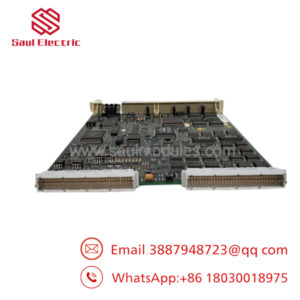
The ABB UFC760BE41 (3BHE004573R0041) is an OEM interface board used in selected ABB industrial drive and automation systems. It provides communication and interface functions between internal control electronics, allowing reliable signal exchange within the equipment architecture.
For maintenance projects, selecting the identical ABB part number helps avoid unnecessary engineering changes and compatibility issues. New Original (New Surplus) units are commonly used to extend the service life of installed ABB systems where redesign is not practical.
Troubleshooting Quick Reference
| Symptom | Possible Cause | Relevance to this Part | Quick Check Method | Recommendation |
|---|---|---|---|---|
| Drive will not initialize | Interface board failure | ✅ High | Verify controller boot sequence and status LEDs | Confirm power rails before replacing board |
| Communication between internal boards lost | Interface PCB fault | ✅ High | Inspect board connectors and ribbon cables | Reseat connectors before replacing hardware |
| Intermittent communication | Loose connector or oxidized contacts | ✅ High | Check edge connectors and inspect for contamination | Clean contacts and verify proper seating |
| Hardware diagnostic alarm | Board revision mismatch | ✅ High | Compare replacement labels with original board | Install identical hardware revision |
| System resets unexpectedly | Power supply instability | ⚠️ Medium | Measure DC supply voltages under load | Eliminate power issues first |
| No response after installation | Incorrect connector placement | ⚠️ Medium | Compare wiring with photographs taken before removal | Verify every connector position before power-up |
Technical Support Note: Before replacing the board, record fault codes, firmware revisions, board labels, and connector locations. Photographs taken before removal often prevent installation errors and reduce commissioning time.
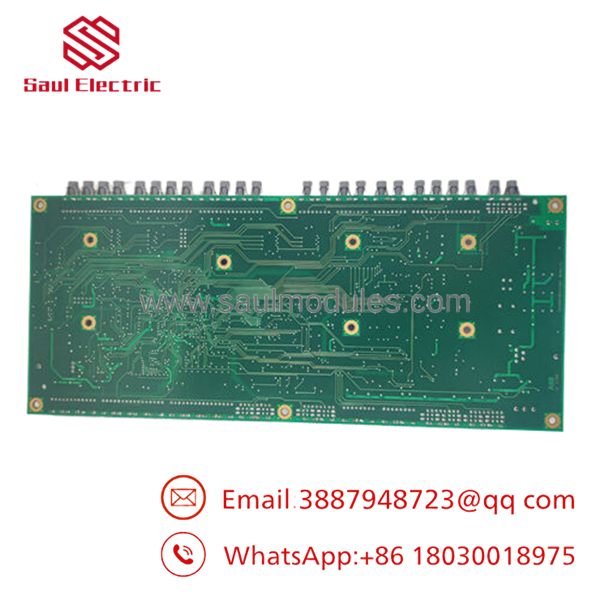
- UFC760BE41 3BHE004573R0041
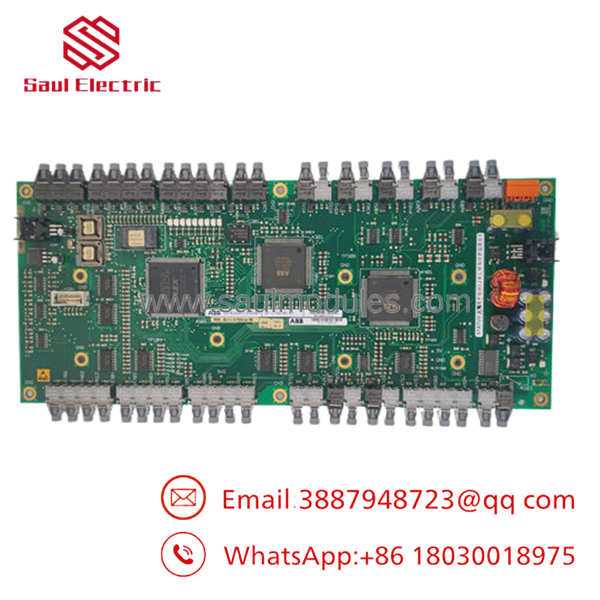
- UFC760BE41 3BHE004573R0041
Frequently Asked Questions (FAQ)
Q1. Is the 3BHE004573R0041 suffix important?
Yes. ABB uses the 3BHE part number to identify the exact hardware revision. Always match both the UFC760BE41 model number and the complete 3BHE004573R0041 identifier before ordering.
Q2. Can I replace this board with another UFC760 version?
Not without confirming compatibility. Several UFC760 interface boards exist with different hardware revisions and applications. Even boards with similar model numbers may not be electrically compatible.
Q3. Can the be hot-swapped?
No. Power down the equipment completely before removing or installing the board. Replacing internal interface boards under power can damage the PCB or connected control electronics.
Q4. Why is New Surplus inventory available?
Many industrial facilities purchased spare interface boards during commissioning or major shutdown projects. Unused OEM inventory has remained in climate-controlled storage and is now available as New Surplus, providing a cost-effective maintenance solution.
Q5. What testing should a supplier perform before shipment?
A qualified supplier should complete the following inspections:
- OEM label and serial number verification
- Anti-counterfeit inspection
- PCB inspection for corrosion, scratches, repairs, and damaged connectors
- Functional testing on a compatible ABB drive test platform
- Communication interface verification
- Continuous burn-in testing with thermal monitoring
- Electrical integrity inspection
- ESD-safe packaging with QC approval
Test reports, inspection photographs, and startup videos should be available upon request.
Q6. What installation mistakes create the most downtime?
From field experience, these are the problems that appear most often:
- Firmware or hardware revision mismatch. I’ve seen technicians spend an entire shift troubleshooting a communication fault that was caused by installing the wrong board revision.
- Connector installation errors. Label every cable before removal. Two ribbon cables may look identical but serve completely different interfaces.
- Poor contact at edge connectors. Always inspect for oxidation and ensure the board is fully seated in the backplane.
- ESD damage. Wear a grounded wrist strap throughout the installation. Interface boards can be damaged by static discharge before the system is ever powered on.
Keep these checks in mind and you’ll avoid most unnecessary board replacements while reducing commissioning and troubleshooting time.

 Start Chat


