





Description
Product Introduction & Engineering Value
AB7001 is designed for a common retrofit problem: a legacy serial instrument or controller needs to exchange data with a DeviceNet control system without rewriting the field device. The gateway operates as a DeviceNet adapter/slave while acting as a serial master, supporting RS-232, RS-422, and RS-485 communications.
That architecture makes the unit useful in older PLC installations where the serial device is still serviceable but the plant network has standardized on DeviceNet. Configuration supports Modbus RTU Master as well as generic and custom serial transactions, allowing the gateway to translate field data into PLC-readable I/O data.
Technical Specifications
| Specification | AB7001 |
|---|---|
| DeviceNet Function | Adapter / Slave |
| Serial Interface | RS-232 / RS-422 / RS-485 |
| Serial Connector | 1 × 9-pin female D-sub |
| DeviceNet Baud Rate | 125, 250, 500 kbit/s |
| Serial Baud Rate | 1,200 to 57,600 bit/s, depending on configuration |
| DeviceNet Input Data | 512 bytes |
| DeviceNet Output Data | 512 bytes |
| Serial Input Data | 512 bytes |
| Serial Output Data | 512 bytes |
| Supply Voltage | 24 VDC, ±10% |
| Typical Current | 100 mA @ 24 VDC |
| Maximum Current | 300 mA @ 24 VDC |
| Mounting | DIN rail, EN 50022 |
| Dimensions | 27 × 120 × 75 mm |
| Operating Temperature | 0°C to 55°C |
| Storage Temperature | -40°C to 85°C |
| Protection | IP20 |
| Isolation | Yes |
HMS specifies a 27 mm-wide DIN-rail housing, reverse-polarity and short-circuit protection, and galvanic isolation. The device also uses an 8-position DIP switch for DeviceNet MAC ID and baud-rate settings.
Field Application & the “Trench” Experience
A typical retrofit looks like this: an older process skid has a serial flow controller that the plant does not want to replace because its control characteristics are already validated. The new PLC rack, however, communicates through DeviceNet. Rather than redesigning the instrument interface, the engineer installs an AB7001 on the DIN rail, connects the instrument through its serial port, configures the serial transaction, and maps the resulting values into the DeviceNet I/O image.
The practical advantage is not simply protocol conversion. The gateway takes care of the serial transaction logic so the PLC receives structured process data rather than having to construct and interpret every serial message itself. HMS specifically describes support for Modbus RTU Master and configurable request/response or produce/consume transactions.
Niche application scenarios
- Legacy Modbus RTU analyzer → DeviceNet PLC: Import analyzer measurements into an existing DeviceNet control architecture.
- Serial variable-frequency drive monitoring: Transfer drive status, fault codes, frequency, and operating values into PLC I/O.
- Packaging-machine retrofit: Preserve a serial weighing or measurement device while upgrading the machine controller network.
- Remote skid instrumentation: Connect RS-485 field instruments to a DeviceNet-based control cabinet without replacing the instruments.
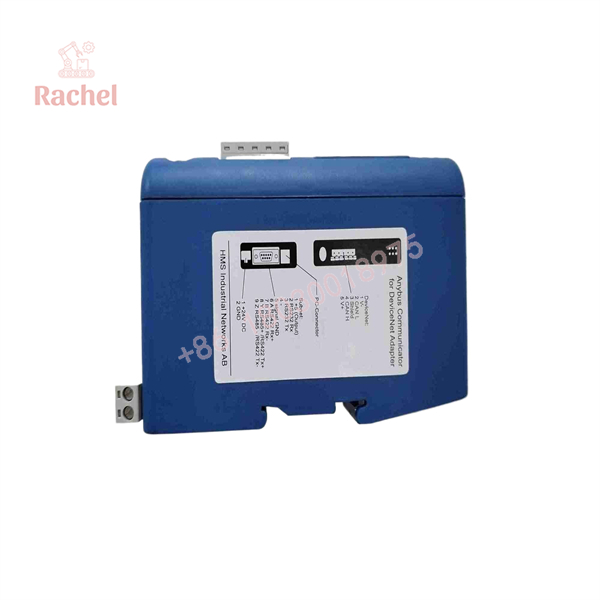
AB7001
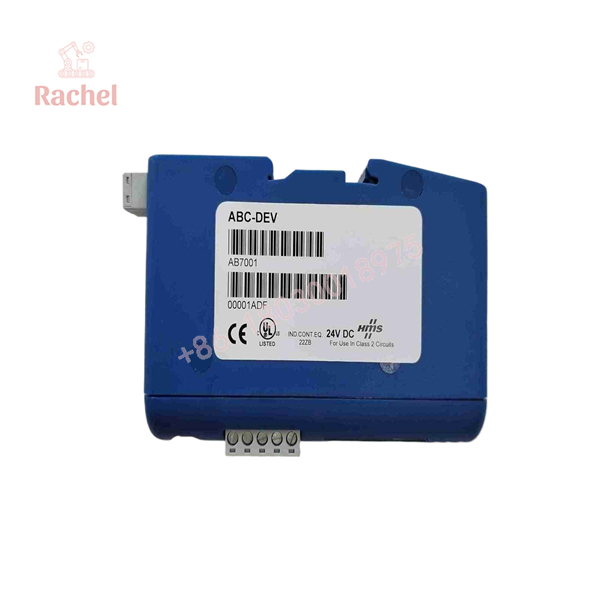
AB7001
Transparency SOP: QA & Testing
For New Surplus or refurbished AB7001 inventory, a meaningful inspection should go beyond checking whether the LEDs illuminate.
1. Hardware verification
Confirm the AB7001/AB7001-C identification, connector condition, DIP switches, DIN-rail mechanism, and enclosure.
2. Power test
Apply the specified 24 VDC supply and verify normal startup/current behavior.
3. Serial interface test
Test the applicable RS-232, RS-422, or RS-485 mode with a known-good serial device.
4. DeviceNet test
Verify node addressing, network baud rate, and DeviceNet I/O exchange using a compatible master/scanner.
5. Configuration test
Load or create the required serial transaction configuration and confirm that the expected data reaches the DeviceNet I/O image.
HMS specifies CE, UL, and WEEE certifications for the current AB7001-C version, with UL information including hazardous-location Class I Division 2 references. The exact certification marking on the physical unit should still be checked before installation in a classified area.
The Veteran’s Tech Trap Guide
⚠️ Trap #1 — Confusing serial baud rate with DeviceNet baud rate
They are independent settings. The serial side can use rates such as 9.6 or 19.2 kbit/s, while DeviceNet operates at 125, 250, or 500 kbit/s. Setting one correctly does not configure the other.
⚠️ Trap #2 — Forgetting the DeviceNet MAC ID
The unit uses an 8-position DIP switch for DeviceNet MAC ID and baud-rate configuration. On a replacement, do not assume the factory/default address matches the failed gateway. Record the old settings before removing it.
PRO TIP: Save the existing configuration before replacing a functioning AB7001. A physically identical gateway can still behave differently if its serial transaction configuration has not been restored.
⚠️ Trap #3 — Assuming every RS-485 device is automatically compatible
Electrical compatibility is only one part of the problem. The serial device’s message structure, addressing, timing, parity, stop bits, register mapping, and request/response sequence must also match the AB7001 configuration.
Dynamic FAQ
Is AB7001 a DeviceNet gateway?
Yes. AB7001 is the Anybus Communicator for connecting serial equipment to a DeviceNet control system. HMS currently identifies the corresponding product as .
What serial interfaces does AB7001 support?
It supports RS-232, RS-422, and RS-485. The serial side can operate as a Modbus RTU Master and can also handle generic or custom serial transaction structures.
How much I/O data can it exchange?
The documented capacity is up to 512 bytes of DeviceNet input data and 512 bytes of DeviceNet output data, with the same 512-byte input/output capacities specified for the serial side.
Does AB7001 require a DIN rail?
Yes. The unit is designed for EN 50022 DIN-rail mounting and has a compact 27 mm-wide housing.
Is AB7001 still available as a current product?
HMS’s current product page lists , while a 2024 HMS product-change notice lists among the Anybus gateway products covered by its lifecycle communication. For a replacement purchase, verify whether the required unit is the original AB7001 or the current AB7001-C variant.
How can I verify New Surplus authenticity?
Check the original Anybus/HMS identification label, item number, hardware revision, serial number, connector condition, and packaging. For a technically tested unit, request evidence of 24 VDC startup and both serial and DeviceNet communication testing. Warranty coverage should be confirmed with the seller in writing; it should not be assumed solely from the phrase “New Surplus.”

 Start Chat


