





Description
Product Introduction & Engineering Value
When an older inspection station starts producing inconsistent images, the camera is often overlooked because the fault appears to originate from lighting, software, or motion timing. The Basler A404AM-RT provides a dedicated industrial imaging component for legacy vision systems that depend on Camera Link communication and precise image acquisition timing.
Built for integration into automated inspection equipment, this camera model is relevant for engineers maintaining existing production lines where replacing the entire vision architecture would require unnecessary downtime. The correct replacement process requires checking interface type, sensor format, cable configuration, and acquisition hardware compatibility.
Technical Specifications
| Parameter | Specification |
|---|---|
| Manufacturer | Basler AG |
| Model | A404AM-RT |
| Camera Family | A400 Series |
| Camera Type | Area Scan Camera |
| Sensor Technology | CMOS |
| Sensor Format | 4 Megapixel class |
| Resolution | 2352 × 1726 pixels |
| Color Mode | Monochrome |
| Shutter Type | Electronic rolling shutter |
| Interface | Camera Link |
| Output Configuration | Camera Link Medium / Full configuration depending on operating mode |
| Maximum Frame Rate | Up to 48 fps (4 tap mode) / 96 fps (8 tap mode) according to A404k family documentation |
The A404 camera family documentation lists the A404 as a monochrome/color-capable platform depending on variant, with Camera Link LVDS output configurations and high-speed acquisition modes. The exact suffix A404AM-RT should be matched against the original camera label before final compatibility approval.
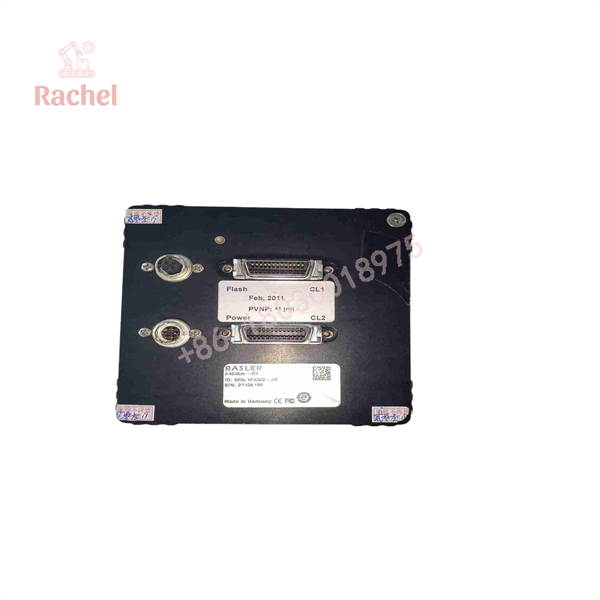
A404AM-RT
Field Application & The “Trench” Experience
A packaging manufacturer running a 15-year-old inspection station began seeing random image dropouts during high-speed production. The vision engineer initially suspected the frame grabber because the software occasionally lost synchronization.
During troubleshooting, the team found that the Basler A404AM-RT camera had developed intermittent communication behavior after years of continuous operation. Instead of redesigning the entire inspection cell, the maintenance team sourced a replacement camera, confirmed the Camera Link configuration, adjusted acquisition parameters, and returned the system to production.
The lesson from this type of repair is simple: legacy machine vision systems often fail at the component level long before the complete inspection architecture becomes obsolete.
Specific application scenarios
- PCB optical inspection stations requiring stable grayscale image capture.
- Precision dimensional measurement systems for machined components.
- High-speed packaging inspection where camera timing must remain synchronized with conveyors and strobes.
- Industrial print inspection equipment using Camera Link frame grabbers.
Transparency SOP: QA & Testing
Every A404AM-RT supplied as New Surplus or Refurbished stock should go through documented inspection:
1. Identity verification
- Confirm Basler label and complete model number.
- Check serial number and hardware revision.
2. Physical examination
- Inspect sensor window condition.
- Check connectors, housing, mounting threads, and signs of previous installation.
3. Functional evaluation
- Verify image output through compatible Camera Link acquisition hardware.
- Check image stability, noise level, trigger response, and communication reliability.
4. Packaging control
- Store using ESD protection.
- Protect optical surfaces from dust and mechanical damage.
The Veteran’s Tech Trap Guide
⚠️ Camera Link compatibility is not automatic.
A replacement camera may physically connect but still fail if the frame grabber configuration does not match the camera’s tap mode, pixel format, or timing requirements.
⚠️ Do not ignore the suffix.
Basler A400-series cameras contain multiple variants. The complete model marking must match before installation.
PRO TIP: Save the original camera configuration file before removal. Exposure timing, gain settings, trigger mode, and acquisition parameters are often forgotten after a hardware replacement.
⚠️ Inspect the sensor window carefully.
A visually clean housing does not guarantee a clean imaging surface. Contamination on the sensor window can appear as fixed defects across every captured image.
Dynamic FAQ
What is the Basler A404AM-RT?
The Basler A404AM-RT is an industrial machine vision camera from the Basler A400 series, designed for image acquisition applications using Camera Link communication.
Is the Basler A404AM-RT still manufactured?
The A400 series documentation is available through Basler’s discontinued camera documentation area, indicating that these models are legacy products rather than current production cameras.
What interface does the A404AM-RT use?
The A404 camera family uses Camera Link LVDS output. The required frame grabber configuration should be confirmed before replacement.
Can I replace an A404AM-RT with another Basler camera?
Not necessarily. Replacement requires checking resolution, sensor characteristics, interface type, mounting, triggering method, and software compatibility.
What should I verify before purchasing a New Surplus A404AM-RT?
Request:
- Actual camera photos
- Complete model label
- Serial number
- Operating condition
- Test record if refurbished
- Warranty terms
Does a refurbished A404AM-RT need calibration?
For precision inspection systems, calibration should be checked after installation because camera replacement can affect optical alignment, focus position, image scaling, and measurement accuracy.

 Start Chat


