





Description
Product Introduction
The Alerton BT-VIEWPORT (BACtalk Viewport) is a compact, panel- or wall-mounted operator terminal engineered for direct integration into BACnet MS/TP local area networks. Designed by Alerton (a Honeywell company), it serves as a rugged, low-cost local human-machine interface (HMI) for facility technicians and system operators who need immediate visibility into HVAC setpoints, system schedules, temperature trends, and DDC controller parameters without firing up a full operator workstation.
Equipped with a backlit 4-line by 20-character display and an intuitive 8-button keypad, the BT-VIEWPORT complies strictly with ANSI/ASHRAE Standard 135 (BACnet). When paired with Alerton LSi or VisualLogic controllers, it operates as a standalone system access point or local override interface. Its onboard RS-232 port allows technicians to drop in locally with a PC running BACtalk software for rapid field commissioning and display programming.
Key Technical Specifications
| Parameter | Specification |
| Manufacturer | Alerton / Honeywell Building Automation |
| Model | BT-VIEWPORT (BACtalk Viewport) |
| Display | Backlit LCD, 4 lines x 20 characters per line |
| Operator Input | 8-button membrane keypad |
| Primary Network Interface | BACnet MS/TP LAN (EIA-485) |
| Service Interface | RS-232 Point-to-Point (PTP) serial connection |
| Protocol Compliance | ANSI/ASHRAE Standard 135 (BACnet) |
| Mounting Options | Standard wall mount or panel cutout mounting |
| Power Supply | 24 VAC (±15%), 50/60 Hz, Class 2 power supply |
Application Scenarios & The “Trench” Experience
When an air handling unit or chiller plant trips out in the middle of summer and the head-end BAS server loses its network connection, you can’t wait for a server reboot to see what’s failing. I was on-site at a hospital mechanical room at 1 AM when a primary AHU dropped off the main Ethernet trunk. By plugging into the local MS/TP loop at the wall-mounted BT-VIEWPORT, we were able to manually override the static pressure setpoint, check the freeze-stat lockout flag, and get airflow restored to the operating rooms before morning procedures started.
- Commercial HVAC Mechanical Rooms – Local AHU/Chiller Monitoring – Allows field technicians to view local temperatures, damper positions, and fan status directly at the equipment rack.
- Institutional & Campus Buildings – Local Setpoint Adjustment – Gives facility managers a secure wall-mounted portal to adjust zone temperature offsets and occupancy schedules.
- Small Standalone Building Automation – Economical BAS Operator Panel – Functions as the primary HMI in smaller facilities where a dedicated PC workstation is cost-prohibitive.
- Field Commissioning & Troubleshooting – Local BACnet Access Point – Connects a laptop running BACtalk for Windows via RS-232 to diagnose MS/TP traffic or update controller logic.
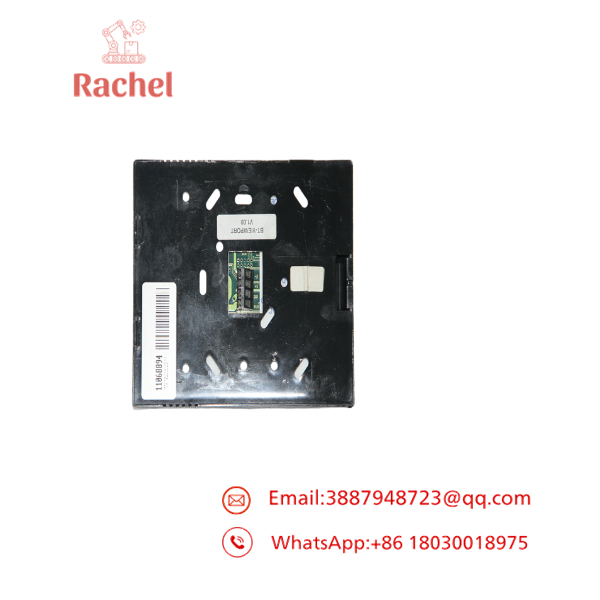
BT-VIEWPORT
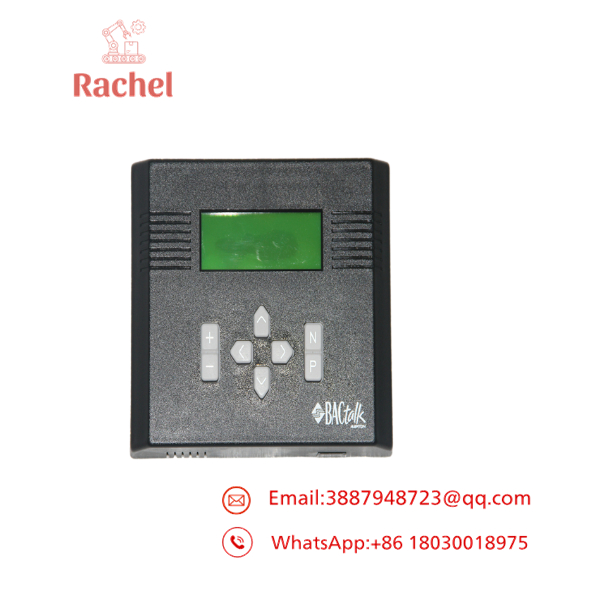
BT-VIEWPORT
Transparency SOP: Quality Assurance & Testing
We don’t just ship vintage building automation hardware out in a box; every BT-VIEWPORT unit undergoes strict bench testing before it leaves our shop:
- Inbound & Housing Inspection: Inspection of the front membrane keypad, display glass, terminal block connectors, and rear PCB for signs of mechanical wear, cracked solder joints, or heat stress.
- 24 VAC Power-On Test: Energizing the internal power supply circuits to check voltage regulators, LCD backlight uniformity, and contrast adjustments.
- Keypad & Screen Verification: Testing all 8 keys for physical contact resistance and executing character display self-tests to ensure zero dead pixels or corrupted character lines.
- Live BACnet MS/TP Communication Test: Connecting the BT-VIEWPORT to a live Alerton BACtalk test loop to verify device discovery, MS/TP baud rate handshakes (9.6k to 76.8k baud), and object read/write commands.
- RS-232 Service Port Test: Connecting a PC via the RS-232 interface to confirm local serial data transfers and display programming uploads.
- Anti-Static Cleaning & ESD Safe Packaging: Cleaning the front faceplate, applying contact cleaner to the terminal strip, and sealing the unit in an anti-static bag with fresh desiccant.
The Veteran’s Tech Trap Guide (Crucial Value-Add)
⚠️ Watch Your MS/TP Polarity and Termination! The RS-485 BACnet MS/TP network is polarity sensitive (+, -). Swapping the signal pair will disable communication on the whole trunk segment. Always ensure the end-of-line (EOL) termination resistors (120 Ω) are properly set if the BT-VIEWPORT sits at the physical end of the MS/TP daisy-chain.
❗ Avoid Over-Tightening Terminal Screws: The removable terminal plug on the back of the Viewport can crack if you crank down too hard on 18 AWG twisted-shielded pair cable. Strip the wire cleanly, use ferrules if possible, and hand-tighten firmly without strip-torqueing the housing.
⚠️ Power Supply Grounding: Never share 24 VAC power with ungrounded high-current inductive loads (like heavy relay coils or motor starters). Inductive kickback on a shared transformer secondary will cause the BT-VIEWPORT micro-controller to reset intermittently or freeze up its display driver.
Frequently Asked Questions (FAQ for Conversion)
Q: Is the Alerton BT-VIEWPORT hot-swappable on an active MS/TP network? A: You can disconnect the MS/TP plug from the back of the Viewport without downing the entire trunk, but we strongly advise killing the 24 VAC power wire before pulling the connector to prevent arcing small power pins into the signal lines.
Q: Can I use the BT-VIEWPORT with third-party BACnet controllers from Trane, Automated Logic, or Johnson Controls?A: Yes, for standard BACnet MS/TP properties (such as Analog Inputs, Analog Values, and Binary States). However, custom display screens and proprietary software programming utilities require Alerton BACtalk software and controller object structures.
Q: Does replacing a failed BT-VIEWPORT require programming from scratch?A: If the original display program was backed up using BACtalk for Windows, you can re-flash the custom menus into the replacement unit via the RS-232 serial port in a few minutes. If you only need basic BACnet object browsing, the default firmware menus work out of the box.
Q: Why buy a surplus or reconditioned BT-VIEWPORT instead of upgrading to a modern touch display?A: The BT-VIEWPORT is a legacy component. Upgrading to a modern touchscreen interface often requires replacing the entire controller rack and upgrading head-end software licenses. Installing a tested surplus BT-VIEWPORT keeps your existing plant running without downtime or engineering redesign costs.
Q: What warranty comes with this reconditioned unit? A: Every Alerton BT-VIEWPORT supplied carries a full 12-month functional warranty. If the unit experiences hardware, display, or communication faults under normal operating conditions within one year, we replace it or refund your purchase.

 Start Chat


