





Description
Core Product Summary
The Beijer Electronics E1043 is a 3.5-inch monochrome graphic human-machine interface (HMI) from the E1000 operator panel series. It provides a touchscreen interface for displaying machine information and interacting with an automation system. Its display resolution is 320 × 240 pixels, with grayscale graphics and a resistive touch screen.
The E1043 uses a 20–30 V DC power supply and has a maximum power consumption of 3.6 W. Communication interfaces include Ethernet at 10/100 Base-T through a shielded RJ45 connector, RS-232 with RTS/CTS handshaking, and RS-422/RS-485 serial communication. Application projects are configured using E-Designer software for the E1000 series. The panel’s 155.8 × 119 × 62.8 mm overall dimensions and 139 × 105 mm panel cutout are important when assessing physical fit during maintenance or equipment replacement.
Key Technical Specifications
| Parameter | Specification |
|---|---|
| Manufacturer | Beijer Electronics |
| Model | E1043 |
| Part number | 603221119 |
| Product type | Monochrome graphic touchscreen HMI |
| Product series | E1000 |
| Display size | 3.5 inches |
| Display technology | TFT-LCD with CCFL backlight |
| Resolution | 320 × 240 pixels |
| Touch technology | Resistive |
| Project storage | 12 MB |
| Supply voltage | 20–30 V DC |
| Maximum power consumption | 3.6 W |
| Serial communication | RS-232 (RTS/CTS), RS-422/RS-485 |
| Ethernet | 10/100 Base-T, shielded RJ45 |
| Overall dimensions (H × W × D) | 155.8 × 119 × 62.8 mm |
| Panel cutout | 139 × 105 mm |
| Weight | 0.6 kg |
| Operating temperature | 0 to +50 °C |
| Housing | Gray powder-coated aluminum |
Detailed Product Overview
Operator interface for machine control
The Beijer Electronics E1043 provides a graphical interface between an operator and an automation system. It is designed for applications where personnel need to view machine information and interact with a control application through a compact touchscreen rather than a physical keypad.
As part of the E1000 series, the E1043 uses a 3.5-inch grayscale TFT display with a resolution of 320 × 240 pixels. This format supports screen layouts built around text, status indicators, numeric values, and simple graphical elements. The resistive touchscreen provides the operator input method.
Communication and control-system integration
The E1043 combines Ethernet and serial interfaces, allowing system integrators to select an appropriate communication path for the connected controller or automation equipment.
The Ethernet interface supports 10/100 Base-T through a shielded RJ45 connector. Serial communication includes RS-232 with RTS/CTS handshaking and RS-422/RS-485. These interfaces serve different electrical and communication requirements; selecting the correct port, cable, wiring arrangement, and controller protocol is essential when commissioning or replacing a panel.
The presence of an Ethernet or serial port does not by itself establish compatibility with a particular PLC. The controller model, communication driver, protocol configuration, and HMI project must also match the intended system.
Application development and project storage
The E1000 operator panels are configured using E-Designer. The E1043 provides 12 MB of project storage, which is relevant when assessing the size of an existing HMI application and its associated graphics and resources.
For maintenance planning, retain the existing project file and document the communication settings before replacing a functioning panel. The project should be checked for model-specific settings and communication dependencies before it is transferred to replacement hardware.
Power and physical installation
The panel operates from a 20–30 V DC supply and has a maximum power consumption of 3.6 W. Its specified panel cutout is 139 × 105 mm, while the overall enclosure measures 155.8 × 119 × 62.8 mm.
These dimensions matter when assessing an existing cabinet opening. A matching cutout alone does not establish mechanical interchangeability; mounting clearances, connector access, sealing arrangements, and the depth available behind the panel must also be considered.
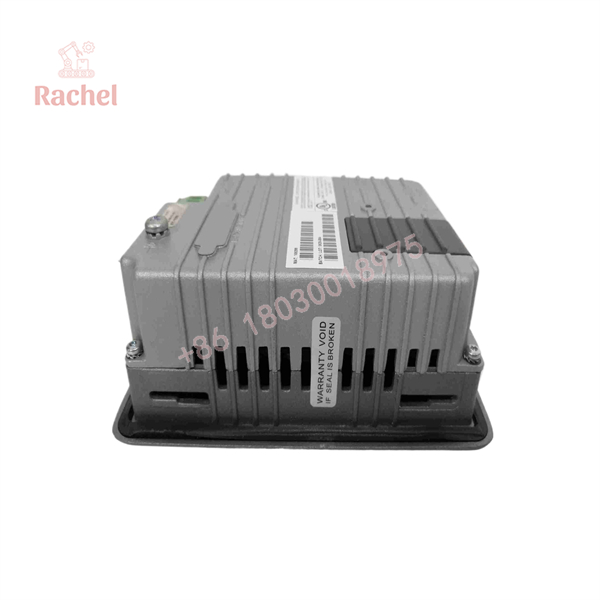
E1043
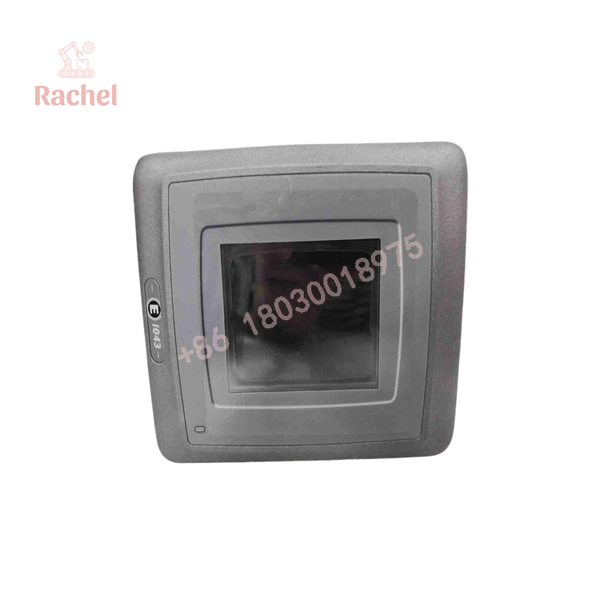
E1043
System Compatibility & Integration Requirements
| Item / Dependency | Requirement | Practical Note |
|---|---|---|
| HMI configuration software | E-Designer for E1000 panels | Check the project file and software compatibility before transferring an application. |
| DC power supply | 20–30 V DC | Confirm supply polarity, wiring, and available capacity. |
| Ethernet connection | 10/100 Base-T, shielded RJ45 | Check network configuration and the controller’s supported communication protocol. |
| Serial connection | RS-232 with RTS/CTS, or RS-422/RS-485 | Select the correct interface and corresponding cable and wiring arrangement. |
| Panel opening | 139 × 105 mm | Confirm the physical cutout and mounting clearance. |
Engineering Selection Highlights
- E1000 series identity: Confirm that the existing HMI project and application configuration correspond to the E1043 platform.
- 320 × 240 grayscale display: Check that the existing screen layout and graphical content suit the monochrome display format.
- 20–30 V DC supply: Confirm that the available panel supply falls within the specified operating range.
- Ethernet and serial interfaces: Match the intended communication port and protocol to the connected controller.
- 12 MB project storage: Assess the existing project size and required application resources before planning a transfer.
- 139 × 105 mm cutout: Compare the required opening and mounting arrangement with the installed panel.
- 0 to +50 °C operating range: Evaluate the panel’s installation location against the specified ambient operating temperature.
Dimensions, Mounting & Connection Notes
The E1043 has overall dimensions of 155.8 mm high, 119 mm wide, and 62.8 mm deep. The specified panel cutout is 139 × 105 mm, and the unit weighs 0.6 kg.
Before installation, account for the rear clearance needed for power and communication connectors. Use the correct serial interface and cable arrangement for the connected controller, and follow the documented terminal and wiring instructions for the installation.
The specified operating temperature is 0 to +50 °C. The panel should be installed where the surrounding temperature and cabinet conditions remain within its applicable operating limits.
FAQ
What is the Beijer Electronics E1043?
The E1043 is a 3.5-inch monochrome touchscreen HMI in the Beijer Electronics E1000 series, designed to provide a graphical operator interface for automation equipment.
What is the display resolution of the E1043?
The display resolution is 320 × 240 pixels. The panel uses a grayscale TFT-LCD with a CCFL backlight and resistive touchscreen.
What power supply does the E1043 require?
The specified input voltage is 20–30 V DC, with maximum power consumption of 3.6 W.
Which communication interfaces does the E1043 support?
The panel supports 10/100 Base-T Ethernet, RS-232 with RTS/CTS handshaking, and RS-422/RS-485 serial communication. The appropriate interface depends on the connected controller and its communication configuration.
Which software is used to configure the E1043?
E-Designer is the configuration software used for E1000 operator panels. The existing application project and communication settings should be checked before a replacement or project transfer.
What are the mounting dimensions of the E1043?
The overall dimensions are 155.8 × 119 × 62.8 mm, and the specified panel cutout is 139 × 105 mm. Check rear clearance and connector access as well as the opening dimensions.
Verification & Troubleshooting Notes
- Panel does not power up: Check the DC supply, polarity, wiring, and applicable circuit protection.
- Controller communication fails: Confirm the selected interface, cable pinout, serial settings or Ethernet configuration, and controller communication driver.
- HMI project does not operate as expected: Check project compatibility, configured device drivers, and communication parameters.
- Touch input is inaccurate or unresponsive: Inspect the touchscreen surface and review the applicable panel maintenance instructions.
- Panel does not fit the existing opening: Recheck the cutout, overall dimensions, mounting arrangement, and rear clearance before installation.
Disconnect power and follow the applicable electrical-safety procedures before handling wiring or connectors.

 Start Chat


