





Description
Product Introduction & Engineering Value
A robot controller can continue running for thousands of hours, but its internal electronics depend on consistent airflow. When cooling fans degrade, temperature alarms, unexpected controller shutdowns, and shortened component life can follow. The FANUC A05B-2452-C900 provides the replacement cooling function required for maintaining FANUC robot cabinet thermal performance.
This dual fan assembly is commonly maintained as a spare in factories operating legacy FANUC robot systems. Replacing a failing fan unit is usually a preventive maintenance task that protects servo drives, control boards, and power components from excessive heat exposure.
Technical Specifications
| Parameter | Specification |
|---|---|
| Manufacturer | FANUC Robotics |
| Part Number | A05B-2452-C900 |
| Product Type | Dual Cooling Fan Assembly |
| Application | Robot controller cabinet cooling |
| Rated Voltage | 240 VAC |
| Power Supply | Single Phase |
| Fan Configuration | Dual fan assembly |
| Installation Location | FANUC robot controller cabinet |
| Cooling Method | Forced air circulation |
| Function | Heat removal from controller enclosure |
| Replacement Category | Cabinet spare part |
| Compatible Systems | FANUC robot controller platforms (verify by cabinet model) |
FANUC parts references identify A05B-2452-C900 as a dual cooling fan assembly, 240V AC, single-phase, robot controller application.
Field Application & The “Trench” Experience
A stamping plant running multiple FANUC robotic cells begins receiving intermittent controller temperature warnings during summer production shifts. Operators notice that faults occur after several hours of continuous operation rather than immediately after startup.
The maintenance team checks cabinet filters, ambient temperature, and ventilation clearance. During inspection, one of the internal cooling fans is found operating intermittently. Instead of waiting for a controller board failure, the team replaces the worn assembly with a verified FANUC A05B-2452-C900.
After installation, technicians confirm:
- Fan rotation direction
- Cabinet airflow
- Controller temperature readings
- Alarm history clearance
The production cell returns to operation without replacing expensive controller electronics.
The practical lesson: cooling components are inexpensive compared with the hardware they protect. Preventive replacement schedules often prevent larger robot controller failures.
Specific application scenarios
- Automotive welding robot cells — maintaining controller cooling during continuous multi-shift operation.
- Press and stamping automation lines — protecting robot electronics in high-duty-cycle environments.
- Material handling robot systems — reducing thermal stress during repetitive production cycles.
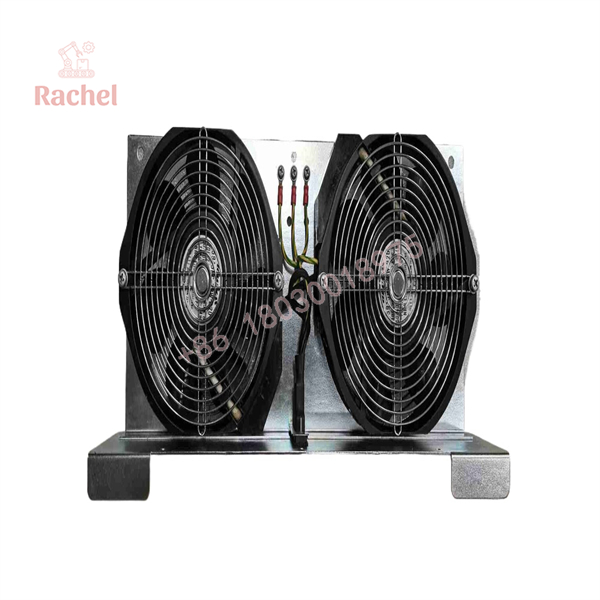
A05B-2452-C900
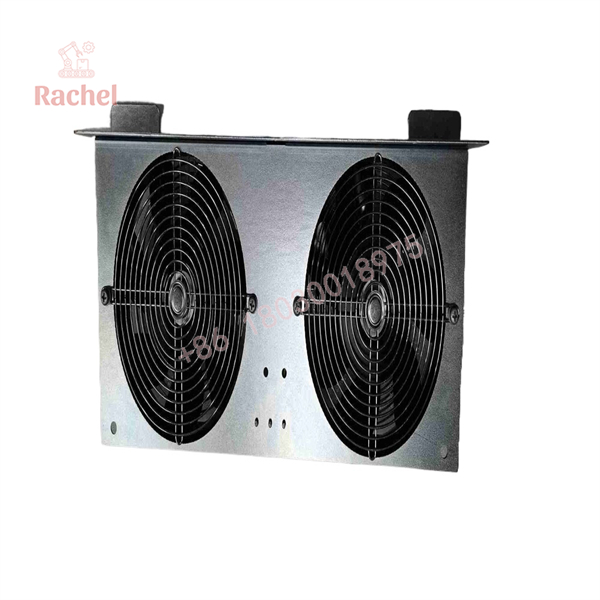
A05B-2452-C900
Transparency SOP: QA & Testing
For New Surplus or Refurbished A05B-2452-C900 inventory, inspection should focus on airflow performance and electrical condition.
Step 1 — Identification Verification
- Confirm FANUC marking.
- Verify part number:
- A05B-2452-C900
- Record serial information when available.
Step 2 — Mechanical Inspection
- Check fan blades.
- Inspect mounting brackets.
- Verify connector condition.
- Check for dust buildup or physical damage.
Step 3 — Electrical Testing
- Verify 240 VAC operation.
- Check current consumption.
- Confirm smooth startup.
- Listen for bearing noise or vibration.
Step 4 — Airflow Validation
- Confirm both fans operate.
- Verify airflow direction.
- Check abnormal vibration.
Step 5 — Packaging
- Protect fan blades during transport.
- Prevent connector damage.
- Use suitable protective packaging.
The Veteran’s Tech Trap Guide
⚠️ Trap #1 — Replacing only one fan in a dual assembly
A partially failed fan can still appear functional during a quick inspection. However, uneven airflow can reduce cabinet cooling efficiency.
PRO TIP: Replace the complete fan assembly when the original unit shows age-related wear.
⚠️ Trap #2 — Ignoring cabinet airflow restrictions
A new fan cannot compensate for:
- Blocked filters
- Incorrect cabinet clearance
- Excessive dust accumulation
- Poor ventilation design
Check the complete cooling path.
⚠️ Trap #3 — Installing the wrong voltage version
FANUC cabinet fan assemblies exist in different electrical configurations.
Before installation, verify:
- Voltage rating
- Controller cabinet model
- Existing fan label
- Connector style
Never assume a visually identical fan assembly has the same electrical specification.
Dynamic FAQ
Q1: What is FANUC A05B-2452-C900?
The FANUC is a dual cooling fan assembly designed for FANUC robot controller cabinet cooling applications.
Q2: What voltage does A05B-2452-C900 use?
The referenced specification identifies this unit as a 240 VAC single-phase dual fan assembly.
Q3: What happens if the FANUC controller cooling fan fails?
A failed cooling fan may cause:
- Higher internal cabinet temperatures
- Controller temperature alarms
- Reduced component service life
- Unexpected robot downtime
Q4: Can A05B-2452-C900 fit every FANUC robot controller?
No. Compatibility depends on the controller cabinet design and installed cooling configuration. Verify the existing fan assembly part number before replacement.
Q5: Is New Surplus A05B-2452-C900 unused?
New Surplus normally refers to unused inventory from previous stock holdings. Confirm actual photos, label condition, storage history, and testing status before purchase.
Q6: Does this FANUC fan assembly include warranty?
Warranty depends on supplier and stock condition. New Surplus, refurbished, and tested used FANUC spare parts may have different warranty terms, so confirm coverage before ordering.
Q7: How often should FANUC controller fans be replaced?
Replacement intervals depend on operating environment, duty cycle, dust exposure, and temperature conditions. Many facilities inspect controller fans during scheduled robot preventive maintenance rather than waiting for a thermal alarm.

 Start Chat


