





Description
Product Introduction & Engineering Value
The 080-332-000-R addresses a very practical controls problem: keeping legacy serial equipment connected to a modern Ethernet infrastructure. Instead of replacing an operational PLC, instrument, controller, or other serial device simply because the plant network has moved to Ethernet, a device server can provide the communications bridge.
For maintenance engineers, the important question is not whether the unit has an Ethernet connector. It is whether its serial interface, protocol behavior, network configuration, and software-driver requirements match the existing application. That should be verified before treating another Lantronix model as a substitute.
Technical Specifications
The exact OEM datasheet for 080-332-000-R is not readily available in the public sources reviewed. The following specifications therefore distinguish documented information from characteristics reported by secondary-market sources.
| Parameter | 080-332-000-R |
|---|---|
| Manufacturer | Lantronix |
| Part Number | 080-332-000-R |
| Product Category | Device server / serial network interface |
| Primary Function | Serial-to-Ethernet communication |
| Network Interface | Ethernet |
| Serial Interface | Serial equipment connectivity |
| Network Protocols Reported | TCP/IP, UDP |
| Industrial Mounting | 35 mm DIN rail reported |
| Power Supply | 9–30 VDC reported by secondary-market documentation |
| Configuration | Web-based configuration reported |
| Remote Serial Access | Supported |
| Virtual COM Function | Reported |
| Application | PLC, instrumentation, legacy serial equipment networking |
A current secondary-market technical listing describes the unit as supporting bidirectional conversion between serial data and Ethernet TCP/UDP traffic, virtual COM functionality, web configuration, and DIN-rail mounting. It also reports a 9–30 VDC supply range. These specifications should be treated as secondary-source data, not as an OEM datasheet substitute.
One reseller page incorrectly reports values such as 220 V operating voltage and 50 kHz output frequency for this device. Those values are inconsistent with its identification as a serial device server and should not be used for engineering design or purchasing specifications.
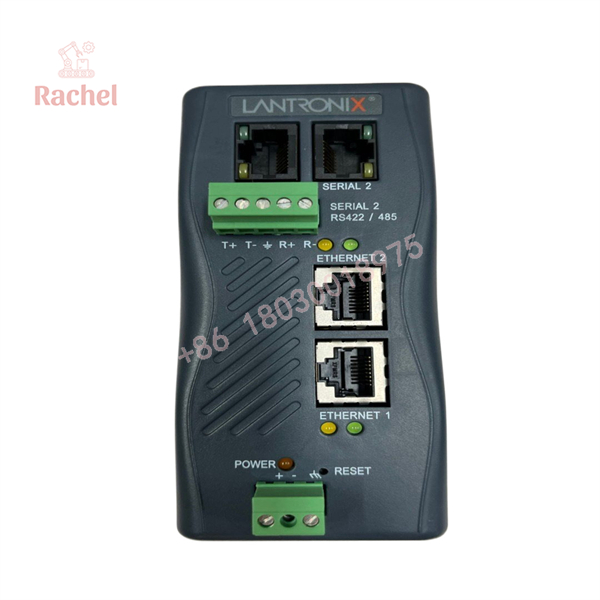
080-332-000-R
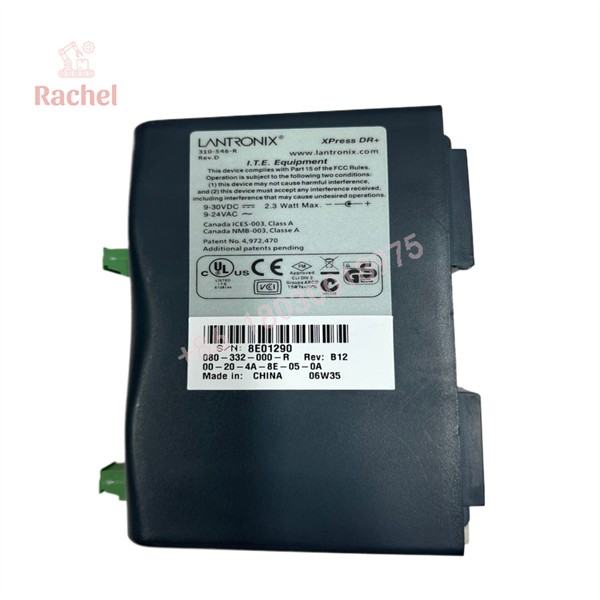
080-332-000-R
Field Application & the “Trench” Experience
A plant has an older PLC-controlled machine that still communicates through a serial port. The PLC itself is healthy. The field instruments are healthy. The problem appears when the IT department retires an old serial server and moves the production network onto Ethernet.
Replacing the PLC would be excessive. Rewriting the control application would be worse.
A properly matched 080-332-000-R can serve as the communications bridge between the legacy serial device and the plant Ethernet network. The engineer’s job is then to reproduce the existing serial parameters—baud rate, parity, stop bits, addressing, and protocol behavior—and verify the Ethernet-side configuration.
The trap is assuming that “serial-to-Ethernet” means universally interchangeable. It does not.
Specific Application Scenarios
- Legacy PLC serial port networking — providing Ethernet access without replacing the installed controller.
- SCADA access to serial instruments — connecting older meters, analyzers, or controllers to a supervisory Ethernet network.
- Remote maintenance of serial equipment — allowing authorized engineering workstations to access equipment through an IP network.
- Factory-floor communications migration — preserving an existing serial device while the surrounding infrastructure transitions to Ethernet.
Transparency SOP: QA & Testing
For a surplus or refurbished 080-332-000-R, I would require the following acceptance procedure:
1. Identity
- Verify
080-332-000-Ron the actual product label. - Record serial number and hardware revision.
- Photograph the front, rear, connectors, and label.
2. Physical condition
- Inspect the Ethernet connector.
- Inspect serial terminals/connectors.
- Check DIN-rail mounting hardware.
- Look for corrosion, cracked housing, damaged LEDs, or evidence of previous repair.
3. Power-up
- Apply the correct DC supply using a controlled bench supply.
- Check startup behavior and status indicators.
- Confirm that the unit does not exhibit excessive current draw or repeated rebooting.
4. Network test
- Establish Ethernet connectivity.
- Access the configuration interface where supported.
- Verify IP addressing and basic network communication.
5. Serial test
- Connect the unit to a known-good serial test device.
- Verify bidirectional transmission.
- Test the actual serial parameters required by the customer’s application.
6. Application test
- If possible, test the unit with the customer’s PLC, instrument, or SCADA environment. A successful ping is not a functional serial communications test.
The Veteran’s Tech Trap Guide
⚠️ Trap #1 — Buying on the part number but ignoring the interface
The 080-332-000-R is used in a communications role. Before substitution, document the original serial interface and protocol. RS-232, RS-422, and RS-485 applications are not interchangeable simply because all three are described as “serial.”
PRO TIP: Capture the old device’s serial configuration before removing it: baud rate, data bits, parity, stop bits, flow control, and protocol.
⚠️ Trap #2 — Confusing a device server with a protocol gateway
Transparent serial-to-TCP conversion is not necessarily the same thing as protocol conversion. A device server can transport serial traffic without understanding the application protocol. If the application requires Modbus RTU-to-Modbus TCP conversion, verify that the specific device supports that function rather than assuming transparent tunneling is sufficient. Secondary-market documentation reports Modbus TCP/RTU support for this model, but this should be validated against the exact hardware/firmware revision.
⚠️ Trap #3 — Trusting generic reseller specifications
This model is a good example of why procurement teams should not copy specifications from the first search result. One listing gives obviously questionable electrical specifications, while another provides a much more coherent device-server architecture.
⚠️ Trap #4 — Forgetting network security
Putting an old serial device directly onto a plant Ethernet network can create an unnecessary security exposure. Segment the device appropriately, restrict access, and avoid exposing legacy management interfaces outside the intended control network.
Dynamic FAQ
What is Lantronix 080-332-000-R?
It is a Lantronix serial device server/network interface used to connect serial equipment to Ethernet networks. Current industrial listings describe it as a serial-to-Ethernet communication device.
Is the 080-332-000-R a PLC?
No. It is a communications device, not a PLC CPU or conventional I/O module. Its purpose is to provide network connectivity for serial equipment.
Can it connect an old PLC to Ethernet?
Potentially, yes. The critical checks are the PLC’s serial electrical interface, protocol, communication settings, and the required Ethernet-side communication method.
Does it support Modbus?
Secondary-market documentation reports Modbus TCP and Modbus RTU capability. However, because exact firmware and hardware configuration can affect protocol support, confirm the capability against the actual unit before specifying it for a critical Modbus application.
Is the 080-332-000-R obsolete?
The part is widely traded through industrial surplus and automation-spares channels rather than conventional mainstream distribution. Current listings show it as available through secondary-market suppliers.
How should New Surplus authenticity be verified?
Request photographs of the actual 080-332-000-R, including the Lantronix label, serial number, connectors, and packaging. “New Surplus” should mean unused inventory; it should not be used interchangeably with “tested,” “used,” or “refurbished.”
What warranty should I request?
Warranty is supplier-specific. Some current secondary-market listings advertise 12-month warranty coverage, but that should be confirmed in writing on the quotation or purchase order.

 Start Chat


