





Description
Product Introduction
The Pilz 773731 (PNOZ mc9p) is a PROFINET fieldbus expansion module designed for the PNOZmulti modular safety family. Attached directly to the side of a PNOZmulti base controller, it serves as a high-speed communication gateway to external PLCs, SCADA architectures, and industrial HMIs.
Unlike basic hardwired alarm outputs that restrict diagnostic visibility, the 773731 exports detailed internal system state maps over PROFINET IO. It relays input status, virtual flags, output conditions, and fault codes directly to standard automation hosts, cutting down troubleshooting time during unexpected safety trips.
Key Technical Specifications
| Parameter | Value / Specification |
| Manufacturer | Pilz |
| Part Number / Type | 773731 / PNOZ mc9p |
| Fieldbus Protocol | PROFINET IO Device (RT) |
| Physical Interface | 1x RJ45 Female Socket |
| Transmission Rate | 100 Mbit/s (Full Duplex) |
| Bus Connection | Integrated Left-Hand/Right-Hand Backplane Connector |
| Power Supply | Supplied via PNOZmulti Base Unit Backplane |
| Galvanic Isolation | Yes (Fieldbus to internal logic) |
| Status LEDs | MOD STAT, COM STAT, LINK, ACT |
| Mounting Type | 35mm DIN Rail Mounting (EN 60715) |
Application Scenarios & The “Trench” Experience
Picture this: It’s 2 AM on a high-speed bottling line. The main PLC shows a general “Safety Cell Tripped” alarm, but gives zero indication of which specific interlock opened. The line operator is staring at a panel with 30 safety switches. Without detailed fieldbus diagnostics, your technician is forced to meter every single input contact manually while downtime costs mount.
In our field experience, mounting a Pilz 773731 module on the PNOZmulti rack eliminates the guesswork. It streams exact input states directly into the host Siemens or Allen-Bradley PLC over PROFINET, letting the HMI pinpoint the exact door interlock or light curtain that triggered the line stop.
- Automotive Body Shops – Connects safety system diagnostic maps to central Siemens S7-1500 PLC networks over PROFINET.
- Continuous Web Handling – Reports E-stop and safety gate trips to plant SCADA without running extra physical wiring.
- Robotic Palletizing Cells – Sends zone intrusion status to upper-level cell controllers for automated recovery routines.
- Packaging Machines – Allows real-time remote monitoring of safety outputs and internal virtual flags on local touch panels.
Transparency SOP: Quality Assurance & Testing
We don’t just ship boxes; we test them on actual Pilz test rigs. Here is how we verify every 773731 module before it leaves our facility:
- Inbound Visual & Mechanical Inspection: Check backplane pin headers, side latching clips, RJ45 port spring contacts, and verify genuine Pilz serial labels.
- Backplane Handshake Test: Connect the expansion card to a live PNOZmulti base module to confirm power rail propagation and backplane communication.
- PROFINET Link & Traffic Test: Connect to an industrial PROFINET master controller to verify IP addressing, GSD file loading, and bi-directional packet transfer.
- Diagnostic Data Mapping Check: Toggle inputs on the base safety controller and verify corresponding I/O bit changes across the PROFINET data structure.
- Final Clean & ESD Packaging: Treat port contacts with precision cleaner and vacuum-seal the card inside anti-static shielding with fresh desiccant.
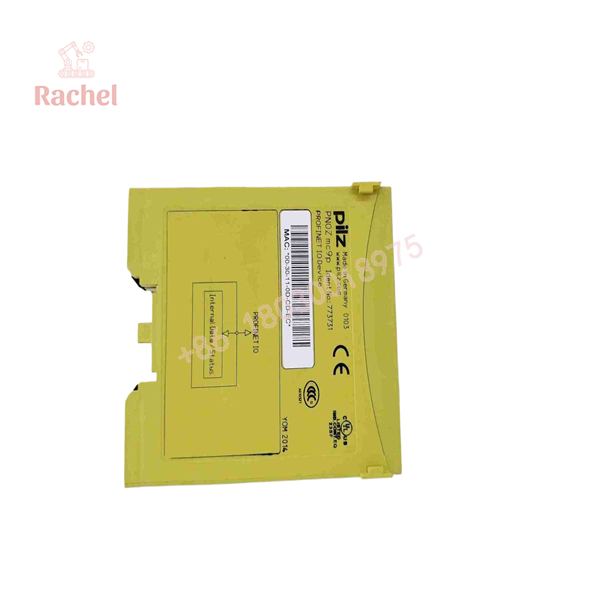
773731
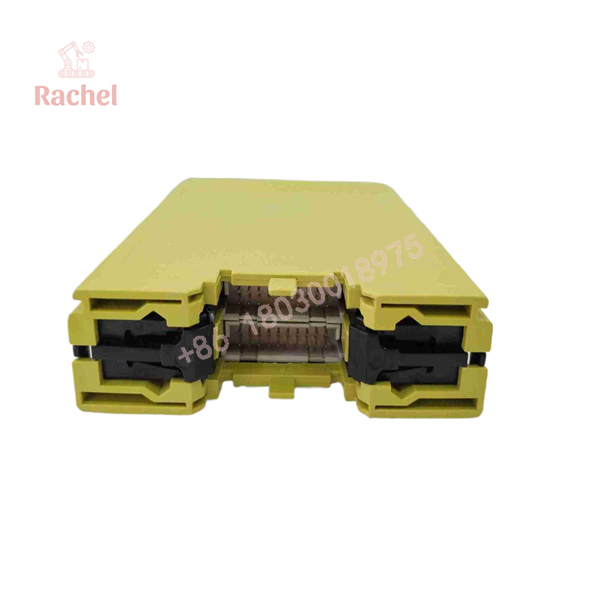
773731
The Veteran’s Tech Trap Guide (Crucial Value-Add)
- ⚠️ This Card Does NOT Transmit Safe Data! The PNOZ mc9p is a standard fieldbus module used for non-safety diagnostic status and control commands. Do not attempt to use its data mapping for safety-critical interlocks; all safety functions must remain handled by the base PNOZmulti logic.
- ❗ Never Connect Backplane Connectors Hot! Always power off the 24VDC supply to the base unit before sliding the 773731 onto the side bus. Hot-plugging expansion modules can bend or short the delicate backplane pins.
- ⚠️ Check Your Base Unit Compatibility: Verify that your base unit model supports side-mounted fieldbus modules. The 773731 attaches to standard PNOZmulti units, but physical positioning rules on the left or right rail must follow the hardware manual strictly.
- ❗ Set Station Names Correctly: PROFINET relies on device names, not just IP addresses. When replacing a failed module, ensure you assign the exact PROFINET device station name via your engineering software (e.g., TIA Portal or PILZ Configurator); otherwise, the master PLC will refuse to establish an IO connection. Trust me.
Frequently Asked Questions (FAQ for Conversion)
Q: Is the Pilz 773731 hot-swappable?
A: No. Always disconnect the main power supply from the PNOZmulti base module before removing or attaching expansion modules to prevent backplane pin damage.
Q: Does this module require an external 24VDC power supply?
A: No. Power for the internal logic and PROFINET interface is drawn directly from the PNOZmulti base module via the backplane bus connector.
Q: Can I send control commands from my PLC to the PNOZmulti through this module?
A: Yes, you can send non-safety control signals (like resets or mutes) from your host PLC into virtual inputs on the PNOZmulti, provided safety functions are not compromised.
Q: What warranty comes with this module?
A: We back all New Surplus and Refurbished Pilz hardware with a complete 12-month replacement warranty starting from the date of invoice.
Q: Why buy surplus Pilz modules instead of ordering through factory channels?
A: Factory lead times for specialty fieldbus expansion cards can drag on for weeks. Sourcing bench-tested surplus modules gets your diagnostic networks back online immediately.

 Start Chat


