





Description
Product Introduction & Engineering Value
When a machine operator station fails, replacing only the display hardware may seem simple. The difficult part is preserving the original operator workflow, especially on systems where function keys, touch input, and screen layout are tied directly to production procedures.
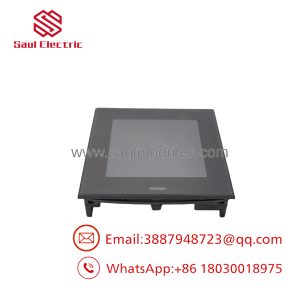
The PRO-FACE FP3710-K41-U (3620004-01) is an industrial flat panel display designed for PC-based control systems. Unlike standard commercial monitors, it combines industrial mounting, touchscreen operation, and dedicated keypad functions for machine operation.
For retrofit work, engineers should verify the complete identification: 3620004-01 / FP3710-K41-U. Similar FP-series displays may have different touch interfaces, power requirements, or keypad configurations.
Technical Specifications
| Parameter | Specification |
|---|---|
| Manufacturer | PRO-FACE |
| Registration Model Number | 3620004-01 |
| Product Model | FP3710-K41-U |
| Series | FP3700 Series |
| Product Type | Flat Panel Display with Keypad |
| Display Size | 15 inch |
| LCD Type | TFT Color LCD |
| Resolution | 1024 × 768 pixels (XGA) |
| Display Colors | 16.7 million colors |
| Touch Panel Type | Analog resistive |
| Key Input | Function keypad |
| Video Interface | Analog RGB / DVI-D |
| Touch Interface | USB / Serial interface depending on configuration |
| Power Supply | DC24V |
| Allowable Voltage | Approx. DC19.2–28.8V |
| Mounting | Panel mount |
| Front Protection | Industrial panel installation protection |
| Hazardous Location Approval | Available certification references for Class I Division 2 applications |
PRO-FACE certification documents list 3620004-01 / FP3710-K41-U as a flat panel display with keypad, including UL-related industrial certifications.
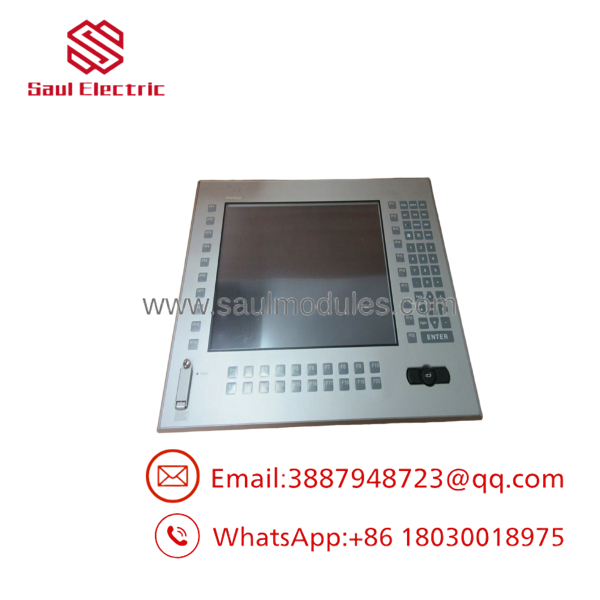
3620004-01
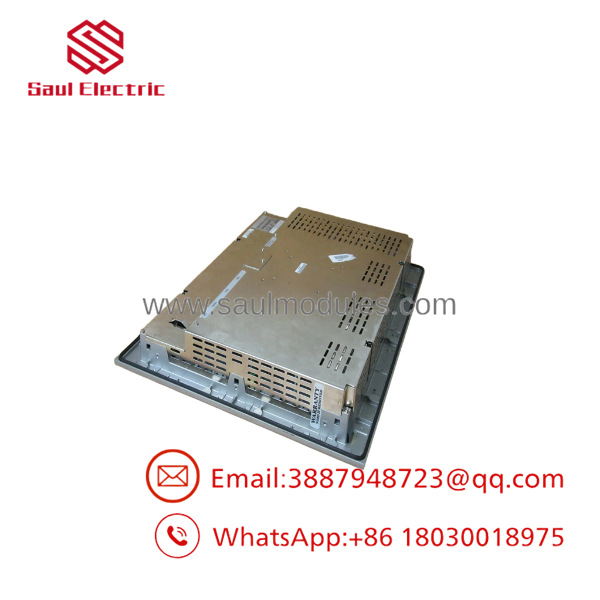
3620004-01
Field Application & the “Trench” Experience
A machine builder operates a legacy inspection station where operators use both touchscreen commands and physical function keys. After years of service, the display develops intermittent touch response and several keypad buttons become unreliable.
The maintenance team identifies the unit:
PRO-FACE FP3710-K41-U
Registration Model: 3620004-01
Before ordering a replacement, they verify:
- Existing PC video output.
- Touch communication wiring.
- Keypad functions used by operators.
- Panel mounting dimensions.
- DC24V power wiring.
The replacement display restores the original operator station without modifying the machine control software.
Typical applications include:
- PC-based vision inspection stations
- CNC machine operator terminals
- Semiconductor production equipment
- Factory automation workstations
- Process monitoring consoles
Transparency SOP: QA & Testing
Industrial flat panel displays require functional verification, not only cosmetic inspection.
Incoming QA Procedure
Identification Check
- Confirm PRO-FACE label.
- Verify:
- FP3710-K41-U
- 3620004-01
- Record serial number and revision information.
Display Test
- Power the unit with regulated DC24V.
- Check:
- LCD brightness
- Pixel condition
- Image stability
- Color rendering
Touch Verification
- Test touchscreen response.
- Perform calibration.
- Verify touch communication.
Keypad Verification
- Test all function keys.
- Confirm key response consistency.
- Check for stuck or intermittent switches.
Interface Testing
- Verify:
- Video input operation
- Touch interface
- External communication ports
A proper test report should accompany surplus or refurbished units because these displays are legacy industrial components.
The Veteran’s Tech Trap Guide
⚠️ Do not confuse with FP3710-T42 variants.
They belong to the same industrial display family, but the keypad configuration and application purpose are different.
⚠️ Check the host connection before ordering.
The display may physically fit while failing to communicate because of differences in:
- Video input type
- Touch interface
- Driver requirements
⚠️ PRO TIP: Preserve keypad mapping information.
On older machines, operators may rely on physical keys for:
- Alarm acknowledgment
- Mode selection
- Manual operation
- Maintenance functions
A replacement without equivalent keypad behavior can affect daily operation.
⚠️ Do not assume certification equals condition.
A certification record confirms product approval. It does not prove that a specific surplus unit has passed operational testing.
Dynamic FAQ
Q1. What is PRO-FACE 3620004-01?
PRO-FACE 3620004-01 is the registration model number for the flat panel display with keypad.
Q2. What type ofs ?
It is an industrial flat panel display designed for automation applications, combining a 15-inch display, touchscreen capability, and keypad input.
Q3. What is the display resolution?
e uses:
1024 × 768 pixels (XGA)
with a TFT color LCD panel.
Q4. Does this unit include PLC control functions?
e is a display interface device. The control application normally runs on a connected industrial PC or controller.
Q5. Is PRO-FACE 3620004-01 still manufactured?
The FP3700 family is a legacy product line. Availability today generally comes from industrial surplus, refurbished inventory, and repair channels.
Q6. How should buyers verify a 3620004-01 replacement?
Request:
- Actual unit photos
- Rear lag
- Power-on display test
- Touchscreen test
- Keypad test results
- Warranty terms
Q7. Can another FP3710 model replace 3620004-01?
Not automatically. Verify:
- Keypad requirement
- Touch interface
- Power supply
- Video connection
- Panel cutout dimensions
Q8. What warranty should buyers expect?
Warranty depends on the supplier. For discontinued industrial displays, coverage is normally provided by the seller through inspection reports, return periods, or repair guarantees rather than active OEM production warranty.

 Start Chat


