





Description
Product Introduction & Engineering Value
The card uses an onboard Intel i960 processor to handle PROFIBUS protocol processing, with 512 KB of local RAM. A further 256 KB of shared RAM provides the data exchange area between the VME host application and the interface card.
This is a host-interface card, not conventional rack I/O. That distinction matters when sourcing a replacement. The VMEbus form factor, address settings, interrupt configuration, firmware/software module, and PROFIBUS configuration all have to match the existing control architecture.
Technical Specifications
| Parameter | Specification |
|---|---|
| Manufacturer | SST / Woodhead |
| Part Number | 5136-PFB-VME |
| Network | PROFIBUS |
| Supported functions | DP Master, DP Slave, FDL Layer 2 |
| PROFIBUS baud rates | 9.6 Kbps to 12 Mbps |
| Host bus | VMEbus |
| Board format | IEEE 1014, 6U |
| VME compatibility | P1 compatible |
| Local processor | Intel i960 |
| Local RAM | 512 KB |
| Shared RAM | 256 KB |
| Flash memory | 512 KB |
| Interrupts | VMEbus levels 1–7, switch selectable |
| PROFIBUS connector | Standard PROFIBUS DB-9 |
| Operating temperature | 0 to 60 °C |
| Maximum current | 950 mA at 5 V |
The hardware manual specifies standard PROFIBUS rates of 9.6 K, 19.2 K, 93.75 K, 187.5 K, 500 K, 750 K, 1.5 M, 3 M, 6 M, and 12 Mbaud. It also specifies a 6U, P1-compatible VME card and a maximum current consumption of 950 mA at 5 V.
Field Application & the “Trench” Experience
A VME-based motion-control cabinet can remain in service for decades when the application software and machine mechanics are stable. The problem usually appears when one communication card fails and the original system depends on a very specific bus architecture.
With the 5136-PFB-VME, the replacement process is more involved than inserting another PROFIBUS card. The VME short-I/O address, interrupt level, access privileges, jumpers, firmware module, and PROFIBUS configuration all have to be considered. The hardware manual specifically requires switch and jumper configuration before installation.
Niche application scenarios
- VME-Based Motion Controller Networking — exchanging PROFIBUS data between a VME motion-control computer and distributed field devices.
- Legacy VME PLC Architecture — maintaining PROFIBUS connectivity without replacing an otherwise functional VME control platform.
- Distributed PROFIBUS-DP Machine Control — operating the VME host as a DP Master while communicating with distributed DP slaves.
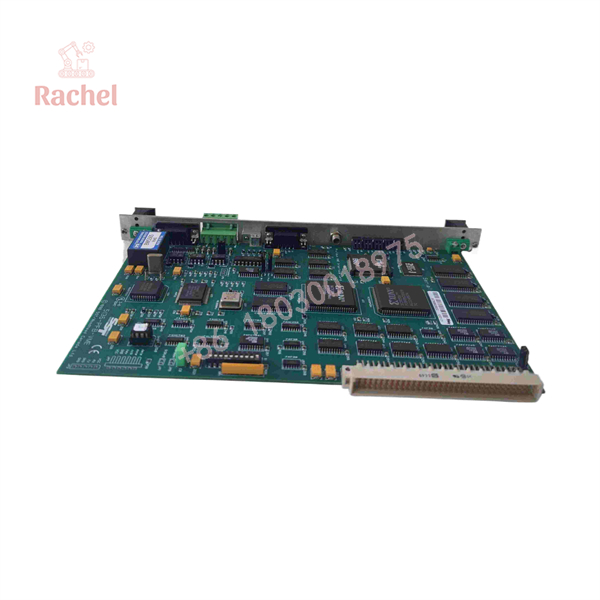
5136-PFB-VME
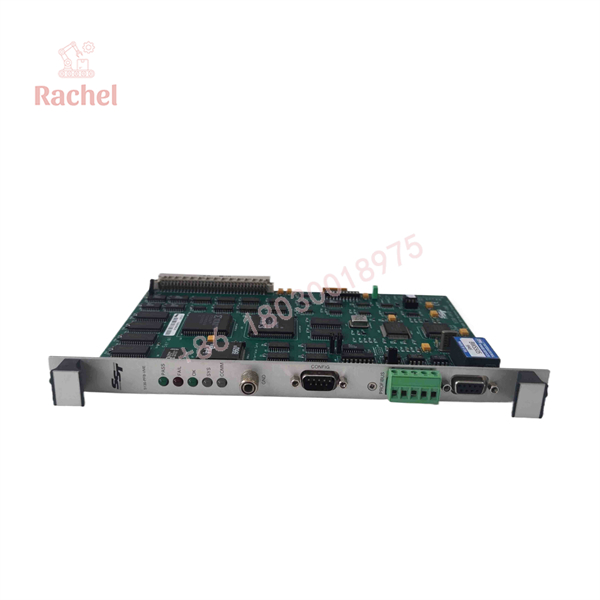
5136-PFB-VME
Transparency SOP: QA & Testing
For New Surplus or refurbished 5136-PFB-VME inventory, a meaningful test should go beyond checking whether the card powers up.
Hardware inspection: Verify the SST/Woodhead identification, PCB condition, VME connector, PROFIBUS connector, jumpers, DIP switches, and visible components.
Bus verification: Confirm that the VME interface responds at the intended address and that the configured interrupt behavior is compatible with the host system.
Firmware verification: The original hardware documentation states that the VMEPROFI software module must be downloaded and configured before the card can communicate on PROFIBUS. The module can be run from shared RAM or stored in flash.
Network test: Connect the card to a controlled PROFIBUS test network and verify DP Master, DP Slave, or FDL functionality as applicable.
The Veteran’s Tech Trap Guide
⚠️ Trap #1 — Forgetting the VME address settings.
The 5136-PFB-VME uses a 10-position DIP switch. Positions 1–6 select the short-I/O base address, while other positions control access privileges and interrupt configuration.
⚠️ Trap #2 — Installing the card without the VMEPROFI software module.
The card’s onboard hardware is not the complete application interface. The documentation explicitly calls for downloading, configuring, and running the VMEPROFI module before PROFIBUS operation.
⚠️ Trap #3 — Treating a generic PROFIBUS card as equivalent.
A PCI or ISA PROFIBUS card is not a replacement for a VMEbus card. The host architecture is different at both the mechanical and bus-interface levels.
PRO TIP: Record the existing card’s DIP-switch positions, jumper settings, VME address, interrupt level, firmware/software version, and PROFIBUS configuration before removing it. On legacy VME systems, that information can save hours of commissioning work.
Dynamic FAQ
Q: What is the SST 5136-PFB-VME used for?
A: It connects a VMEbus host computer or controller to PROFIBUS networks and supports DP Master, DP Slave, and FDL Layer-2 communications.
Q: What is the maximum PROFIBUS speed?
A: The hardware documentation specifies operation up to 12 Mbps, with the standard PROFIBUS rates from 9.6 Kbps through 12 Mbps supported.
Q: What VME form factor does it use?
A: It is an IEEE 1014, 6U-height, P1-compatible VME card.
Q: Does the 5136-PFB-VME have onboard memory?
A: Yes. It has 512 KB of local RAM, 256 KB of RAM shared with the host, and 512 KB of flash memory for programs and configuration data.
Q: Is New Surplus 5136-PFB-VME suitable for an existing VME system?
A: Potentially, but verify the exact hardware revision, DIP-switch/jumper configuration, firmware/software availability, VME host compatibility, and PROFIBUS configuration before installation.
Q: What should I verify for New Surplus authenticity and warranty?
A: Request photographs of the original SST/Woodhead label, complete part number, serial information, PCB condition, and packaging if available. Also confirm whether the supplier’s warranty covers DOA, functional testing, and return conditions.

 Start Chat


