





Description
Product Introduction & Engineering Value
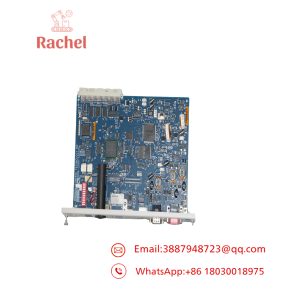
The 5136-PFB family was designed for PC-based industrial networking rather than conventional PLC rack I/O. Depending on the hardware variant, the card can provide PROFIBUS DP master/slave functionality and related Layer-2 communications. The ISA version, for example, supports DP, FDL, and FMS communications.
The critical procurement issue is the suffix. A bare “5136-PFB” does not identify the host-bus implementation. ISA, PCI, PC/104, and VME versions are not mechanically interchangeable.
Technical Specifications
| Parameter | Specification |
|---|---|
| Manufacturer | SST / Woodhead |
| Product family | 5136-PFB |
| Network | PROFIBUS |
| Primary protocol | PROFIBUS DP |
| Operating modes | DP Master / DP Slave on applicable variants |
| Additional protocols | FDL; FMS on supported versions |
| Host interfaces | ISA, PCI, PC/104, VME variants |
| Typical application | PC-based industrial control and PROFIBUS networking |
| Configuration | Variant- and software-dependent |
| Network speed | Up to 12 Mbps on documented 5136-PFB variants |
| Physical interface | PROFIBUS connector, variant dependent |
| Product generation | Legacy industrial communication hardware |
The documented 5136-PFB-ISA supports standard PROFIBUS baud rates from 9.6 kbps through 12 Mbps, while the 5136-PFB-VME documentation also specifies operation up to 12 Mbps.
Field Application & the “Trench” Experience
A PC-based control system at a manufacturing plant was still running legacy Windows control software with a PROFIBUS network connecting distributed field equipment. When the original communication card failed, replacing the entire PC control platform would have required software migration, driver changes, and a lengthy commissioning period.
The maintenance team first identified the exact 5136-PFB hardware variant. That distinction mattered: the configuration software lists separate SST master definitions for 5136-PFB-ISA, 5136-PFB-PCI, 5136-PFB-104, and 5136-PFB-VME.
Niche application scenarios
- PC-Based PROFIBUS-DP Master Station — controlling distributed I/O from legacy industrial PC software.
- Legacy Machine Supervisory Control — maintaining PROFIBUS communications without replacing the host application.
- VME-Based Industrial Control — integrating PROFIBUS field devices into VMEbus computer systems using the 5136-PFB-VME variant.
Transparency SOP: QA & Testing
For New Surplus or Refurbished SST 5136-PFB inventory, testing should proceed in this order:
- Identify the variant. Confirm whether the card is ISA, PCI, PC/104, VME, or another documented version.
- Inspect the hardware. Check connectors, edge contacts, jumpers, DIP switches, PCB condition, and identification labels.
- Verify host compatibility. Confirm the available computer bus and operating environment before installation.
- Power-up test. Check initialization and diagnostic behavior.
- PROFIBUS test. Connect to an appropriate test network and verify expected master/slave communication.
- Configuration test. Confirm that the applicable SST configuration software recognizes the correct card definition.
For the VME version specifically, the hardware manual states that the PFBPROFI software module must be downloaded and configured before the card is used on PROFIBUS.
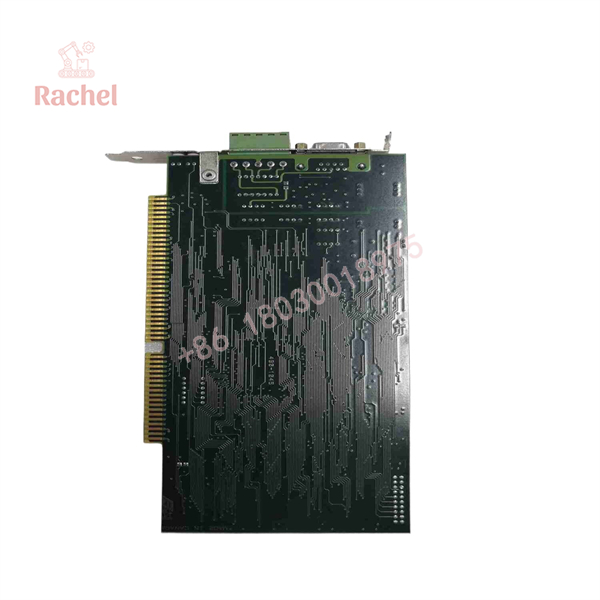
5136-PFB
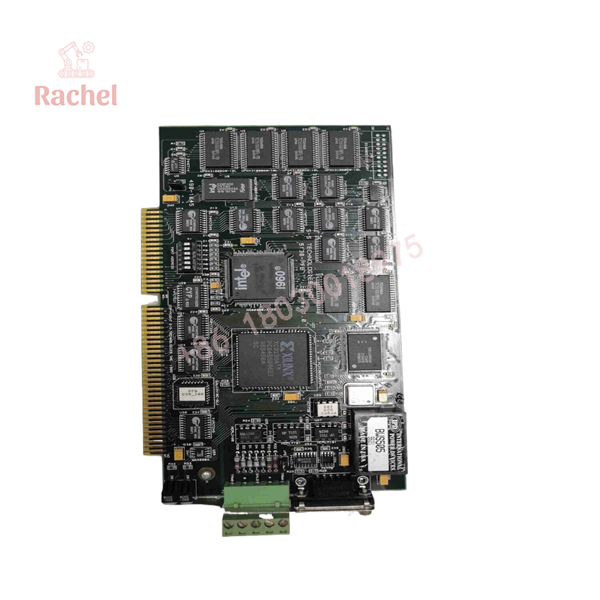
5136-PFB
The Veteran’s Tech Trap Guide
⚠️ Trap #1 — Treating 5136-PFB as one physical card.
It is a family designation. A 5136-PFB-ISA cannot simply replace a 5136-PFB-VME or PCI card. The host-bus architecture is fundamentally different.
⚠️ Trap #2 — Forgetting legacy software dependencies.
These cards rely on configuration software and host-side integration. Hardware replacement without confirming the existing driver/configuration environment can turn a simple spare replacement into a software troubleshooting project.
⚠️ Trap #3 — Ignoring jumpers and address settings.
The documented VME hardware, for example, uses board switches and jumpers for functions including address selection, access privileges, transmit enable, and flash protection.
PRO TIP: Before ordering, photograph the entire PCB and record the complete suffix. If the label says 5136-PFB-ISA, 5136-PFB-PCI, or 5136-PFB-VME, that information should appear on the purchase order—not merely “5136-PFB.”
Dynamic FAQ
Q: What is the SST 5136-PFB?
A: It is a family of industrial PROFIBUS interface cards used by PC-based control systems to communicate with PROFIBUS networks.
Q: Is 5136-PFB a PROFIBUS master card?
A: Applicable variants can operate as PROFIBUS DP masters or slaves. The exact capabilities depend on the hardware variant and loaded software.
Q: What is the difference between 5136-PFB-ISA and 5136-PFB-PCI?
A: The primary distinction is the host-computer bus interface. They are different physical card formats and should not be treated as direct hardware substitutes.
Q: What about the 5136-PFB-VME?
A: The VME version is a VMEbus interface card designed for PROFIBUS DP/FDL communications. It uses the VMEbus architecture and has its own address, jumper, and software configuration requirements.
Q: Is New Surplus SST 5136-PFB inventory still usable?
A: Yes, provided the exact hardware variant is compatible with the host system and the required legacy software/configuration environment remains available. The age of the hardware makes configuration verification particularly important.
Q: How should New Surplus authenticity and warranty be checked?
A: Request clear photographs of the SST/Woodhead label, complete part number and revision, serial information, and PCB condition. Confirm whether the supplier’s warranty covers DOA, functional testing, and return of an incompatible or defective unit.

 Start Chat


