





Description
Product Introduction & Engineering Value
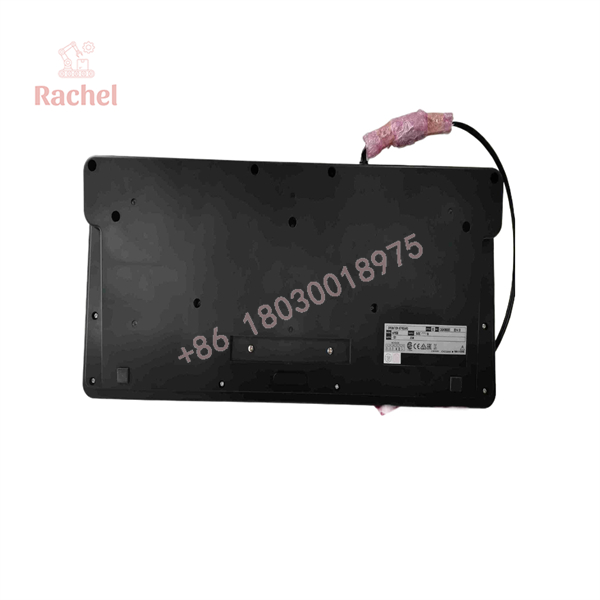
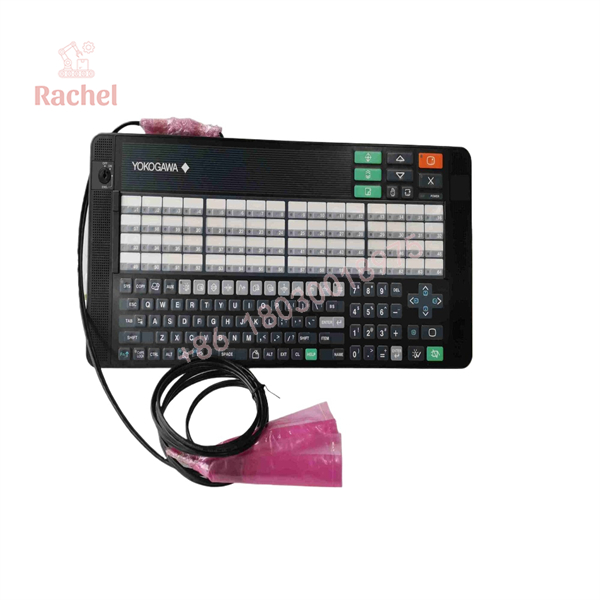
The AIP830 is a dedicated Yokogawa CENTUM operator keyboard, not a generic industrial USB keyboard. It combines alphanumeric keys, dedicated process-control keys, window-call keys, alarm controls, and 64 user-definable function keys for operator interaction with a Desktop Type HIS.
The hardware uses two USB Type-A connections: one for keyboard operation and another for the sound function. Yokogawa specifies USB 2.0 for the keyboard function and USB 1.1 for the speaker function, with both interfaces requiring direct connection to the computer.
Technical Specifications
| Parameter | AIP830 Specification |
|---|---|
| Manufacturer | Yokogawa Electric Corporation |
| Model | AIP830 |
| Product Type | Operation keyboard for single-loop operation |
| HIS Type | Desktop Type HIS |
| Keyboard Interface | USB Type-A × 1 |
| Sound Interface | USB Type-A × 1 |
| Keyboard Standard | USB 2.0, full-speed, bus-powered |
| Sound Standard | USB 1.1, full-speed, bus-powered |
| Input Voltage | 5 V ±5% |
| Maximum Consumption | 1 A |
| User-Definable Function Keys | 64 |
| Operating Temperature | 5 to 40 °C |
| Storage/Transport Temperature | -20 to 60 °C |
| Operating Humidity | 20–80% RH, non-condensing |
| Weight | Approx. 2.0 kg without VESA bracket / 2.5 kg with bracket |
| Cable Length | 2,300 ±100 mm |
| Chassis Color | Black, approximately Munsell N1.5 |
Yokogawa also specifies an optional mode-selection switch, two types of operation-confirmation keys, and an optional VESA mounting bracket. The ordering structure uses suffixes to identify these configurations.
AIP830 model-code details
The base model is AIP830. Yokogawa documentation lists:
- -0: Without mode-selection switch
- -1: With mode-selection switch
- 0 / 1: Operation-confirmation key type
- /VESA: VESA bracket option
- /EIM: English instruction manual
- /JIM: Japanese instruction manual
The exact suffix therefore matters when replacing an installed keyboard.
AIP830
AIP830
Field Application & the “Trench” Experience
Consider a control room running a legacy CENTUM VP Desktop Type HIS. The DCS itself is healthy, but the dedicated operator keyboard begins losing individual keys. Replacing it with a standard USB keyboard may restore basic text entry, but it does not reproduce the dedicated process-control interface, window-call keys, alarm controls, or user-defined function-key layout.
The AIP830 is designed specifically for this operator environment. One keyboard is intended for each Desktop Type HIS, and Yokogawa’s documentation provides dedicated mechanical and electrical specifications for installation.
Specific application scenarios
- CENTUM VP single-loop operation stations — dedicated operator control of individual process loops.
- Refinery control-room HIS terminals — rapid access to process windows, alarms, and operator functions.
- Chemical-process DCS workstations — replacement of worn or failed operator keyboards while retaining the established HIS configuration.
- Power-generation control rooms — operator interaction with legacy CENTUM VP desktop stations.
- Brownfield DCS maintenance — maintaining the original operator interface without modifying the workstation software architecture.
Yokogawa’s product documentation specifically places AIP830 within the hardware documentation for CENTUM VP and identifies it as the single-loop operation keyboard.
Transparency SOP: QA & Testing
For New Surplus or refurbished AIP830 stock, a functional test should cover the keyboard and its independent audio connection.
1. Identification
Verify the AIP830 model and, where applicable, the complete suffix code such as AIP830-111.
2. Physical inspection
Check the keycaps, plastic cover, chassis, cable, USB connectors, mounting points, mode-selection switch, and operation-confirmation keys.
3. USB test
Connect both USB connectors directly to a compatible PC. Yokogawa specifically states that both connectors must be connected directly to the computer rather than through an intermediate hub.
4. Key-function test
Test the alphanumeric keys, cursor controls, function keys, window-call keys, alarm acknowledgement, buzzer reset, data-entry keys, and other dedicated controls.
5. Audio test
Verify the integrated USB speaker and buzzer functions separately from normal keyboard input.
6. Long-duration check
For refurbished stock, repeated key operation and extended USB operation are useful for detecting intermittent switches or cable faults.
The Veteran’s Tech Trap Guide
⚠️ Trap #1 — Buying only by “AIP830.”
The base model is not always enough. AIP830 has suffix codes for the mode-selection switch and operation-confirmation key type, while VESA mounting and manual language are separate options. Compare the complete model code with the installed unit.
⚠️ Trap #2 — Connecting only one USB cable.
There are two USB connections because the keyboard and sound functions use separate interfaces. Yokogawa explicitly states that both connectors must always be connected directly to the computer.
PRO TIP: Photograph the rear label and both USB plugs before replacing the old keyboard. Also record whether the installation uses the VESA bracket.
⚠️ Trap #3 — Treating it as a generic industrial keyboard.
The AIP830 has dedicated DCS operation keys and 64 user-definable function keys. A conventional USB keyboard may be physically usable but will not necessarily provide the same operator functions or established workflow.
Dynamic FAQ
What is the Yokogawa AIP830?
The AIP830 is a Yokogawa operation keyboard for single-loop operation, designed for a Desktop Type HIS. It includes dedicated process-control keys and an independent USB speaker.
How many programmable function keys does it have?
The AIP830 provides 64 user-definable function keys intended for process control and plant monitoring.
Does the AIP830 require an external power supply?
No separate power adapter is specified. The keyboard receives 5 V ±5% through the PC’s USB port, with maximum consumption of 1 A.
Can I use a USB hub?
Yokogawa’s specification states that both USB connectors must be connected directly to the computer. Therefore, a USB hub should not be treated as an equivalent installation method.
Does AIP830 have different versions?
Yes. Yokogawa specifies suffix codes for configurations including the mode-selection switch and operation-confirmation key type, with optional VESA mounting hardware and documentation options. The exact suffix should be checked before ordering.
What should I verify when buying New Surplus AIP830?
Request photographs of the actual AIP830 label, complete suffix code, USB cables, key layout, and packaging. Confirm whether the unit is unused surplus or refurbished, whether the keyboard and audio functions were tested, and what warranty the supplier provides. For a control-room replacement, matching the complete suffix configuration is more important than simply matching the AIP830 base model.

 Start Chat


