





Description
Key Technical Specifications
| Parameter | Specification Value |
|---|---|
| Display Type & Size | 10.4-inch TFT active matrix color display |
| Resolution | SVGA 800 x 600 pixels (4:3 aspect ratio) |
| Backlight Type & Life | LED backlight with minimum 40,000-hour life span |
| Touchscreen Matrix | 4-wire analog resistive film touchscreen |
| Processor Type | 32-bit ARM Cortex-A8 clocking at 800 MHz |
| Onboard Runtime | Pre-installed industrial micro-browser optimized for WebVisu |
| System Memory | 256 MB Flash memory / 256 MB DDR RAM |
| Communication Ports | 1 x Ethernet (10/100 Base-T RJ45), 1 x USB 2.0 host, 1 x SD Card slot |
| Supply Input Voltage | 24 V DC (operational range 18 to 30 V DC) |
| Current Consumption | Approx. 0.6 A at 24 V DC input power |
| Front Enclosure Rating | IP66 dust-tight and water-jet resistant (when flush mounted) |
| Rear Enclosure Rating | IP20 finger-safe physical terminal enclosure protect |
| Mechanical Dimensions | Cutout: 276 mm x 214 mm |
Product Introduction
The ABB CP651-WEB (1SAP551100R0001) is a dedicated 10.4-inch touchscreen operator interface built specifically to serve as a visualization client for automated systems. Unlike standard programmable HMIs that require standalone screen project layouts and internal tags, the “WEB” variant comes equipped with an integrated industrial browser. It is optimized to pull and render HTML5 or Java-based visualization frames directly generated from a host controller, such as an AC500 PLC using Codesys WebVisu.
By using the CP651-WEB, engineers bypass double-engineering efforts; modifications done inside the PLC application code are immediately active on the operator screen via the network. Featuring a bright, high-contrast SVGA TFT screen and a durable resistive touch matrix, this panel fits easily into machine-level or processing enclosures where reliable remote operation and network flexibility are prioritized.
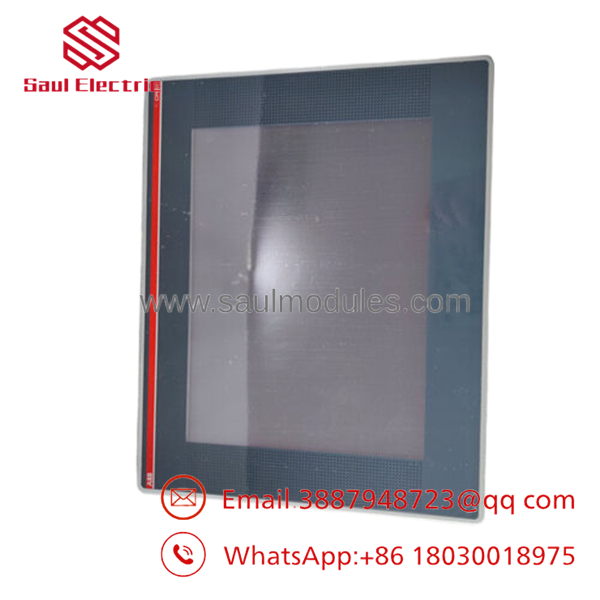
- CP651-WEB
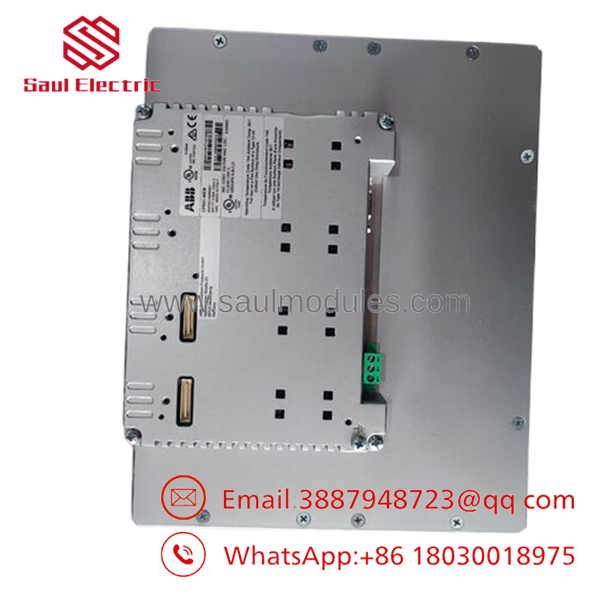
- CP651-WEB
Installation & Configuration Guide
Stage 1: Panel Mechanical Cutout & Mounting (Estimated Time: 15 minutes)
- ⚠️ Safety First: Prior to starting panel cut out work, verify that the behind-panel clearance area is free of high-voltage wiring, conduit paths, or active structural support struts.
- Prepare a precise panel face cutout measuring 276 mm wide by 214 mm high in your electrical enclosure door sheet. Clean away any metal shavings or rough burrs.
- Confirm the foam sealing gasket is seated uniformly within the peripheral channel on the back of the CP651 front bezel.
- Push the HMI chassis straight forward into the prepared cutout hole from the outside.
- Working from the rear inside of the door, clip the provided screw-fastened mounting brackets into the chassis grooves, tightening the retention screws evenly until the front bezel seal compresses flush against the panel skin.
Stage 2: Power & Communication Wiring (Estimated Time: 10 minutes)
-
- Route a dedicated, clean 24 V DC supply line from a stable industrial power brick to the 3-pin screw terminal plug.
- Terminate the wire leads matching the molded polarity stamps:
+24V,0V, and the grounding lug tokenPE. - Connect a shielded Cat5e or Cat6 Ethernet cable from your network switch or target AC500 PLC directly into the RJ45 port located on the side panel profile.
Stage 3: Network IP Configuration (Estimated Time: 10 minutes)
- Turn on the 24 V DC power feed line. The panel will launch its local setup and configuration menu utility automatically on initial power up.
- Navigate into the Network Settings screen block.
- Disable DHCP if using a fixed automation loop, and enter a dedicated static IP address sequence matching the subnet structure of your PLC system (e.g.,
192.168.0.50). - Set the matching Subnet Mask (typically
255.255.255.0) and click Apply.
Stage 4: Defining the Web Target URL (Estimated Time: 10 minutes)
- Go into the browser application setup wizard on the CP651 screen.
- Type in the target URL matching your PLC’s internal web server page network address.
- For standard ABB AC500 V2 PLCs, this path structure typically looks like:
[http://192.168.0.10/webvisu.htm](http://192.168.0.10/webvisu.htm)
- For standard ABB AC500 V2 PLCs, this path structure typically looks like:
- Configure the browser initialization timeout parameter to 10 seconds, giving the controller ample time to cycle and launch its web daemon engine upon a shared power loss scenario.
- Save adjustments and cycle the panel power. The -WEB will automatically boot into full-screen kiosk mode, showing the graphic layout served by the PLC.
Frequently Asked Questions (FAQ)
Can the -WEB execute local HMI programs designed in CP600-Pro or PB610 software?
No. The -WEB model lacks the internal data storage engine and driver runtimes necessary to compile and execute local, standalone HMI project structures. It functions exclusively as a specialized, hardened web client terminal designed to display screens hosted by external servers or PLCs. If your application calls for local project storage, you should specify the standard standard version, model (without the “-WEB” suffix).
What happens if the network connection to the PLC falls offline?
If the Ethernet link drops out or the host PLC loses power, the screen image will freeze and the integrated micro-browser will display an standard connection timeout warning pop-up overlay. As soon as physical network integrity is restored, the browser attempts auto-reconnection cycles to re-establish touch interactions.
Does this web panel support modern HTML5 elements, or is it limited to old Java applets?
Depending on the specific firmware revision level running inside the unit, older versions used Java-centric tools for older web layouts. Modern firmware revisions update the panel’s micro-browser engine to natively render modern HTML5 visual packages. This ensures clean compatibility with newer automation processors, like the AC500 V3 series controllers.
Is the touchscreen lens material resistant to harsh cleaning agents or cutting oils?
The polyester front layer of the resistive touchscreen provides solid chemical resistance against standard industrial alcohols, cleaning solutions, and diluted cutting oils. However, you should avoid exposure to high-concentration organic solvents, ketones, or sharp mechanical points that can puncture the touch-membrane surface.

 Start Chat


