





Description
Key Technical Specifications
| Parameter | Value |
|---|---|
| Manufacturer | ABB |
| Model | PM860 |
| Product Family | AC 800M Controller |
| Product Type | Processor Unit |
| Processor Type | MPC860 |
| Clock Frequency | 48 MHz |
| Performance | 0.23 ms per 1,000 boolean operations |
| Memory | 8 MB SDRAM / 2 MB Flash PROM (PM860 standard) |
| Power Supply | 24 V DC (19.2–30 V DC) |
| Ethernet Interface | 2 × RJ45 Ethernet ports |
| Serial Interface | 2 × RS-232C ports |
| Mounting Method | DIN rail mounting with TP830 baseplate |
| Protection Class | IP20 |
| Operating Temperature | 0 to +55 °C |
| Typical Application | ABB System 800xA process control systems |
Product Introduction & Supply Chain Strategy
The ABB PM860 is an AC 800M processor unit designed for industrial DCS and automation control applications. It executes Control Builder applications and provides Ethernet, serial communication, and ModuleBus integration for process automation systems using ABB System 800xA architecture.
Maintaining PM860 units as New Original / New Surplus inventory supports lifecycle continuity for installed automation assets. Because processor failures can stop an entire control system, keeping 1–2 units as buffer stock helps reduce emergency procurement exposure, manage EOL risk, and improve Total Cost of Ownership (TCO) compared with sourcing uncertain alternatives after failure.
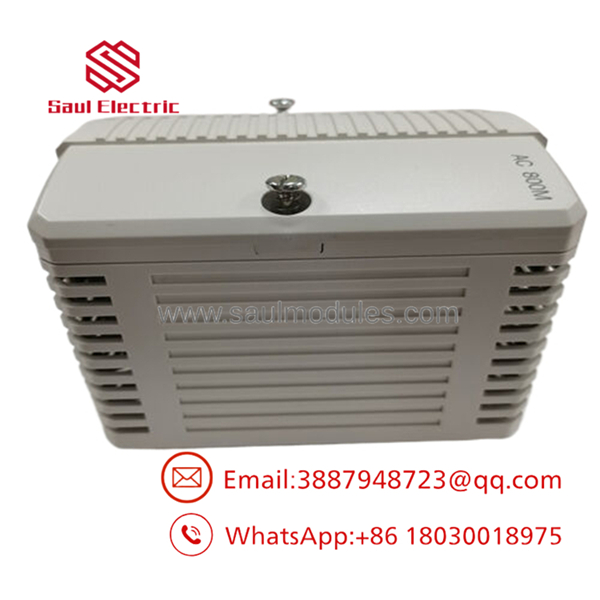
- PM860
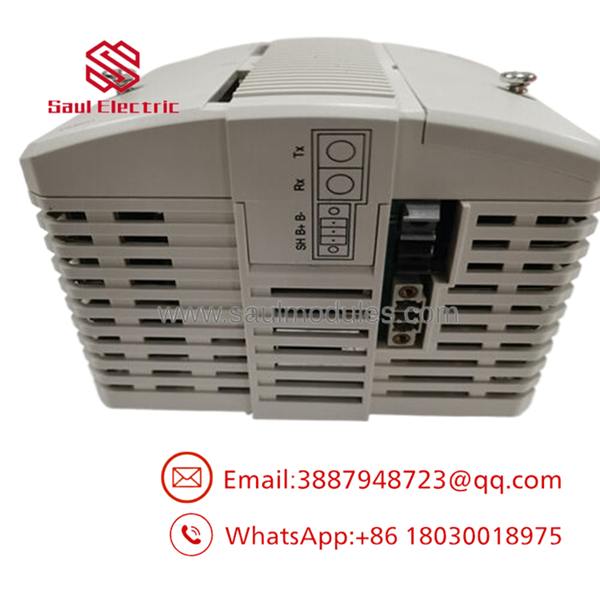
- PM860
Installation & Configuration Guide
Stage 1 – Pre-Installation (Prep & Safety)
- Apply Lock-Out/Tag-Out procedures before opening the control cabinet.
- Confirm the replacement module is and matches the existing hardware revision.
- Wear an ESD grounding wrist strap before handling the processor.
- Back up the existing AC 800M application and controller configuration.
- Photograph:
- Module position
- Ethernet connections
- Serial connections
- Baseplate wiring
- Battery configuration
- Record firmware version and Control Builder project version.
Stage 2 – Removal
- Switch off controller power supply.
- Verify the 24 V DC supply is fully discharged.
- Disconnect communication cables carefully.
- Release the locking mechanism on the DIN rail assembly.
- Remove the processor without forcing the backplane connection.
- Inspect the TP830 baseplate contacts for contamination or bent pins.
Stage 3 – Installation (Clone & Seat)
- Verify the replacement label and part number.
- Install the processor onto the existing TP830 baseplate.
- Ensure the slide-and-lock mechanism fully engages.
- Reconnect Ethernet and serial communication cables.
- Verify battery status and memory backup components.
- Restore the original controller configuration.
Stage 4 – Power-On & Testing
- Verify 24 V DC polarity before energizing.
- Check the power supply for stable voltage output.
- Observe LED indicators.
- Confirm Ethernet communication with the engineering workstation.
- Download or activate the approved Control Builder application if required.
- Verify I/O communication and process values before returning equipment to service.
Firmware/Software Versions & Upgrade Notes
- Controller Platform: ABB AC 800M
- Engineering Software: ABB Control Builder / System 800xA environment
- Firmware Storage: Flash PROM based firmware storage.
- Compatibility Requirement: Match processor firmware with the installed System 800xA and Control Builder version.
- Configuration Backup: Always export the controller application before replacement.
- Upgrade Warning: Firmware upgrades during a hardware swap can introduce compatibility issues with older libraries, communication drivers, and controller configurations.
- Downgrade Warning: Returning to older firmware may require project conversion or parameter rollback.
The hardware family differs from later PM860A versions. Confirm memory capacity, firmware compatibility, and system version before replacement.
Frequently Asked Questions (FAQ)
1. Is ABB supplied as a genuine new product?
Yes. The supplied unit is New Original / New Surplus. It is not refurbished, repaired, or removed from a decommissioned plant.
2. Why is New Surplus more expensive than refurbished units?
New Surplus provides unused OEM manufacturing condition and longer service availability. Refurbished units may have unknown operating history, aging electronic components, or reduced remaining service life.
3. Is ABB obsolete or still useful?
belongs to the AC 800M controller family and remains relevant for many installed System 800xA systems. Plants operating this platform should evaluate Last-time-buy planning and maintain critical processor spares.
4. Can be hot-swapped while the system is running?
Do not assume hot-swapping is allowed. Processor replacement normally requires controlled shutdown procedures unless the specific AC 800M system configuration supports an approved redundancy or replacement method.
5. Will replacing erase the PLC/DCS program?
The application is stored within the controller environment, but replacement procedures require restoring or verifying the correct project configuration. Always maintain a current backup before removal.
6. What quality checks are performed before shipment?
New Surplus units typically undergo:
- OEM part number verification
- Label and serial inspection
- Visual condition inspection
- Connector inspection
- Power-up verification where applicable
- ESD-safe packaging
7. What warranty is recommended for this critical spare?
For a processor module controlling production assets, a 12-month warranty is commonly recommended. Maintaining on-site spare coverage reduces downtime exposure and protects plant reliability.


 Start Chat


