





Description
Key Technical Specifications
- Model Number: SPDSI22
- ABB Product ID: 3BSE018146R1
- Product Type: Digital Input (DI) Module
- System Family: ABB Symphony Plus / Harmony Rack I/O
- Input Channels: 16 digital input channels
- Channel Type: DI (Digital Input)
- Supported Input Voltage: 24 VDC, 48 VDC, 125 VDC, 120 VAC
- Configuration: 32 jumper selectable settings
- Isolation: Group isolation between input channels/system interface (verify hardware revision)
- Power Supply: 24 VDC system power (application dependent)
- Response Time: Approx. 0.5 ms (supplier-listed specification; verify OEM documentation)
- Dimensions: Approx. 73.66 mm D × 269.24 mm W × 358.14 mm H
- Weight: Approx. 2 kg shipping weight (varies by packaging)
Product Introduction
ABB SPDSI22 (3BSE018146R1) is a digital input module for ABB Symphony Plus control systems. It collects discrete field signals from switches, relays, sensors, and status contacts, then transfers the input states into the DCS control architecture.
The module supports multiple field voltage levels through configurable inputs, making it suitable for process control environments where different digital signal standards exist. Before replacement, verify jumper settings, input voltage range, rack position, and existing field wiring.
Troubleshooting Quick Reference
| Symptom | Possible Cause | Relevance to this Part | Quick Check Method | Recommendation |
|---|---|---|---|---|
| Digital input status not changing | Field wiring fault or failed DI channel | ✅ High | Measure input voltage at terminal when field device changes state | Verify field signal before replacing module |
| All channels inactive | Module power or rack communication issue | ⚠️ Medium | Check rack status, module LEDs, and system diagnostics | Check I/O rack before replacing SPDSI22 |
| Wrong input status displayed | Incorrect jumper configuration | ✅ High | Compare jumper settings with original module | Copy original configuration before replacement |
| Some channels work, others fail | Individual input channel damage | ✅ High | Test each channel with known signal source | Replace module if channel failure is confirmed |
| Module offline in DCS | Backplane/rack communication issue | ⚠️ Medium | Check rack communication diagnostics | Verify rack controller and connections |
| New module installed but signals incorrect | Voltage range mismatch | ✅ High | Confirm field voltage (24/48/125 VDC or 120 VAC) | Match input configuration before commissioning |
❗ Technical support note: If diagnosis is unclear, provide photos of the SPDSI22 label, rack position, jumper settings, terminal wiring, and DCS diagnostic screens.
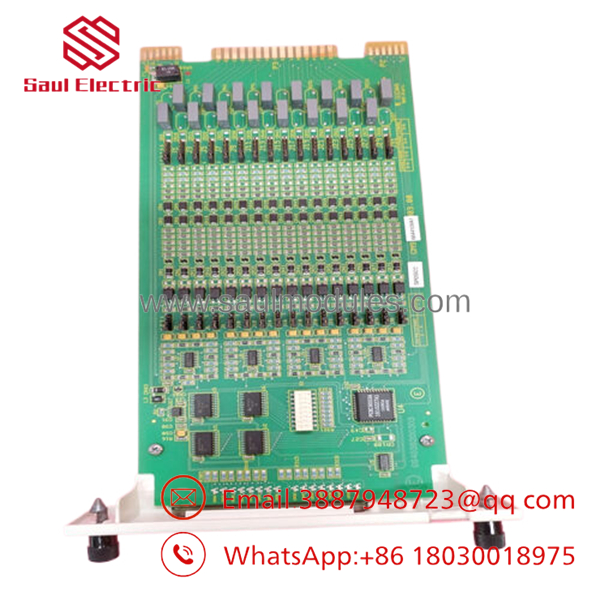
- SPDSI22
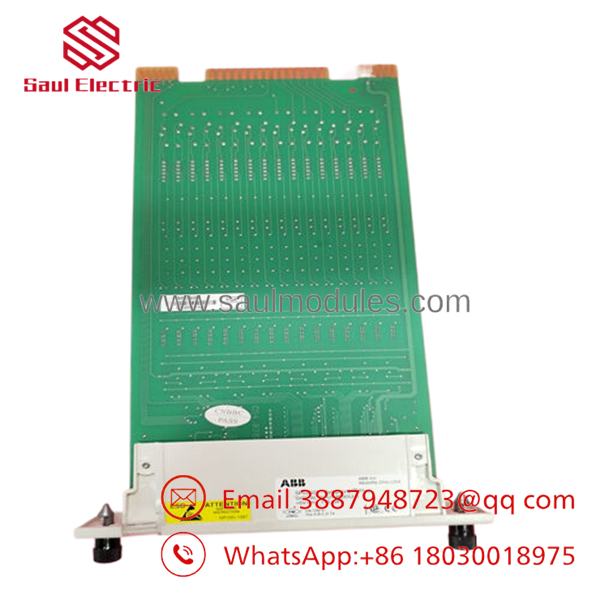
- SPDSI22
Frequently Asked Questions (FAQ)
Q: What is ABB used for?
A: is a digital input module used in ABB Symphony Plus and related control systems to collect discrete field signals from industrial equipment.
Q: How many inputs does ABB have?
A: The module provides 16 digital input channels.
Q: What voltage signals can accept?
A: It supports multiple input levels including 24 VDC, 48 VDC, 125 VDC, and 120 VAC depending on configuration.
Q: Can I install without changing configuration?
A: Only if the replacement module matches the original jumper configuration. Take photos of the old module settings before removal.
Q: Does require programming after replacement?
A: Normally the module does not require user programming, but verify the DCS I/O configuration and channel mapping after installation.
Q: Why is a New Surplus cheaper than factory supply?
A: Industrial automation modules are often available from unused project stock or maintenance inventory. Confirm packaging, traceability, and testing records before purchase.
Q: What is the most common installation mistake with ?
A: Installing the module with incorrect jumper settings or wrong input voltage selection. A visual match is not enough; verify the configuration before powering the rack.


 Start Chat


