





Description
Key Technical Specifications
- Model: ABB UNS0867 A-P V2
- ABB Part Number: HIEE405246R0002
- Product Type: Extension Card I/O
- System Family: ABB UNITROL F / legacy ABB control platforms
- Function: Extended I/O expansion module
- Signal Type: Analog and digital signal interface (V2 version)
- Installation Method: Plug-in card / backplane mounting
- Communication: Internal ABB control rack interface
- Dimensions: Approx. 165 mm × 37 mm × 23 mm
- Weight: Approx. 0.22 kg
- Origin: Switzerland (listed supplier data)
- Operating Temperature: Verify exact ABB hardware specification before installation
- Status: Out of production / lifecycle spare item reported by suppliers
Technical details such as exact channel count, isolation rating, and I/O electrical limits should be confirmed against ABB documentation for the specific hardware revision.
Product Introduction
ABB UNS0867 A-P V2 (HIEE405246R0002) is an Extension I/O Card designed for ABB control systems, including UNITROL F excitation platforms. The module expands available signal processing capacity by adding additional I/O capability within the existing control rack architecture.
The V2 hardware version is commonly identified as supporting analog signal functions in addition to digital I/O capability. It is mainly used in maintenance, retrofit, and spare replacement applications where existing ABB excitation systems remain in operation. Verify rack configuration, firmware compatibility, and parameter mapping before installation.
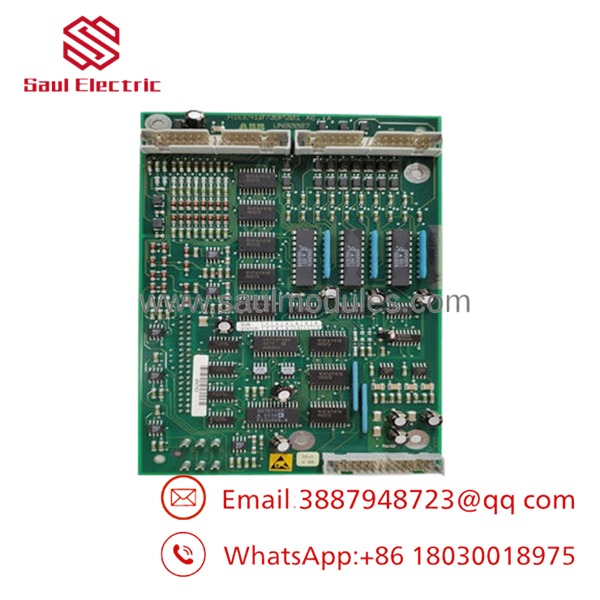
- UNS0867 A-P V2
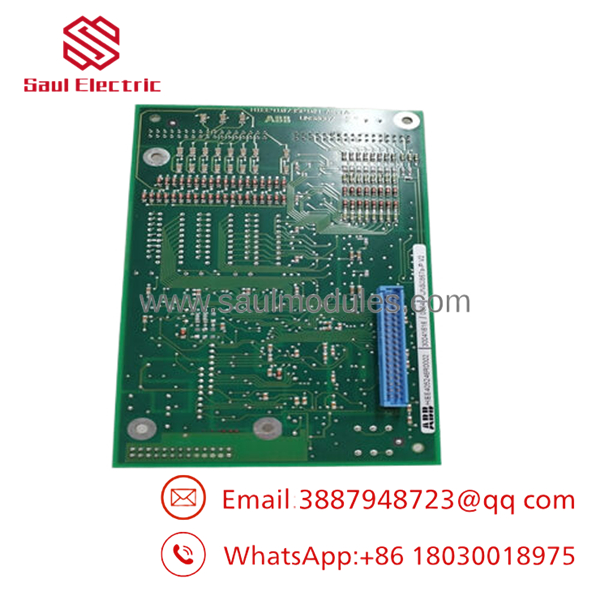
- UNS0867 A-P V2
Installation & Configuration Guide
Stage 1: Pre-Installation Preparation (Approx. 10 minutes)
⚠️ Safety First:
- Notify operations before removing the controller card.
- Place the excitation/control system into a safe operating condition.
- Apply lockout/tagout to the related power source.
- Wait for stored energy discharge before handling the board.
Tools Required:
- ESD wrist strap
- PH1 screwdriver
- Multimeter
- Wire labels
- Smartphone for documentation photos
Data Backup:
- Record current ABB system configuration.
- Document card slot position.
- Photograph connector locations and wiring.
- Record software configuration and module identification.
Stage 2: Removing the Old Module (Approx. 10 minutes)
- Remove cabinet access cover if required.
- Label all connections before removal.
- Disconnect connectors carefully without stressing pins.
- Release card locking mechanism.
- Pull the module straight out from the backplane.
⚠️ Note: Keep the removed UNS0867 card until the replacement is fully tested. Slot location and wiring references are often needed during commissioning.
Stage 3: Installing the New Module (Approx. 10 minutes)
- Wear ESD protection before touching the PCB.
- Verify:
- Model: UNS0867 A-P V2
- Part number: HIEE405246R0002
- Hardware revision
- Configuration Clone (Critical):
- Match original slot position.
- Verify system mapping.
- Confirm analog/digital channel configuration.
- Check any address or jumper settings.
- Insert the card firmly into the backplane.
- Secure locking hardware.
- Reconnect all wiring.
Self-Checklist:
[ ] Correct model installed
[ ] Card fully seated
[ ] Connectors secured
[ ] Configuration verified
[ ] ESD handling followed
Stage 4: Power-On & Testing (Approx. 20–30 minutes)
Pre-Power Check:
- Verify no damaged connectors.
- Check supply conditions.
- Confirm correct rack installation.
Power-On Steps:
- Energize the control rack.
- Check module status indicators.
- Verify the ABB control system recognizes the I/O card.
- Confirm configuration download.
- Test analog and digital channels.
- Verify alarm status.
⚠️ Troubleshooting Note:
If the module is not detected, check:
- Slot configuration
- Backplane connection
- Hardware revision compatibility
- System parameter mapping
Frequently Asked Questions (FAQ)
Q1: Is ABB A-P V2 still available from ABB?
The A-P V2 is considered a lifecycle spare item. Availability depends on remaining inventory because this hardware is no longer a standard current-generation module. Many replacement units come from surplus or specialist automation spare inventories.
Q2: What is the difference between A-P V1 and V2?
The main difference reported between versions is signal capability. V2 is commonly listed as supporting analog signal functions, while V1 is associated with digital-only expansion. Always confirm your existing configuration before replacing versions.
Q3: Can I hot-swap the A-P V2?
No. Removing or installing the card under power is not recommended. Backplane communication faults or hardware damage can occur. Shut down the rack power before replacement.
Q4: Will my existing configuration work immediately after replacement?
Not always. The replacement card must match the original hardware revision and system configuration. Incorrect slot assignment or I/O mapping can prevent the controller from recognizing the module.
Q5: Why is the price lower than a new ABB factory module?
Most lower-cost units are from surplus inventory, discontinued stock, or secondary automation markets. Before installation, verify serial number, physical condition, and functional test records.
Q6: What tests should be performed before installing a surplus A-P V2?
A proper inspection should include:
- Serial number verification
- PCB visual inspection
- Connector inspection
- Power-up test
- Rack recognition test
- I/O function verification
- Configuration check
Test photos and reports should be requested when purchasing critical spare cards.
Q7: What is the most common replacement mistake?
Installing the correct-looking card with the wrong system configuration. In legacy ABB systems, the hardware may physically fit while the control software rejects the module. Always record the old module parameters before removal.


 Start Chat


