





Description
Product Introduction
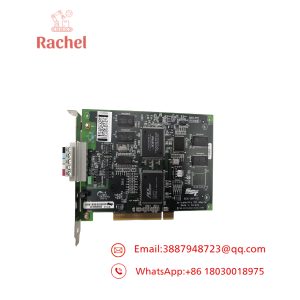
The ADLINK cPCI-8211 is a 3U CompactPCI Fast Ethernet interface card designed to provide network connectivity in embedded computing systems, industrial test equipment, and legacy control platforms. It uses the Intel 82559 Ethernet controller and supports 10BASE-T and 100BASE-TX network connections.
Its 32-bit, 33 MHz CompactPCI interface makes it suitable for compatible legacy chassis that cannot readily migrate to newer bus architectures. For maintenance teams, its main value is restoring an existing system without redesigning the host platform. Driver compatibility and exact board revision remain important purchasing checks.
Key Technical Specifications
| Parameter | Specification |
|---|---|
| Manufacturer | ADLINK Technology |
| Model | cPCI-8211 |
| Product Category | Fast Ethernet interface card |
| Form Factor | 3U CompactPCI |
| Bus Interface | 32-bit, 33 MHz CompactPCI |
| Controller | Intel 82559 |
| Ethernet Standards | 10BASE-T / 100BASE-TX |
| Maximum Ethernet Data Rate | 100 Mbps |
| Duplex Mode | Half-duplex and full-duplex |
| Network Connector | Front-panel RJ-45 |
| Backplane Power | 5 VDC, 100 mA maximum |
| Operating Temperature | 0°C to 60°C |
| Storage Temperature | -20°C to 80°C |
| Relative Humidity | 10%–90%, noncondensing |
| PXI Compatibility | Supported |
| Lifecycle Status | End of life |
Source: ADLINK product information and the cPCI-8210/8211/8212 User’s Guide. Specifications apply to the standard cPCI-8211; the cPCI-8211R has additional rear-I/O hardware requirements. Confirm the exact board revision and applicable manual before installation.
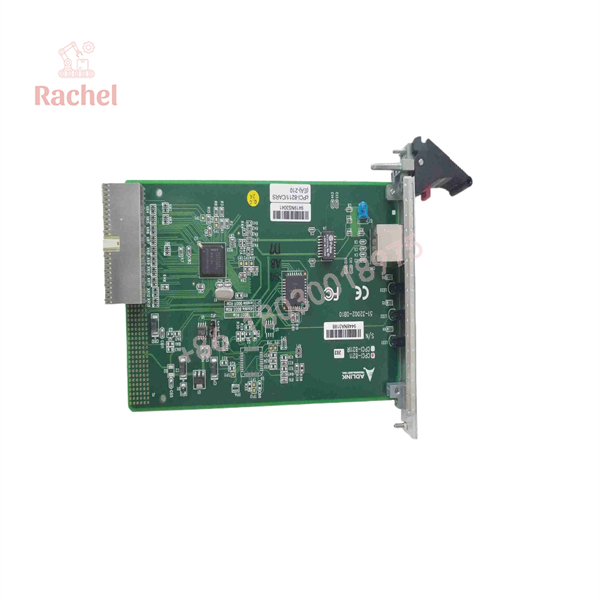
cPCI-8211
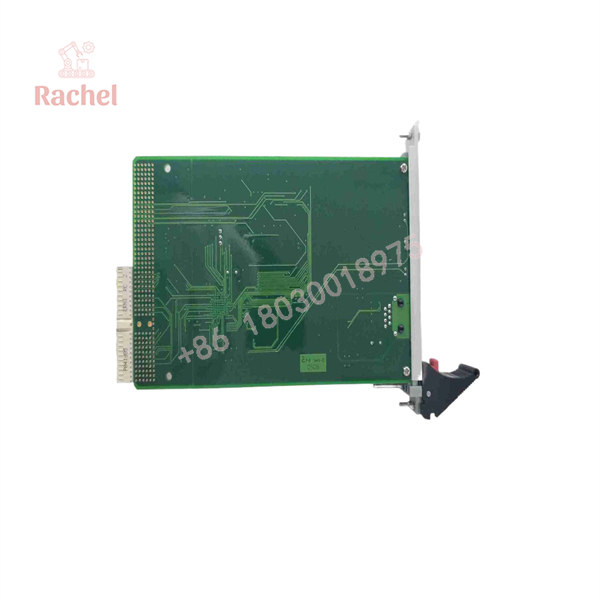
cPCI-8211
Application Scenarios & The “Trench” Experience
A legacy test system can fail at the worst possible time: during a production run, a scheduled acceptance test, or an equipment restart after maintenance. The CPU may still execute its application correctly, yet the host loses network connectivity because the Ethernet interface has failed. Replacing the card sounds simple until the team discovers that the original driver, operating system, and CompactPCI chassis have been out of production for years.
The cPCI-8211 is relevant when the existing platform depends on its particular hardware and software configuration.
Application scenarios
1. Industrial automation — Legacy supervisory computers — Restores Ethernet connectivity in compatible CompactPCI-based monitoring or control computers without immediately replacing the host platform.
2. Automated test equipment — PXI-compatible test racks — Provides 10/100 Mbps network access for test controllers that depend on a supported CompactPCI/PXI configuration.
3. Factory data acquisition — Host-to-instrument communication — Supports Ethernet communication between a legacy embedded computer and network-connected test instruments or data systems.
4. Industrial equipment maintenance — Obsolete controller repair — Provides a replacement option when an existing cPCI-8211 has failed and the original system design must be retained.
5. Legacy embedded computing — Remote boot and network services — The Intel 82559 controller supports PXE-related functionality, subject to compatible system firmware, option ROM configuration, and host software.
These applications depend on the host system and its software. The card is an Ethernet interface, not a standalone PLC CPU or a protocol gateway.
Illustrative replacement case — not a documented customer incident
Consider a production test station built around an older CompactPCI computer. After a maintenance shutdown, its Ethernet interface stops establishing a link. The test application still starts, but the station cannot communicate with its supervisory computer. Replacing the complete controller would require application migration and a new validation cycle.
The maintenance team identifies the installed card as an ADLINK cPCI-8211, checks the board revision, confirms the chassis and operating-system requirements, and sources a compatible replacement. After installation, the team verifies link status, network communication, and application-level data exchange before returning the station to service.
The lesson is straightforward: verify the complete configuration before ordering. A matching model number is necessary, but it does not prove that the replacement will work with the existing software stack.
Transparency SOP: Quality Assurance & Testing
For an obsolete network card, a credible inspection process should establish both physical condition and functional performance. The following is a recommended supplier acceptance procedure; individual tests should only be represented as completed when supported by actual inspection records.
- 1. Inbound Inspection
- Record the full model number, board revision, serial number, and visible component markings.
- Inspect the PCB, edge connector, RJ-45 port, and front panel for damage, corrosion, or unauthorized rework.
- Check original packaging and seals where applicable. A missing OEM seal does not, by itself, establish that a card is counterfeit.
- 2. Live Rig Testing
- Install the card in a compatible CompactPCI test chassis.
- Verify host enumeration and check for hardware initialization errors.
- Connect a known-good Ethernet device and verify link establishment, packet transmission, and packet reception.
- Test 10 Mbps and 100 Mbps operation where the test equipment supports both speeds.
- 3. Electrical Parameter Checks
- Confirm that the card receives the specified 5 VDC supply.
- Check current draw against the documented maximum of 100 mA.
- Inspect for abnormal heating, intermittent connections, or visible electrical damage.
- Use insulation-resistance testing only where appropriate; indiscriminate high-voltage Megger testing can damage semiconductor circuitry.
- 4. Firmware and Driver Verification
- Record the board revision and any identifiable controller or option-ROM revision.
- Verify the driver against the intended host operating system.
- Document successful initialization and network communication.
- Do not claim a firmware update or compatibility with modern operating systems unless it has been verified.
- 5. Final Quality Control and Packaging
- Record the test date, test configuration, results, and technician identification.
- Apply ESD-safe packaging and protect the edge connector during transit.
- Clearly label the product’s actual condition as new surplus, used, or refurbished.
Purchasing note: Request the inspection report for the specific unit being shipped. A generic test procedure is not proof that an individual card has passed testing.
The Veteran’s Tech Trap Guide
⚠️ Trap 1: Confusing cPCI-8211 with cPCI-8211R
The cPCI-8211R is the rear-I/O version and uses an R8211 rear transition module. If your chassis routes network connections through the rear I/O, verify the complete assembly before purchasing. A standard front-I/O card is not automatically an equivalent replacement.
❗ Trap 2: Ignoring legacy driver compatibility
The card dates from an older generation of CompactPCI hardware. A physically compatible installation can still fail if the operating system cannot load a suitable driver. Check the exact OS release, driver package, and host BIOS configuration before scheduling the replacement.
⚠️ Trap 3: Assuming the card is hot-swappable
Do not remove or insert the cPCI-8211 under power unless the complete chassis and system documentation explicitly authorizes live insertion and removal for that slot. Shut down and isolate the system according to the OEM procedure when hot-swap support has not been established.
❗ Trap 4: Treating a link LED as proof of successful communication
A lit link indicator confirms only part of the communication path. Verify negotiated speed, duplex settings, packet errors, host driver status, and actual application traffic. If the replacement connects physically but the software cannot communicate, investigate the complete network path before declaring the card defective.
Frequently Asked Questions (FAQ for Conversion)
Q1. Is the ADLINK cPCI-8211 discontinued?
Yes. ADLINK identifies the cPCI-8211 family as end of life and gives March 9, 2010, as the discontinuation date. Availability therefore depends on remaining inventory and the secondary market. Confirm the exact model and physical condition before placing an order.
Q2. Can I replace the cPCI-8211 with a newer ADLINK Ethernet card?
Potentially, but do not assume a direct replacement. ADLINK recommends the cPCI-3E10/cPCI-3E12 family. Check the chassis backplane, mechanical fit, driver support, network requirements, and any rear-I/O dependencies before selecting an alternative.
Q3. Does the cPCI-8211 support hot-swapping?
Hot-swap capability is not established by the general product information cited here. Do not pull the card from an energized chassis unless the system documentation explicitly confirms that the slot and card support that operation.
Q4. Can it run on a modern Windows or Linux system?
Compatibility is not guaranteed. The documented driver environment includes legacy operating systems, and a compatible driver for your specific OS must be confirmed. For Linux, check the kernel version, supported driver, and PCI device recognition before deployment. Do not assume that a generic Intel Ethernet driver will work with every board configuration.
Q5. Is the cPCI-8211 the same as the cPCI-8210 or cPCI-8212?
No. The cPCI-8211 is the Fast Ethernet card using the Intel 82559 controller. The cPCI-8210 combines Ethernet and SCSI functionality, while the cPCI-8212 provides a Wide Ultra-2 SCSI interface. These models have different functions and should not be substituted solely because their model numbers are similar.
Q6. Is the card genuine, refurbished, or new surplus?
That depends on the individual unit and seller. Obsolete ADLINK cards may be sourced through surplus inventory, equipment decommissioning, or refurbishment channels. Request clear photographs of the actual PCB, model and serial labels, and any available functional test records. New-surplus stock should not be described as factory sealed unless its packaging and condition support that claim.
Q7. Does it come with a 12-month warranty, and why might it cost less than a direct OEM replacement?
A 12-month warranty must be confirmed in the seller’s written terms; it should not be assumed. Secondary-market pricing can be lower because the inventory may come from surplus stock rather than current OEM production and support channels. Compare the warranty, return policy, test documentation, lead time, and replacement availability—not just the unit price.

 Start Chat


