





Description
Product Introduction
The Alcatel-Lucent Enterprise OS6900X24-F-EU (also designated as OS6900-X24-F-EU) is a compact 1RU, high-density 10 Gigabit Ethernet (10GbE) stackable switch built for enterprise data centers, server virtualization racks, and campus core aggregation networks. Equipped with 24 fixed SFP+ (1/10GbE) ports and modular expansion slots, it delivers sub-microsecond latency and wire-speed Layer 2/3 performance under continuous heavy load.
The suffix breakdown highlights its deployment parameters:
-F(Front-to-Back Airflow): Pulls cool air from the front cold aisle across the switch chassis and exhausts hot air out the rear, aligning perfectly with modern data center hot/cold aisle containment designs.-EU(European Region Pack): Bundled with standard European C13 power cords for EU power grid integration.
Powered by the Alcatel-Lucent Operating System (AOS), the OS6900-X24 supports Virtual Network Switching (VNS), Virtual Chassis Stacking (VFL), VXLAN overlay routing, and loss-free Data Center Bridging (DCB) for iSCSI/FCoE storage traffic.
Key Technical Specifications
| Parameter | Specification / Value |
| Manufacturer | Alcatel-Lucent Enterprise (ALE) / Nokia |
| Model Number | OS6900X24-F-EU / OS6900-X24-F-EU |
| Form Factor | 1RU Rack-Mountable Fixed-Configuration Chassis |
| Fixed Ports | 24x 10 Gigabit Ethernet SFP+ / 1GbE SFP Ports |
| Expansion Slots | 2x Modular Slots (Supports optional 4x10GbE, 2x40GbE QSFP+, or stack modules) |
| Airflow Direction | Front-to-Back Airflow (Port-Side Intake to Power Supply-Side Exhaust) |
| Power Supply & Cord | Dual Hot-Swappable Redundant AC PSUs with EU C13 Power Cable |
| Switching Throughput | Up to 1.28 Tbps Switching Capacity / Non-Blocking Architecture |
| Stacking / Clustering | Virtual Chassis Technology via Virtual Fabric Link (VFL) |
| Operating System | Managed via Alcatel-Lucent Operating System (AOS) |
| Operating Temperature | Standard Data Center Operating Range (0°C to 45°C) |
Application Scenarios & The “Trench” Experience
Picture this: It’s 1:30 AM during a data center infrastructure upgrade. You are replacing legacy 1GbE Top-of-Rack switches to support a new cluster of hyper-converged VMware ESXi servers with dual 10GbE SFP+ network interfaces. Installing the OS6900X24-F-EU into the top rack position allows you to connect 12 dual-homed servers directly into the 24 fixed SFP+ ports. Thanks to its Front-to-Back (-F) cooling profile, the switch draws chilled air directly from the cold aisle, preventing thermal alarms and keeping exhaust heat directed into the hot aisle containment system.
- Data Center Top-of-Rack (ToR) Aggregation – Connects high-density server racks and SAN storage arrays using low-latency 10G Direct Attach Copper (DAC) or optical SFP+ links.
- Campus Network Core & Collapsed Core – Serves as a compact, redundant core switch for mid-sized enterprise networks, running Virtual Chassis (VFL) stacking for multi-chassis link aggregation (MC-LAG).
- High-Performance Storage (iSCSI / FCoE) – Utilizes Data Center Bridging (DCB) and Priority-Based Flow Control (PFC) to deliver lossless Ethernet transport for SAN storage traffic.
Transparency SOP: Quality Assurance & Testing
Every OS6900X24-F-EU switch undergoes a rigorous multi-point bench audit prior to dispatch:
- Physical & Port Cage Inspection: Visual audit of the 1RU chassis enclosure, rack mount ears, status LEDs, expansion slot bay covers, and all 24 SFP+ optical cages to ensure zero physical damage or pin wear.
- Boot & AOS CLI Diagnostic: Power-on verification in a test environment to confirm clean AOS firmware loading, EEPROM recognition, and serial/part number matching (
OS6900X24-F-EU). - Full Wire-Speed Traffic Stress Test: All 24 SFP+ ports fitted with 10G optical transceivers/DAC cables and loopback tested at maximum throughput to ensure zero frame drops, CRC errors, or packet buffer drops.
- Thermal & Fan Assembly Check: Monitoring internal thermal sensors and fan tray speed controls to verify smooth front-to-back airflow operation and stable power supply rail voltages under load.
- Factory Reset & Anti-Static Packaging: Cleared of previous configuration files (restored to default admin factory state), fitted with rubber port dust covers, static-neutralized, vacuum-sealed in ESD bags, and packed in reinforced shipping cartons.
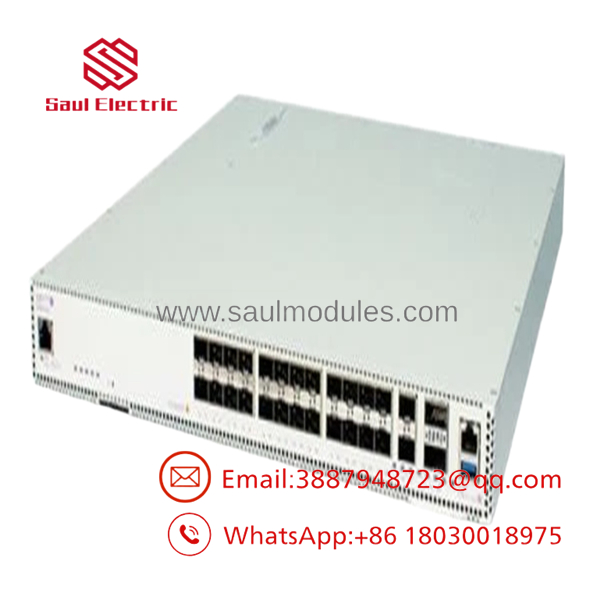
OS6900X24-F-EU
The Veteran’s Tech Trap Guide (Crucial Value-Add)
- ⚠️ Do Not Mix Airflow Directions in the Same Rack Chassis!
The
-FinOS6900X24-F-EUstands for Front-to-Back Airflow. Always verify that your power supply modules, fan trays, and adjacent rack gear match this airflow direction. Mixing Front-to-Back (-F) and Back-to-Front (-R) units in the same chassis or cabinet creates internal thermal loops that trigger CPU throttling and high-temperature shutoff alarms. - ❗ Verify “SFP” vs “SFP+” Transceiver Speed Settings
While the 24 ports accept 1G SFP transceivers in addition to 10G SFP+ transceivers, auto-negotiation on high-speed optical ports can occasionally fail with third-party transceivers. Always manually set the speed (
speed 1000orspeed 10000) in AOS if an optical link fails to establish automatically. - ⚠️ Check Power Cord Region Code (“-EU” vs “-US”)
The
-EUsuffix indicates that the unit ships with European C13 power cords. If installing this unit in a North American or UK facility with different PDU receptacle standards (e.g., NEMA 5-15P or BS 1363), ensure you supply the appropriate local C13 power cables. - ❗ Observe Proper VFL Stacking Ports
When configuring a Virtual Chassis (stacking two OS6900 switches together), ensure you use dedicated high-speed ports (such as the optional 40G QSFP+ expansion modules or designated 10G SFP+ ports) for the Virtual Fabric Link (VFL). Improperly configured VFL ports will cause split-brain behavior in the stack.
Frequently Asked Questions (FAQ)
Q: What is the difference between OS6900-X24-F-EU and OS6900-X24-R-EU?
A: The difference is airflow direction. The -F model features Front-to-Back airflow (air enters port-side/front and exhausts power-side/rear). The -R model features Back-to-Front (Reverse) airflow.
Q: Does the support 40GbE uplink ports?
A: Yes. While the 24 fixed ports are 10GbE SFP+, the switch contains two expansion module slots on the rear. You can install optional OS6900 expansion modules (such as the -X2Q or -Q2C) to add 40GbE QSFP+ uplinks.
Q: Can this switch run dual redundant power supplies?
A: Yes. The chassis features two hot-swappable AC power supply bays for 1+1 hardware power redundancy.

 Start Chat


