





Description
Product Introduction
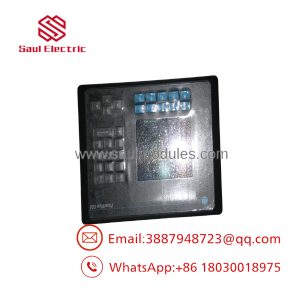
The Allen-Bradley 2711-K6C9 is a legacy PanelView 600 operator interface terminal designed for industrial automation applications requiring real-time machine monitoring and tactile control. Featuring a 5.5-inch active-matrix color display combined with a rugged 10-function-key numeric keypad, this terminal provides high-contrast graphics and reliable operator feedback in demanding environments.
Equipped with an RS-232 communication port operating via the DH-485 protocol, the 2711-K6C9 interfaces directly with SLC 500, MicroLogix, and PLC-5 controllers. Powered by an internal 85–264V AC power supply, it is configured using PanelBuilder32 software, offering seamless integration into established Rockwell Automation architectures.
Key Technical Specifications
| Parameter | Value |
|---|---|
| Series Line | Allen-Bradley PanelView 600 Standard Terminal |
| Display Type & Size | 5.5-inch Color Active Matrix TFT |
| Display Resolution | 320 x 234 pixels |
| Input Method | Tactile Stainless-Steel Keypad (F1–F10 Function Keys + Numeric) |
| Communication Port | RS-232 (DH-485 Protocol) / 9-pin D-sub |
| Auxiliary Port | RS-232 Printer Port |
| Input Voltage | 85–264V AC (47–63 Hz) |
| Power Consumption | 60 VA maximum |
| Application Memory | 240 KB Flash Memory |
| Operating Temperature | 0°C to 55°C (32°F to 131°F) |
| Enclosure Rating | NEMA 12, 13, 4X (Indoor use only), IP65 |
| Weight | Approx. 4.2 lbs (1.9 kg) |
Application Scenarios & The “Trench” Experience
Imagine an automotive stamping press where an old PanelView 600 terminal suddenly suffers a dead CCFL backlight or broken function keys, leaving operators unable to adjust die heights or view safety interlock faults. Upgrading to a modern PanelView Plus 7 or Graphic Terminal requires rewriting the display application in FactoryTalk View Studio, changing network media, and re-engineering panel cutouts. Drop-in replacement with a refurbished 2711-K6C9 allows maintenance personnel to flash the original .PVA runtime file via PanelBuilder32 or a memory card, mounting the hardware directly into the existing panel cutout in under 45 minutes with zero software translation risks.
- Stamping & Metal Forming Presses: Ideal for environments where glove-wearing operators require tactile function key feedback instead of touchscreen inputs.
- Packaging & Palletizing Machinery: Displays line speeds, fault conditions, and batch counts while accepting preset recipes via the numeric keypad.
- Water & Chemical Batch Systems: Connects to SLC 5/03 or MicroLogix controllers over RS-232 to monitor tank levels, valve statuses, and system alarms.
- Legacy Machine Retrofits: Serves as a direct drop-in spare for older control cabinets maintaining AC control power and RS-232 serial networks.
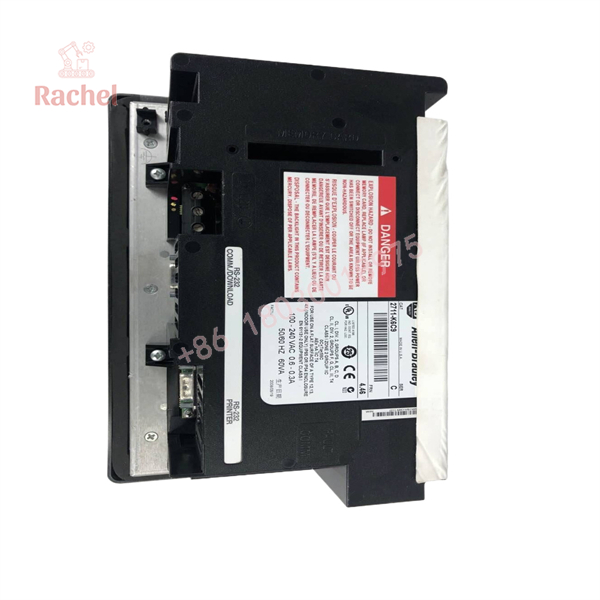
2711-K6C9
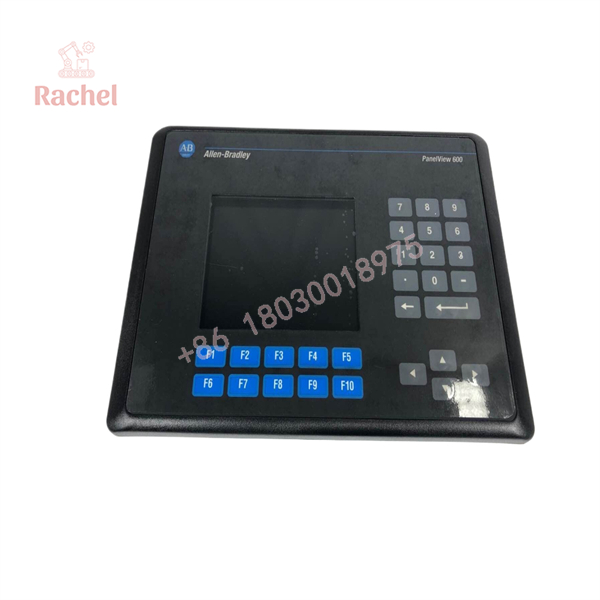
2711-K6C9
Transparency SOP: Quality Assurance & Testing
We rigorously test every legacy operator interface terminal to guarantee field readiness. Here is our testing regimen for the 2711-K6C9:
- Inbound Visual & Housing Inspection: Examination of bezel gaskets, mounting studs, front membrane overlay, and rear terminal blocks for cracks or wear.
- Display & Backlight Burn-In: Extended power-on test to check for dead pixels, color distortion, image burn-in, or flickering CCFL backlight tubes.
- Keypad Matrix Verification: Individual testing of all function keys (F1–F10), navigation arrows, and numeric keys to confirm crisp tactile response and signal contact.
- Communication Loopback & PLC Link Test: Active RS-232 DH-485 communication testing with an SLC 500 processor to verify data transfer, alarm triggers, and runtime loading.
- Memory & Runtime Upload/Download Test: Firmware and application memory checks using PanelBuilder32 over the serial port and ATA memory card slot.
- ESD Packaging & Protection: Sealed in static-shielding bags with protective screen covers, wrapped in custom foam inserts to prevent shipping shock.
The Veteran’s Tech Trap Guide (Crucial Value-Add)
In our field experience, replacing standard PanelView terminals involves several mechanical and electrical details that can trip up technicians:
- ⚠️ Distinguish RS-232 (DH-485) from RS-232 (DF1): The 2711-K6C9 uses the RS-232 physical port running DH-485 protocol, not DF1 point-to-point! Connecting it directly to a standard PC RS-232 port or a DF1-configured PLC port without a 1747-PIC or 1761-NET-AIC converter will result in communication failure.
- ❗ Verify Power Supply Voltage Specs: The
2711-K6C9requires 85–264V AC input. Wiring 24V DC to this unit will fail to power the terminal, whereas connecting AC power to a DC-rated variant (like a2711-K6C8) will instantly destroy the internal power supply board. - ⚠️ Gasket & NEMA Seal Integrity: Always inspect or replace the rear sealing gasket when re-installing the unit into an enclosure. An old, brittle gasket allows oil mist and moisture to penetrate the housing, leading to short circuits on the display inverter board.
- ❗ Backup Battery Maintenance: The internal clock battery preserves real-time clock data. If the terminal displays a
Low Batterywarning during boot, replace the lithium coin cell before cycling cabinet power to avoid losing time-stamped alarm logs.
Frequently Asked Questions (FAQ)
Q: What programming software is used to configure the Allen-Bradley 2711-K6C9?
A: The 2711-K6C9 is programmed using Rockwell Automation’s PanelBuilder32 software (file extension .PVA). It is not programmed using FactoryTalk View Studio.
Q: Can I convert a 2711-K6C9 program to run on a modern PanelView Plus terminal?
A: Yes. You can import the PanelBuilder32 .PVA file into FactoryTalk View Studio Machine Edition (ME) using the built-in application import wizard, though graphic objects and communication paths may require manual adjustment.
Q: What is the difference between a 2711-K6C9 and a 2711-T6C9?
A: The features a physical keypad input interface (F1–F10 keys), whereas the T6C9 features a analog resistive touchscreen interface. Both share similar communication and power specifications.
Q: How do I transfer a program to the 2711-K6C9 without a direct serial connection?
A: You can transfer runtime files using a compatible PCMCIA ATA memory card (or CompactFlash card with a PCMCIA adapter) formatted to FAT16 inserted directly into the rear card slot.
Q: What warranty coverage is provided with this unit?
A: We cover this unit with a full 12-month operational warranty. If the terminal experiences hardware defects or display failures under standard operating conditions within one year, we provide an immediate replacement or repair.

 Start Chat


