





Description
Product Introduction
The Beckhoff CP7002-0001-0010 is a 15-inch touchscreen control panel from the CP70xx family, built for machine-mounted and cabinet-door visualization in TwinCAT automation environments. The aluminum-housed panel connects to a Beckhoff Industrial PC — or any compatible IPC — via CP-Link, Beckhoff’s DVI/USB extension that lets you separate the display from the computer by up to 15 meters of standard cabling. Machining centers, packaging lines, and press controls are its natural habitat.
The core advantage of the CP7002 is architecture, not raw display specs. The panel itself is passive — no fan, no hard drive, no OS to patch at the machine. All the computing happens back in the IPC in the cabinet, which means heat and vibration stay away from the operator interface and your MTBF follows. That’s the distinction between a CP70xx panel and a full panel PC bolted to a machine: fewer moving parts at the point of abuse, and when the display does eventually die, you swap a panel, not a computer. In our field experience, that’s exactly the failure you’re shopping for right now.
Key Technical Specifications
| Parameter | Value |
|---|---|
| Display | 15″ TFT, 1024 x 768 (XGA), 4:3 |
| Touch Technology | Resistive analog touchscreen (glove-compatible) |
| Interface | CP-Link connection (DVI/USB extended to Industrial PC) |
| Max. Cable Distance | Up to ~15 m with standard CP-Link cabling (verify per installed IPC/doc) |
| Housing | Aluminum front bezel, IP65-rated front face (typical for CP70xx) |
| Mounting | Control cabinet door / machine mounting, standard 15″ cutout |
| Power | Supplied via CP-Link interface from host system |
| Keyboard | None (touch-only variant; CP71xx/CP72xx variants add keys) |
| Dimensions | Approx. 426 x 395 x 28.5 mm family envelope (confirm per datasheet) |
| Weight | Approx. 4.3 kg (shipping weight may vary) |
| Operating Temperature | 0 °C to +50 °C typical (confirm rating per datasheet) |
| Status | Discontinued by Beckhoff — succeeded by newer CP-generation panels |
Verify exact cutout dimensions, cable length limits, and IP rating with the official Beckhoff CP70xx documentation before installation.
Application Scenarios & The “Trench” Experience
The call comes in on a Saturday. A CNC machining cell’s operator panel took a coolant spray to the bezel gasket for the ten-thousandth time, and now the touch layer reads ghosts — phantom inputs across the whole screen. The machine runs fine; the operator just can’t change offsets, so the cell sits idle. Beckhoff discontinued this panel years ago, the machine builder is out of business, and the OEM distributor quotes you a “modern equivalent” that needs a new cutout, new cabling, and a software rebuild. All for a dead $300 touchscreen layer. We’ve seen this exact movie dozens of times.
- Machine Tools — CNC machining center operator interface — CP-Link keeps the IPC in the clean cabinet while the panel lives on the machine, absorbing coolant, chips, and vibration; a like-for-like swap restores the cell in an hour.
- Packaging — High-speed wrapper/labeler control — Resistive touch works with gloved hands and a stylus, and the passive panel needs no fans — critical in dusty corrugated and converting environments.
- Plastics / Injection Molding — Press-side HMI — Cabinet heat and vibration stay on the IPC side; the 15″ XGA screen shows full mold-setup screens without the scrolling a 10″ panel forces.
- Woodworking & Material Handling — Saw and sorter line control — The 4:3 format matches legacy project resolutions exactly, so restoring the original panel avoids any scaling blur on operator screens.
Field case (fictionalized, plausible): A tier-1 automotive supplier’s transfer line went down on a Sunday night when the CP7002 panel’s backlight failed. Four machines idle, 22 operators on premium overtime, and the integrator’s “upgrade path” quote was six figures with a two-week lead. A tested new surplus CP7002-0001-0010 shipped overnight, bolted into the existing cutout Monday morning, and the CP-Link cable plugged into the same port. Line running by 7:30 AM shift start. Total cost: a few hundred dollars plus freight — against an estimated $38,000 in lost throughput and overtime the downtime would have burned by midweek. That’s the whole business case for legacy spare panels.
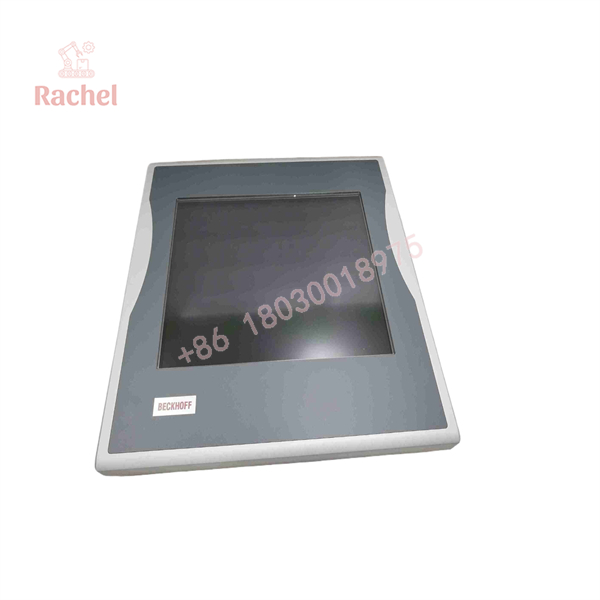
CP7002-0001-0010
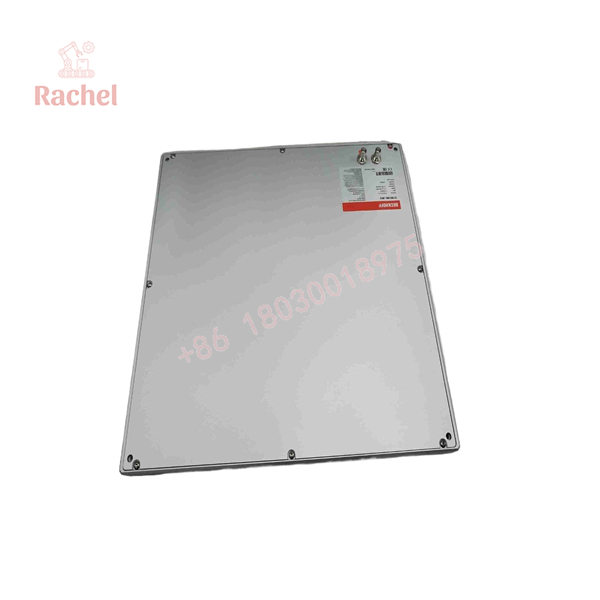
CP7002-0001-0010
Transparency SOP: Quality Assurance & Testing
We don’t just ship boxes; we test them on actual Beckhoff CP-Link hardware.
- Inbound Inspection — Serial number verified against Beckhoff records, OEM labels and aluminum housing inspected for repair or repaint tells, anti-counterfeit screening at intake.
- Live Rig Testing — Full power-up on a genuine CP-Link host IPC, confirming DVI video signal integrity and USB touch communication end-to-end.
- Touchscreen Verification — Full-grid touch calibration test — every screen quadrant checked for accuracy and ghost inputs, since a drifting touch layer is the #1 failure on used panels.
- Electrical Parameter Checks — CP-Link interface current draw and pin continuity verified; backlight brightness and uniformity checked across the display.
- Firmware/BIOS Verification — Panel-side firmware revision logged and documented in the shipment paperwork.
- Final QC & Packaging — Gasket compression set inspected (critical for IP65 integrity), then anti-static bag with foam protection. Panels ride with face protection — we’ve all seen what a forklift does to an unprotected TFT.
The Veteran’s Tech Trap Guide
- ⚠️ Match the -0001- / -0011- / -1070- suffix precisely. The CP70xx family looks identical across variants but differs in display resolution, connector placement, and bezel dimensions. A CP7002-0011-0010 will not be a drop-in for a -0001-0010 cutout or application layout. Read the nameplate on the back before you order. Better yet, photograph it and send it to us.
- ❗ The CP-Link cable is your first suspect, not the panel. Before condemning the panel, reseat both ends of the CP-Link cable and inspect for crushed or chafed runs. Half the “dead panel” calls we get are a damaged DVI/USB extension cable behind the cable duct. Take a photo of the routing before you pull the old one. Trust me.
- ⚠️ Gasket condition decides your IP rating. A replacement panel with a compressed, hardened gasket gives you a panel that works — and a cabinet that takes on coolant. Inspect the gasket during install and replace it if it doesn’t spring back. Verify sealing requirements against the OEM datasheet before installation.
- ❗ ESD on the touch controller, and grounded wrist straps always. The ribbon connector behind the bezel is static-sensitive, and dry winter air in a machine shop is a killer. A zoned-out touch controller fails intermittently weeks later — the worst kind of fault to chase at 2 AM.
Frequently Asked Questions (FAQ for Conversion)
Q1: Is this panel a computer? Do I need to load software onto it?
No — the CP7002-0001-0010 is a passive panel. It carries no OS, no application, no fan, no storage. Your TwinCAT project and visualization run on the Industrial PC in the cabinet, and the panel is just the display and touch surface over CP-Link. That’s good news for you: replacing it means zero software work.
Q2: Can I swap it live while the machine is running?
Not recommended, and technically no. Breaking the CP-Link connection drops the operator interface — the IPC keeps running, but your operator is blind. It’s not dangerous to the hardware, but plan the swap for a break in production, not mid-cycle.
Q3: Is the CP7002-0001-0010 discontinued? Can I still get one?
Yes, Beckhoff has retired the CP70xx generation in favor of newer panel series. We stock genuine units from global surplus — cancelled projects, decommissioned lines, OEM overstock — all fully tested on real CP-Link hardware before shipping. This is precisely our business: keeping legacy platforms alive without a six-figure retrofit.
Q4: Will a newer Beckhoff panel work in its place?
Sometimes, with caveats. Newer panels use different interfaces (e.g., DVI/USB direct or Ethernet-based single-cable solutions) and different cutouts. You may face mechanical rework and, on some hosts, cable or interface board changes. If a true like-for-like swap matters — and on a running production line it usually does — the CP7002-0001-0010 is the clean answer. Ask us and we’ll lay out both paths honestly.
Q5: Is this fake or refurbished? Why is it cheaper than OEM?
It’s genuine Beckhoff, sourced from the global surplus market — overstock and pulled units from decommissioned equipment. We list the condition honestly per unit: factory-sealed new surplus or tested pulls, all with the same rig-test documentation. We’re not an authorized distributor and don’t pretend to be — we’re the spare-parts channel that keeps your legacy line alive at a sane price.
Q6: What’s the warranty?
12 months from delivery covering functional failure under normal operating conditions. Given the passive design — no fans, no drives, no moving parts — a tested panel is one of the lowest-risk purchases in this whole catalog.
Q7: My touch layer is flaky but the display is fine. Should I repair instead?
Sometimes, yes — touch layer and bezel repair can be economical if the display and backlight test healthy. We can quote repair alongside replacement so you can compare. But factor in the real cost: a second failure on a running line costs more than the panel did. For a discontinued unit, a tested replacement spare on the shelf is usually the smarter spend.

 Start Chat


