





Description
Product Introduction & Engineering Value
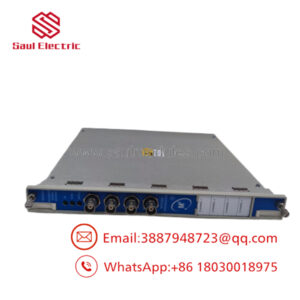
The 3500/93-01-00-00 configuration specifies the active backlit version of the 3500/93 display unit, ordered without extra mounting hardware accessories and configured for standard environmental environments. It uses the 135785-02 liquid crystal display (LCD) panel to provide high-contrast readability under low-light or variable control room conditions.
By pulling data directly from the Display Interface Module (DIM) over an RS-422 link, this assembly gives operators an on-panel window into real-time phase, amplitude, gap voltages, and channel statuses. It serves as a direct, plug-and-play spare for existing face-mounted setups where the display panel has faded or failed, but the existing hinges, brackets, and external power supplies remain fully functional.
Technical Specifications & Configuration Breakdown
Understanding the exact options of the 3500/93-01-00-00 ordering code is essential to verify it drops correctly into your panel layout:
- AA Option (01) — Display Type: Backlit Display Unit. This utilizes the high-visibility
135785-02board assembly, which features active white electroluminescent illumination for low-light environments. - BB Option (00) — Display Mounting: None. This indicates that the display ships without physical rack, panel, or independent wall-mounting hardware kit accessories. It is typically selected when replacing a failed display within an existing face-mount hinged frame.
- CC Option (00) — Agency Approvals: None / Standard. This matches standard industrial safety classifications without additional regional certifications.
- Input Voltage Requirement: Requires an external 115/230 Vac power supply adapter for the backlight to function.
- Signal Connection: 9-pin D-sub connector communicating via RS-422.
- Maximum Distance from DIM: Up to 100 feet using standard system power, or up to 4,000 feet when paired with an external supply.
Field Application & The “Trench” Experience
The “Trench” Story
A technician at a gas storage facility was tasked with restoring local visibility to a 3500 protection rack on a critical reciprocating compressor skid. The original display had developed dark splotches and the backlight had completely burned out over a decade of continuous service. The mounting frame and the external power supply brick at the bottom of the cabinet were still in perfect shape. Rather than purchasing a costly, full mounting kit, the plant ordered the 3500/93-01-00-00. Since this option code specifies the raw backlit screen without redundant mounting brackets, we were able to swap the screens within 15 minutes, plug in the existing display cable, and restore immediate, crystal-clear readability to the operator floor.
Specific Niche Applications
- Face-Mount Replacements on Hinged Racks: Replacing degraded or sun-damaged displays mounted directly over the front of standard 3500 machine protection racks.
- Consolidated Operator Console Retrofits: Swapping out faded displays inside pre-existing panel cutouts without buying extra mounting brackets.
- Remote Cabinet Monitoring Stations: Serving as an independent, locally powered screen linked back to a central DIM located up to 4,000 feet away in the rack room.
Transparency SOP: QA & Testing
Each 3500/93-01-00-00 module undergoes a precise bench validation process prior to dispatch:
- Visual Check: We inspect the LCD face for dead pixels, scratches, or moisture ingress behind the protective layer.
- Backlight Diagnostic: We power the electroluminescent backlighting circuit through an external power adapter to ensure uniform, flicker-free brightness.
- Serial Port Communication Test: We link the display’s RS-422 port to a test rack DIM module and monitor the data stream to verify that channel names, numerical values, and bar graphs refresh correctly.
- Keypad/Contrast Audit: We test the membrane keys (including the Page, Contrast, and Reset keys) to ensure positive tactile response and instantaneous system reaction.
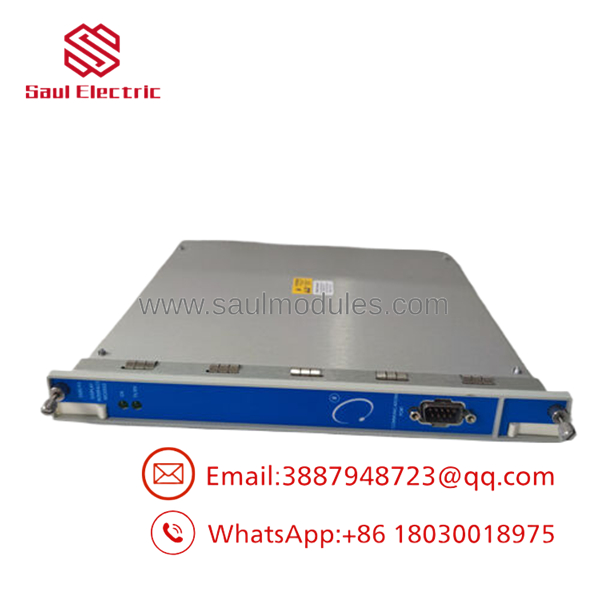
- 3500/93-01-00-00
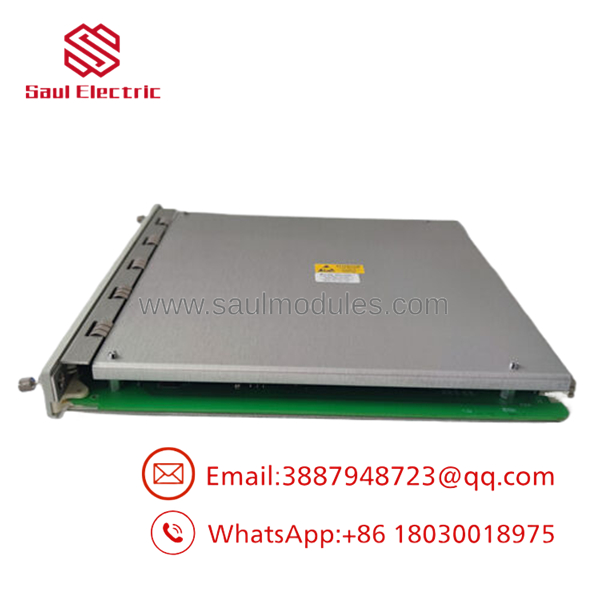
- 3500/93-01-00-00
The Veteran’s Tech Trap Guide
- ⚠️ The Backlight Power Pitfall: Do not forget that the
01option (backlit) will remain completely dark if you do not connect the external power supply adapter. If you attempt to run this card solely on the power supplied through the host DIM cable without the external transformer, the logic will boot but the display will be unreadable in dark cabinets. - PRO TIP: When installing this module into an existing face-mount bracket, be extremely careful when routing the ribbon cable around the hinged bracket. If the cable is pinched during the hinge closure, it can create micro-shorts in the RS-422 transmit lines, resulting in a persistent “Communication Error” message on the screen.
- ⚠️ Contrast Reset Trap: After cold-booting a replacement display, the screen might look completely blank. Before assuming the module is dead, use the physical contrast keys on the front of the display unit. Often, the default contrast registers boot at zero, making the pixels appear completely invisible.
Dynamic FAQ
- Q: Can I use the 3500/93-01-00-00 to replace a non-backlit 3500/93-02 display?
- A: Yes, but with one major caveat: the non-backlit
02display did not require an external power supply, whereas the backlit01display does. If you are upgrading from02to01, you must add the external power supply adapter to your cabinet to power the backlighting.
- A: Yes, but with one major caveat: the non-backlit
- Q: Does this part number include the connecting cable to the 3500 rack?
- A: No. The 3500/93-01-00-00 is the display assembly itself. The RS-422 cable that runs from the display back to the Display Interface Module (DIM) in the rack must be purchased separately.
- Q: How can I adjust the refresh rate of the channel values on this screen?
- A: The display update rate is handled automatically by the backplane processor and the DIM, updating approximately once per second. This rate cannot be adjusted manually within the screen’s firmware.
- Q: Is this unit rated for Class 1 Div 2 hazardous locations?
- A: Because the
-00suffix specifies “No Approvals,” this specific configuration is designed for safe-area installations or cabinets where the display is physically isolated from hazardous environments. If your application requires explosion-proof ratings, you must specify the corresponding agency approval option when ordering (e.g.,-01or-02).
- A: Because the

 Start Chat


