





Description
Product Introduction
The Dell 825W power supply module (Part Numbers: D825EF-00, H825EF-00, DPN 0GHN08) is a custom hot-plug power supply engineered specifically for Dell Precision T5600 and T5610 dual-socket workstation chassis. Built to support heavy compute workloads, CAD modeling, and 3D rendering, this unit feeds stable DC rails directly into the chassis power distribution board (PDB) via a rear golden card-edge connector.
Unlike standard ATX power supplies with hardwired cable harnesses, this proprietary modular design allows rapid, toolless swapping from the rear exterior of the workstation. Its 80 PLUS Gold rating guarantees high conversion efficiency, minimizing internal heat output and ensuring steady power delivery to dual Intel Xeon CPUs and multi-GPU configurations.
Key Technical Specifications
| Parameter | Value |
| Manufacturer | Dell / Delta Electronics / Lite-On |
| Dell Part Numbers (DP/N) | 0GHN08, 0V6257, 0C6150, 0K24B |
| Manufacturer Models | D825EF-00, H825EF-00, DPS-825AB A |
| Form Factor | Proprietary Dell Precision Toolless Hot-Plug Sleeve |
| Output Power | 825 Watts Maximum Continuous |
| Efficiency Rating | 80 PLUS Gold Certified (~90% at 50% load) |
| AC Input Range | 100–240V AC ~12A (50/60 Hz Auto-Switching) |
| Main Output | +12.0V Main Rail, +12.0VSB Standby Rail |
| Chassis Compatibility | Dell Precision Workstation T5600 and T5610 |
Application Scenarios & The “Trench” Experience
Picture this: You are running a complex 3D CAD rendering job or training a local AI model on a dual-Xeon workstation when the machine instantly shuts down without a blue screen. Pressing the power button gives you a quick amber flash on the front panel LED and silence. The power supply’s secondary 12V rail collapsed under the sustained draw of dual GPUs. In a production studio or engineering firm, a dead workstation halts billable hours instantly.
- 3D Animation & CAD Workstations (Precision T5600/T5610) – Delivers dedicated high-current 12V rails to power dual Intel Xeon CPUs and workstation GPUs like NVIDIA Quadro or AMD Radeon Pro cards.
- Server-Grade Compute Nodes – Maintains tight voltage stability during multi-hour CPU/GPU continuous load passes without dropping thermal thresholds.
- Legacy Engineering Replacements – Keeps high-value, specialized software hardware keys and legacy workstations operational without buying new systems.
Field Replacement Case: An architectural design firm in California had a Precision T5610 render node drop offline during deadline week. Diagnostic LED codes on the rear PSU confirmed an internal fault. Replacing the dead unit with a bench-tested 825W module took less than two minutes: pulling the release lever, sliding out the failed unit, and snapping in the replacement—getting the machine back into the rendering pool immediately.
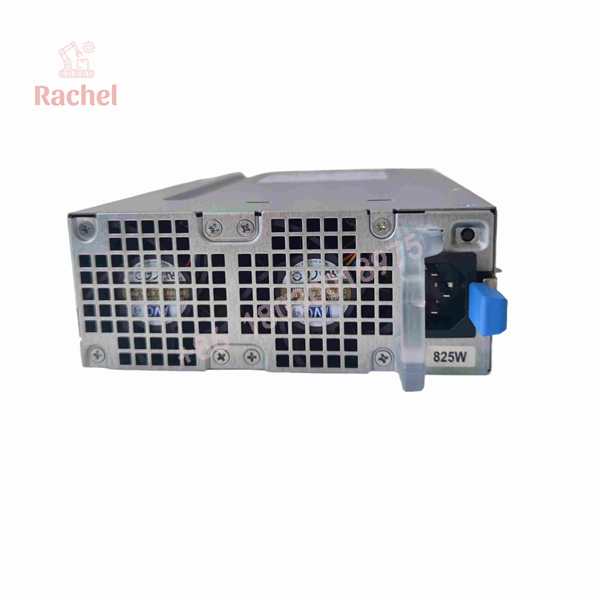
825W
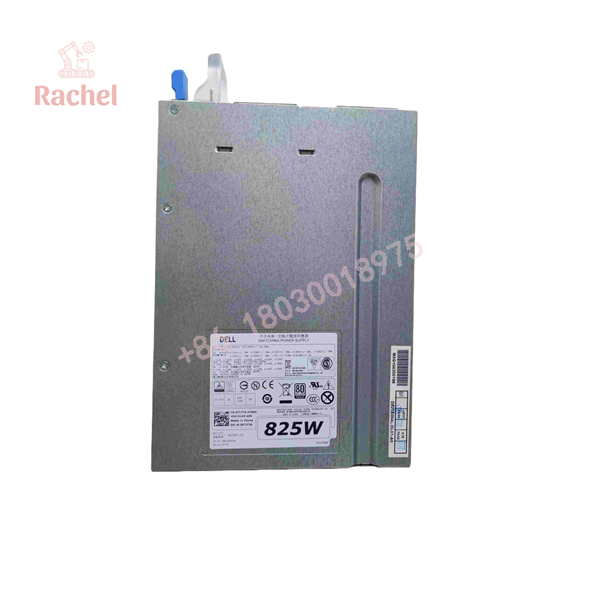
825W
Transparency SOP: Quality Assurance & Testing
We don’t just ship boxes; we test every OEM pull and surplus unit on physical load benches:
- Inbound Visual Inspection: Check the rear card-edge fingers for wear, copper lifting, or arcing marks, and inspect the internal fan blades for physical binding.
- AC Hi-Pot & Grounding Test: Verify ground wire continuity and perform high-voltage insulation tests to prevent electrical shorts.
- Chassis Load Bank Burn-In: Seat the PSU in an OEM power distribution test rack and load the 12V rails up to 825W continuously while checking voltage stability.
- Ripple & Thermal Scan: Use a digital oscilloscope to confirm output DC voltage ripple stays within ATX spec, scanning internal transformers with FLIR thermal imaging.
- Anti-Static Packaging: Clean the edge connectors with contact cleaner, seal the chassis in a conductive ESD shield bag, and ship in custom foam-suspended containers.
The Veteran’s Tech Trap Guide (Crucial Value-Add)
- ⚠️ Do Not Force It Into T7600/T7610 Chassis: While the Precision T7600 and T7610 look similar, they utilize a larger 1100W/1300W PSU form factor. The 825W unit is physically shaped for the T5600 and T5610 chassis sleeve. Forcing it into the wrong bay will snap the internal guide rails.
- ❗ Inspect the Internal Power Distribution Board (PDB): If your old 825W supply failed with a loud pop or burning smell, inspect the receiving card-edge socket inside the chassis before sliding in the new one. A scorched socket will instantly ruin the gold fingers on your new power module.
- ⚠️ Check Your GPU Power Cable Harness: Remember that this 825W module is a bare metal power sleeve—it does NOT have cable leads coming out of it. All PCIe GPU power cables connect directly to the internal Power Distribution Board inside the chassis.
- ❗ Listen for the Rear Latch Click: When installing, slide the module in firmly until the green release handle clicks into place. If the board edge isn’t fully seated into the chassis backplane connector, high electrical resistance will cause thermal degradation across the contacts.
Frequently Asked Questions (FAQ for Conversion)
Q: Is the Dell 825W power supply hot-swappable?
A: While the physical form factor features a quick-release handle and card-edge connector, the Precision T5600/T5610 motherboard architecture does NOT support redundant hot-swapping. Always shut down Windows and unplug the AC power cord before swapping the module.
Q: Will this 825W power supply work in a standard desktop PC case?
A: No. This is a proprietary Dell workstation power supply module without standard ATX mounting holes or hardwired cables. It only fits compatible Dell Precision chassis architectures.
Q: Can I use this 825W PSU to upgrade a T5600 that came with a 635W PSU?
A: Yes! The 635W and 825W modules share the exact same physical sleeve dimensions and backplane connector inside the Precision T5600/T5610 chassis. Upgrading to the 825W gives you the extra headroom required for dual GPUs or higher-TDP Xeon CPUs.
Q: Why buy Tested Surplus or OEM Pulls over generic third-party replacements?
A: Dell Precision workstations use strict proprietary signal handshakes on the power distribution board. Generic aftermarket power supplies often lack proper pin timing, resulting in boot errors or fan speed control faults.
Q: What warranty comes with this power supply module?
A: We back all our Dell 825W power supplies with a full 12-month replacement warranty. If the unit fails during normal operation within 365 days of purchase, we replace it or issue a full refund.

 Start Chat


