





Description
Product Introduction & Engineering Value
Fiber communication failures in industrial networks are rarely solved by replacing random components. The real challenge is maintaining the exact topology, VLAN structure, and optical connections that production systems depend on. The Enterasys A4H124-24FX P0973JN provides a managed fiber switching platform for legacy Ethernet infrastructures requiring controlled replacement.
Designed for SecureStack A4 environments, this switch supports Layer 2 functions such as VLAN configuration, SNMP monitoring, link aggregation, and spanning-tree protocols. It remains relevant in facilities where validated network architectures continue operating years after initial deployment.
Technical Specifications
| Parameter | Specification |
|---|---|
| Manufacturer | Enterasys Networks |
| Model | A4H124-24FX |
| Part Number | P0973JN |
| Product Family | SecureStack A4 |
| Switch Type | Managed Layer 2 Fiber Ethernet Switch |
| Fixed Fiber Ports | 24 × 100Base-FX |
| Fiber Connector | MT-RJ |
| Gigabit Uplink Ports | 2 × 1000Base-X SFP |
| RJ45 Ports | 2 × 10/100/1000Base-T |
| Switching Capacity | 12.8 Gbps |
| Forwarding Rate | 9.5 Mpps |
| MAC Address Table | 16K entries |
| VLAN Support | IEEE 802.1Q |
| Management Protocols | SNMP, RMON, Telnet, HTTP, SSH |
| Input Voltage | 100–240 VAC |
| Power Consumption | Approx. 65.7 W |
| Operating Temperature | 0°C to 50°C |
Field Application & The “Trench” Experience
A power-generation facility operates several remote control buildings connected through a fiber Ethernet backbone. During a scheduled maintenance inspection, technicians notice increasing port link instability on a legacy Enterasys SecureStack switch.
The PLC network remains online, but several remote stations experience communication delays. The engineering team checks fiber attenuation, connector cleanliness, and switch diagnostics before identifying the aging A4H124-24FX P0973JN as the replacement target.
The replacement process involves:
- Recording existing VLAN assignments.
- Backing up switch configuration.
- Verifying fiber port mapping.
- Installing the replacement switch.
- Confirming SCADA and PLC communication paths.
The field lesson is straightforward: replacing a managed switch is a network restoration task, not only a hardware exchange.
Specific application scenarios
- DCS control network fiber distribution — connecting remote operator stations and automation cabinets.
- PLC-to-SCADA communication backbones — supporting fiber-based Ethernet links in production facilities.
- Industrial building-to-building fiber networks — reducing copper distance limitations and electrical interference risks.
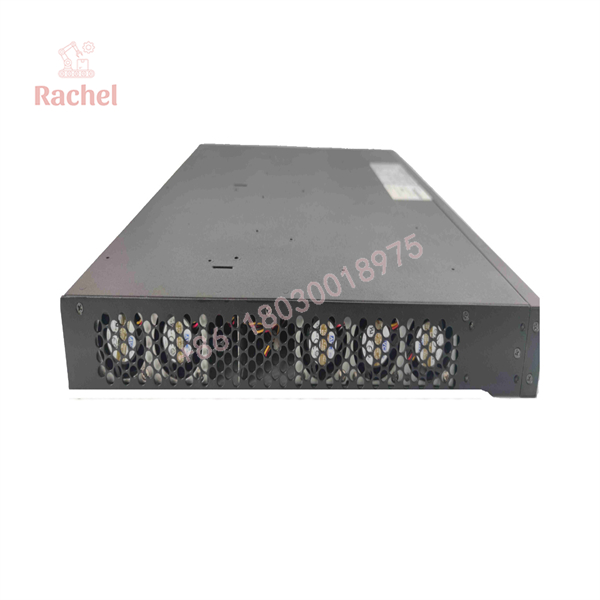
A4H124-24FX P0973JN
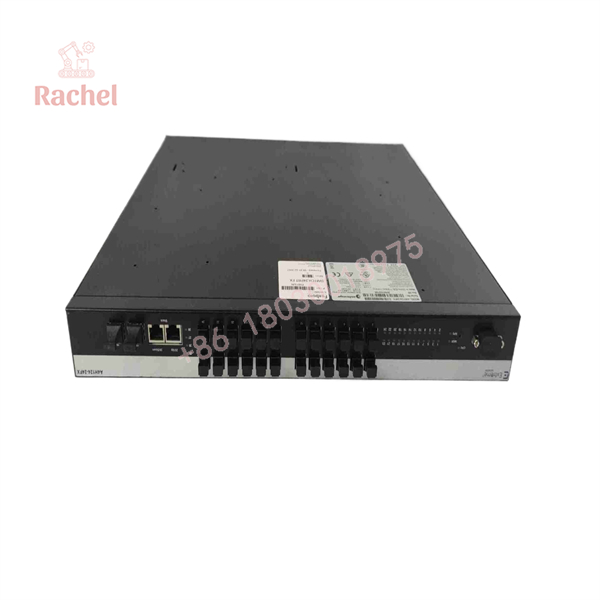
A4H124-24FX P0973JN
Transparency SOP: QA & Testing
For New Surplus or Refurbished Enterasys A4H124-24FX P0973JN inventory, inspection should verify both hardware condition and network functionality.
Inspection workflow:
Step 1 — Identity Verification
- Confirm:
- Enterasys branding
- Model: A4H124-24FX
- Part number: P0973JN
- Record hardware revision and serial number.
Step 2 — Physical Examination
- Inspect MT-RJ fiber ports.
- Check SFP cages.
- Examine RJ45 connectors.
- Verify chassis condition.
Step 3 — Power Testing
- Confirm startup sequence.
- Check status LEDs.
- Verify normal cooling operation.
Step 4 — Network Testing
- Test fiber link detection.
- Verify Gigabit uplinks.
- Confirm management access.
- Validate VLAN configuration where possible.
Step 5 — Packaging
- Use anti-static protection.
- Protect optical connectors.
- Include inspection records.
The A4H124-24FX supports console, WebView, CLI, and SNMP-based management, making configuration verification possible during controlled testing.
The Veteran’s Tech Trap Guide
⚠️ Trap #1 — Ordering without checking the fiber connector type
The uses 100Base-FX MT-RJ fiber ports. Many newer switches use LC fiber connectors, so physical compatibility cannot be assumed.
PRO TIP: Check the existing patch cables before purchasing. A connector mismatch can stop an otherwise correct replacement project.
⚠️ Trap #2 — Losing the original switch configuration
A replacement unit may power up normally but fail to communicate if configuration files are missing.
Always save:
- VLAN database
- Management IP settings
- Port assignments
- SNMP parameters
- Spanning-tree settings
⚠️ Trap #3 — Ignoring redundant power requirements
The A4H124-24FX supports optional redundant power configurations. Verify the correct power accessory before connecting external power equipment.
⚠️ Trap #4 — Confusing A2 and A4 series switches
The A2H124-24FX and A4H124-24FX have similar naming styles but belong to different product generations. Confirm the exact series before replacement.
Dynamic FAQ
Q1: What is Enterasys A4H124-24FX P0973JN?
The Enterasys is a SecureStack A4 managed fiber Ethernet switch with 24 × 100Base-FX ports and Gigabit uplink capability.
Q2: Is A4H124-24FX suitable for industrial automation networks?
Yes. It is commonly maintained in industrial and enterprise Ethernet infrastructures where managed fiber communication, VLAN separation, and remote monitoring are required.
Q3: What fiber interface does this switch use?
The fixed fiber ports use 100Base-FX MT-RJ connectors. The switch also provides two Gigabit SFP uplink ports for expansion.
Q4: Can A4H124-24FX replace an A2H124-24FX?
Not automatically. Although both belong to Enterasys SecureStack families, replacement requires checking:
- Network configuration
- Firmware compatibility
- Fiber interface type
- Existing system documentation
Q5: What should be checked before buying a New Surplus P0973JN?
Confirm:
- Actual product photos
- Model label
- Part number
- Firmware version
- Port condition
- Test report availability
Q6: Does the A4H124-24FX include warranty coverage?
Warranty depends on supplier and stock condition. New Surplus, refurbished, and tested used units normally have different warranty terms, so confirm coverage before purchase.

 Start Chat


