





Description
Product Introduction & Engineering Value
When an HMI fails, the PLC often continues controlling the process, but operators lose visibility into alarms, diagnostics, recipes, and production status. That can quickly turn routine maintenance into unnecessary downtime. The GE IC754VSF15CTD restores the operator interface while preserving the existing control strategy.
Designed for the GE QuickPanel View family, this industrial terminal combines a 15-inch TFT color display, resistive touchscreen, Windows CE operating system, and Proficy View Machine Edition support. It integrates easily into existing GE automation systems without requiring changes to PLC logic.
Technical Specifications
| Parameter | Specification |
|---|---|
| Manufacturer | GE Fanuc / Emerson |
| Model | IC754VSF15CTD |
| Product Family | QuickPanel View |
| Product Type | Industrial HMI Operator Interface |
| Display Size | 15-inch TFT Color LCD |
| Resolution | 1024 × 768 Pixels |
| Touch Technology | Analog Resistive Touchscreen |
| Operating System | Microsoft Windows CE .NET |
| Application Software | Proficy View – Machine Edition |
| Memory | 64 MB Flash Memory |
| Ethernet | Integrated Ethernet LAN |
| Serial Ports | RS-232/RS-485 and RS-232 |
| Input Voltage | 12–24 VDC (24 VDC Nominal) |
| Mounting | Panel Mount |
| Approximate Weight | 10 lb (4.5 kg) |
Field Application & The “Trench” Experience
A beverage bottling plant experienced repeated production interruptions because the original HMI developed touchscreen dead zones near the recipe selection buttons. Although the PACSystem PLC continued running normally, operators could no longer acknowledge alarms or switch production recipes efficiently.
Maintenance engineers installed an IC754VSF15CTD during a scheduled shutdown, restored the archived Machine Edition project, and recalibrated the touchscreen. The production line returned to normal operation without modifying PLC logic, field wiring, or network architecture.
Typical applications include:
- Packaging and palletizing machine operator stations
- Water treatment process visualization
- Automotive assembly line equipment monitoring
- Batch process recipe management
- Conveyor and material handling control systems
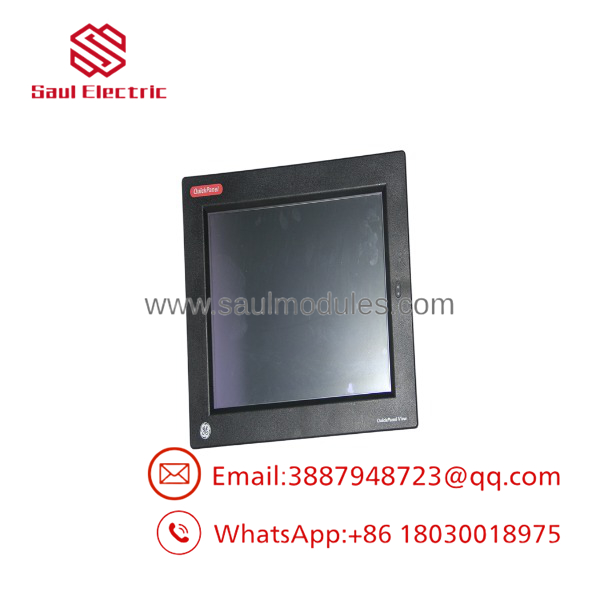
IC754VSF15CTD
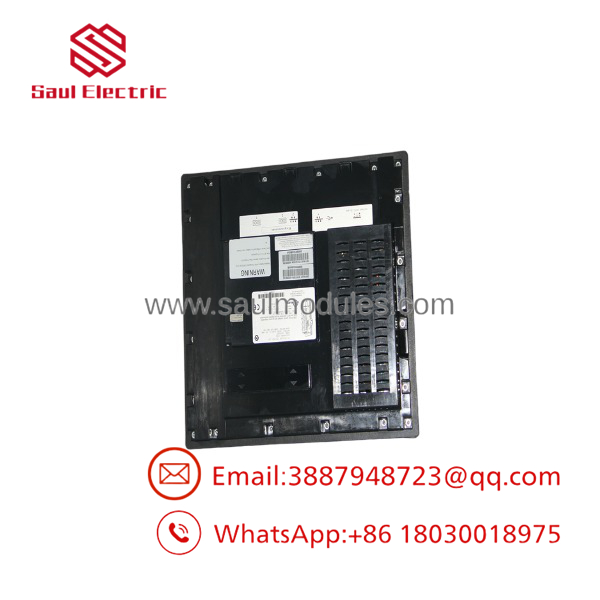
IC754VSF15CTD
Transparency SOP: QA & Testing
Every New Surplus and refurbished IC754VSF15CTD undergoes documented inspection before shipment.
- ✓ LCD inspected for brightness, uniformity, and pixel integrity
- ✓ Touchscreen calibration and response verification
- ✓ Complete power-on diagnostic testing
- ✓ Ethernet and serial communication verification
- ✓ USB and peripheral interface inspection (where applicable)
- ✓ Continuous runtime burn-in under HMI application load
- ✓ Internal memory verification
- ✓ Final cosmetic inspection and ESD-safe packaging
The Veteran’s Tech Trap Guide
⚠️ Always Back Up the HMI Application First
Many QuickPanel systems still operate with legacy versions of Proficy View Machine Edition. Before replacing the terminal, archive the complete runtime project and communication settings. Recovering an application years later can be much harder than replacing the hardware.
⚠️ Touchscreen Failure Isn’t Always a Hardware Failure
A touchscreen that appears unresponsive may simply require recalibration after installation. Verify calibration before replacing the display assembly.
PRO TIP:
If the display powers up but cannot communicate with the PLC, verify the serial or Ethernet communication parameters first. Incorrect COM settings, baud rate, or IP configuration are encountered far more often than defective HMI electronics.
⚠️ Inspect the Backlight Carefully
A dim display with a functioning touchscreen often indicates backlight degradation rather than LCD failure. Distinguishing between these conditions can significantly reduce repair costs.
Dynamic FAQ
Q1. What is the IC754VSF15CTD used for?
The IC754VSF15CTD is a 15-inch QuickPanel View operator interface used for process visualization, alarm handling, recipe management, machine diagnostics, and operator control in industrial automation systems.
Q2. Does this HMI include a touchscreen?
Yes. The terminal features a 15-inch TFT color display with an integrated analog resistive touchscreen, allowing operation while wearing industrial gloves.
Q3. Which software is used to configure the ?
The unit is developed and maintained using GE Proficy View – Machine Edition, running on the Windows CE platform.
Q4. Is New Surplus inventory genuine?
Yes. New Surplus terminals are genuine OEM products that have never been placed into industrial service. Each unit is inspected for hardware revision, touchscreen condition, display quality, and connector integrity before shipment.
Q5. How are refurbished units tested?
Refurbished terminals undergo LCD testing, touchscreen calibration, memory verification, Ethernet and serial communication testing, power supply validation, extended runtime burn-in, and complete functional inspection before shipment.
Q6. Can the communicate with GE PLCs over Ethernet?
Yes. The terminal includes integrated Ethernet connectivity and serial communication interfaces, allowing it to interface with compatible GE Fanuc PLCs and PACSystems controllers when configured through Proficy View Machine Edition.

 Start Chat


