





Description
Key Technical Specifications
| Parameter | Value |
|---|---|
| Manufacturer | GE Fanuc Intelligent Platforms |
| Model | VME7768-320000 |
| Product Type | 6U VME Single Board Computer (SBC) |
| Bus Architecture | VME64x |
| Processor | Intel Core 2 Duo (up to 2.16 GHz) or Intel Celeron M variant |
| Chipset | Intel 945GME Express |
| System Memory | Up to 2 GB DDR2 SDRAM |
| Network Interfaces | Dual 10/100/1000 Mbps Ethernet |
| Storage | CompactFlash boot support, SATA interfaces |
| Expansion | One PMC (PCI Mezzanine Card) site |
| USB | Four USB 2.0 ports |
| Serial Ports | Two RS-232 serial interfaces |
| Operating Systems | Windows XP Embedded, Linux, VxWorks (application dependent) |
| Form Factor | 6U Eurocard VME |
| Cooling | Forced-air cooling recommended |
Product Introduction & Supply Chain Strategy
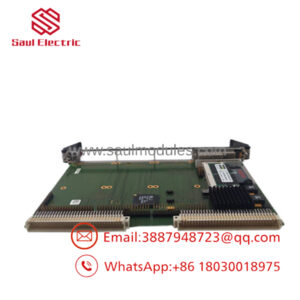
The GE VME7768-320000 is a high-performance VMEbus Single Board Computer designed for embedded computing applications that demand deterministic processing, high reliability, and long service life. It is widely deployed in industrial automation, power generation, aerospace, defense, transportation, and test systems where continuous operation is essential.
As the V7768 family has entered the mature stage of its product lifecycle, sourcing genuine replacement boards has become increasingly difficult. Maintaining New Surplus inventory reduces Total Cost of Ownership (TCO), minimizes lead time variability, and avoids the uncertainty associated with refurbished electronics. For critical systems, maintaining 1–2 units of buffer stock and planning a last-time-buy is a prudent inventory strategy.
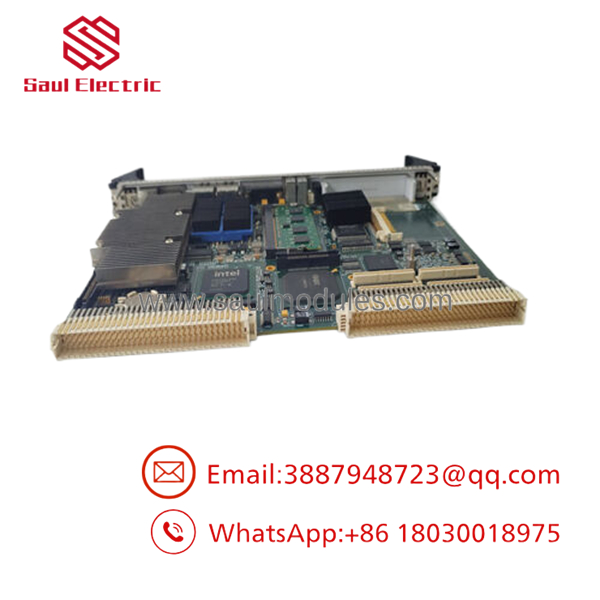
- VME7768-320000
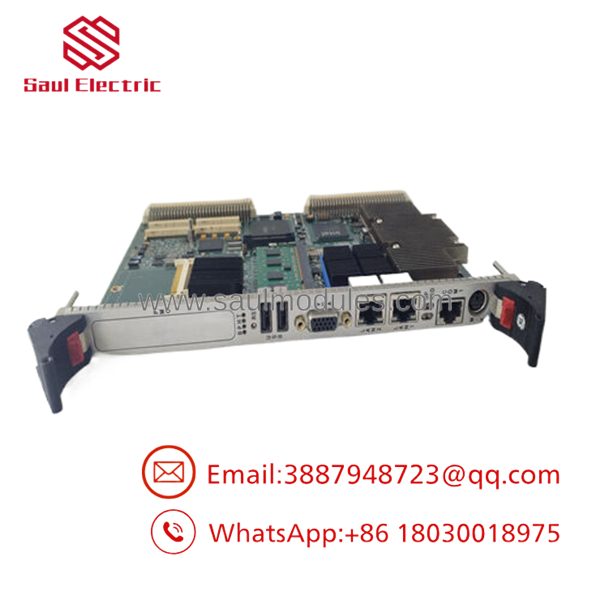
- VME7768-320000
Installation & Configuration Guide
Stage 1 – Pre-Installation (Preparation & Safety)
- Perform Lock-Out/Tag-Out (LOTO).
- Shut down the VME chassis correctly.
- Wear a grounded ESD wrist strap.
- Record:
- BIOS settings
- Boot device configuration
- Network settings
- Installed operating system
- Application software version
- Photograph all PMC modules and cable connections.
Stage 2 – Removal
- Disconnect external communication cables.
- Remove retaining screws.
- Use the injector/ejector handles to remove the board evenly.
- Avoid twisting the board to prevent connector damage.
- Inspect the VME backplane connectors for bent pins or contamination.
Stage 3 – Installation
- Verify the replacement model is VME7768-320000.
- Transfer any PMC expansion modules if required.
- Insert the SBC carefully into the VME backplane.
- Secure the retaining hardware.
- Reconnect all network and peripheral cables.
Stage 4 – Power-On & Testing
- Apply chassis power.
- Verify successful BIOS POST.
- Confirm operating system startup.
- Test Ethernet communication.
- Validate application software, fieldbus communication, and system functionality before returning the equipment to service.
Firmware / Software Versions & Upgrade Notes
- Record the BIOS revision before replacing the board.
- Use the same BIOS revision whenever practical to minimize compatibility issues.
- Verify operating system support for the installed processor revision.
- Confirm drivers for Ethernet, SATA, USB, and PMC devices.
- Avoid simultaneous BIOS upgrades and operating system upgrades during emergency maintenance.
- After replacement, validate VME memory mapping, interrupt assignments, and application software licensing.
Frequently Asked Questions (FAQ)
Q1. Is this a New Original product?
Yes. This product is supplied as New Original / New Surplus. It is not used, repaired, or refurbished. Each board should undergo serial number verification, visual inspection, and functional testing before shipment.
Q2. Why is New Surplus more expensive than refurbished boards?
New Surplus hardware has never been deployed in the field and retains original OEM manufacturing quality. Although the purchase price is higher than refurbished equipment, it substantially lowers the risk of premature failure and unplanned downtime.
Q3. Is the VME7768-320000 still manufactured?
The V7768 family is considered a legacy embedded computing platform. Most available units come from remaining industrial inventory rather than active production, making proactive spare inventory planning advisable.
Q4. Can the board be hot-swapped?
No. Unless the host VME chassis specifically supports managed hot-swap functionality, always power down the system before removing or installing the board.
Q5. Will my operating system and application software work after replacement?
In most cases, yes, provided the replacement board has a compatible BIOS revision, processor configuration, and driver support. Always verify boot configuration, software licensing, and hardware resource assignments after installation.
Q6. What warranty is appropriate for New Surplus inventory?
Professional industrial automation suppliers typically provide a 12 month warranty, along with incoming inspection, functional verification, anti-static packaging, and export-grade shipping protection.
Q7. What inventory strategy is recommended?
For facilities operating VME-based control systems, maintain 1–2 New Surplus boards as critical buffer stock. Because this platform is approaching end-of-life, organizations should monitor lead time variability, consolidate qualified suppliers, and evaluate last-time-buy opportunities to reduce long-term procurement risk.

 Start Chat


