





Description
Key Technical Specifications
| Parameter | Value |
|---|---|
| Manufacturer | GE Intelligent Platforms |
| Model Number | VMIVME-7750-746001 / 350-027750-746001P |
| Product Type | VME Single Board Computer |
| Processor | Intel Pentium III (configuration-dependent, up to 1.26 GHz) |
| System Bus | 133 MHz |
| Memory | Up to 512 MB PC133 SDRAM |
| Flash Storage | CompactFlash option (configuration-dependent) |
| VME Interface | ANSI/VITA VME64 |
| Ethernet | Dual 10/100Base-T Ethernet |
| Graphics | Integrated AGP SVGA Controller |
| Expansion | PMC Expansion Site |
| Operating Systems | VxWorks, QNX, Linux, Windows XP/2000, LynxOS, Solaris |
| Power Requirement | +5 V DC via VME backplane |
| Form Factor | 6U VME Eurocard |
Product Introduction
The GE VMIVME-7750-746001 (350-027750-746001P) is a high-performance 6U VME Single Board Computer (SBC) developed by GE Intelligent Platforms for industrial automation, defense, simulation, transportation, and power generation systems. It combines an Intel Pentium III processor with a VME64 interface to provide deterministic control and high-speed data processing.
In long-life industrial systems, the VMIVME-7750 is commonly installed as the primary CPU within VME-based control racks. It is frequently selected during lifecycle maintenance because it allows existing VME architectures to remain in service without redesigning the entire control platform. Always verify the CPU configuration, memory option, BIOS revision, and rear I/O configuration before purchasing a replacement.
Troubleshooting Quick Reference
| Symptom | Possible Cause | Relevance to this Part | Quick Check Method | Recommendation |
|---|---|---|---|---|
| Board does not boot | Missing +5 V backplane supply | ❌ Low | Measure +5 V DC on the VME backplane | Verify power supply before replacing the SBC |
| No video output | BIOS or graphics initialization failure | ✅ Medium | Connect a VGA monitor and observe POST sequence | Verify BIOS and memory before replacement |
| Ethernet unavailable | Network configuration or cable fault | ❌ Low | Check Ethernet link LEDs and perform a ping test | Verify cables and switch configuration |
| Operating system fails to load | CompactFlash or storage corruption | ✅ High | Boot from recovery media if supported | Replace storage before replacing the SBC |
| Random system resets | Power instability or overheating | ✅ Medium | Monitor +5 V DC and CPU temperature | Verify chassis cooling and power quality |
| VME communication errors | Backplane connector contamination | ✅ High | Inspect P1/P2 connectors for oxidation or bent pins | Clean and reseat the board |
| Watchdog timeout | Application software or CPU fault | ✅ High | Review watchdog logs and operating system diagnostics | Verify software before replacing hardware |
Technical Note: In VME systems, the CPU board is often blamed first, but many failures originate from aging power supplies, failing CompactFlash media, backplane connector wear, or application software corruption. Confirm these items before replacing the board.
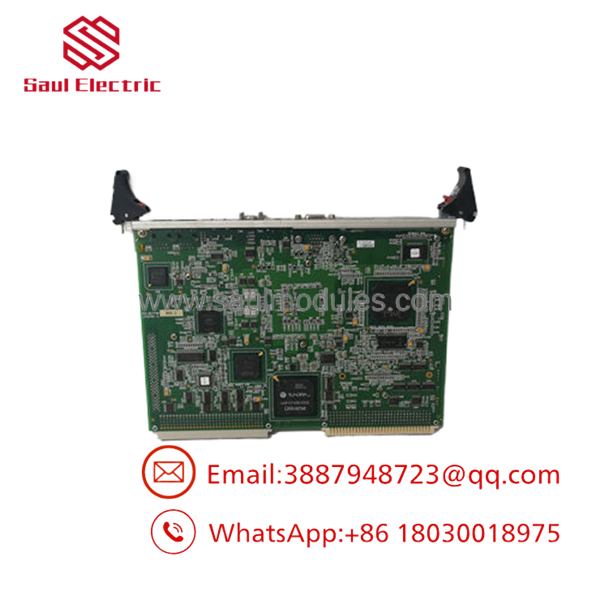
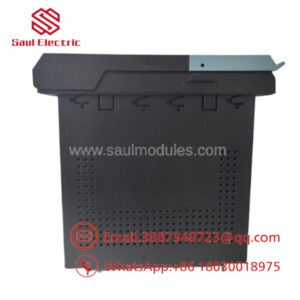
- VMIVME-7750 350-027750-746001P
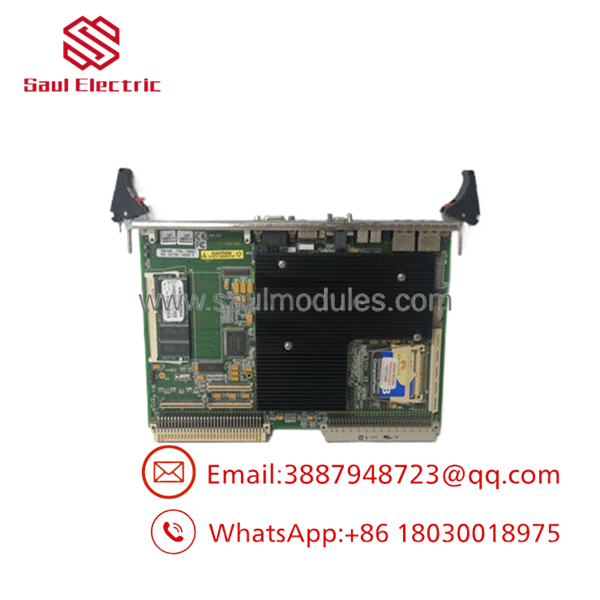
- VMIVME-7750 350-027750-746001P
Frequently Asked Questions (FAQ)
Q1. Is the VMIVME-7750-746001 still manufactured?
No. It is a legacy GE Intelligent Platforms product. Most available inventory consists of New Surplus or professionally tested surplus boards.
Q2. Can this board directly replace another VMIVME-7750?
Usually, but not always.
The base model is only part of the identification. The suffix (746001) and assembly number (350-027750-746001P) determine the processor, memory, BIOS, and hardware configuration. Always match the complete part number.
Q3. Can I hot-swap the board?
Generally, no.
Most VME CPU boards are not intended for hot replacement. Shut down the chassis, isolate power, and follow your site’s lockout/tagout procedure before removing the board.
Q4. Which operating systems are supported?
Depending on the hardware configuration and BSP, the board supports VxWorks, QNX, Linux, Windows 2000, Windows XP, Solaris, and LynxOS. Verify compatibility with your existing application before deployment.
Q5. Why is New Surplus inventory less expensive than factory supply?
Most New Surplus boards originate from canceled projects, OEM spare inventories, or unused maintenance stock. They have not been installed in production but are no longer part of GE’s current manufacturing program.
Q6. What should I verify before ordering?
Verify:
- Complete part number (-746001)
- Assembly number (350-027750-746001P)
- CPU speed
- Installed memory
- BIOS revision
- Rear I/O configuration
- Operating system and BSP compatibility
Five minutes spent checking these items can save days of commissioning work.
Q7. What warranty is typically available?
Most industrial automation suppliers provide a 12-month warranty for verified New Surplus or fully tested boards. Request the power-on test report, BIOS screenshots, and board photographs before shipment.
Quality Inspection & Testing SOP
1. Inbound Inspection & Traceability
- Verify GE Intelligent Platforms labels, serial numbers, and assembly numbers.
- Inspect PCB surfaces for corrosion, scratches, cracked components, rework marks, or UV discoloration.
- Inspect VME edge connectors for wear or bent contacts.
- Record serial numbers and hardware revisions for traceability.
2. Live Functional Testing
- Install the board in an in-house VME64 test chassis.
- Verify POST sequence and BIOS operation.
- Test VGA output, keyboard interface, and Ethernet communication.
- Boot the supported operating system.
- Perform continuous operation for more than 24 hours while monitoring processor temperature and stability.
- Execute watchdog, Ethernet, and VME bus diagnostics.
- Generate a documented functional test report.
- Test photos and videos are available upon request.
3. Electrical Parameter Testing
- Measure insulation resistance using a 500 V Megger where applicable.
- Verify chassis ground continuity.
- Measure +5 V DC backplane voltage using a calibrated Fluke 115 multimeter.
- Monitor operating current throughout the burn-in period.
4. Firmware & Configuration Verification
- Record BIOS revision.
- Verify processor speed and installed memory.
- Document CompactFlash configuration if installed.
- Photograph board labels before shipment.
5. Final QC & Packaging
- Final inspection by a QC engineer.
- Seal the board in an ESD-safe bag.
- Protect with anti-static foam, bubble wrap, and a heavy-duty corrugated carton.
- Apply a dated QC Passed label.
Technical Pitfalls & Survival Guide
❗ BIOS Revision Matters
I’ve seen replacement boards pass every hardware test but refuse to boot the customer’s operating system because the BIOS revision didn’t match the installed BSP.
Record the BIOS version before removing the original board.
❗ Don’t Assume Every Is Identical
The suffix is critical.
-746001 may differ from other variants in processor speed, installed memory, firmware, or rear I/O configuration.
Always order by the complete assembly number.
❗ Verify the VME Backplane
Don’t blame the CPU immediately.
Oxidized P1/P2 connectors, worn card guides, or aging VME backplanes often create intermittent communication faults that resemble CPU failures.
❗ Check Power Supply Stability
This board depends on a clean +5 V DC backplane supply.
Measure voltage under load and maintain at least a 20% capacity margin in the chassis power supply to prevent watchdog resets and random crashes.
❗ Electrostatic Discharge (ESD)
Always wear a grounded wrist strap.
I’ve watched a technician unpack a replacement SBC on a dry winter morning without ESD protection. The board completed POST once, then never booted again. Static damage isn’t always visible, but it can permanently weaken the hardware.
Keep these checks in mind and you’ll eliminate most startup problems, reduce unnecessary board replacements, and shorten system downtime.

 Start Chat


