





Description
Key Technical Specifications
| Parameter | Value |
|---|---|
| Manufacturer | GE Intelligent Platforms / VMIC |
| Model | VMIVME-5565 |
| Product Type | Fiber-Optic Reflective Memory VME Module |
| Bus Interface | ANSI/IEEE 1014 VMEbus (6U) |
| Memory Capacity | 64 MB or 128 MB SDRAM (model dependent) |
| Fiber Network Speed | 2.12 Gbaud Serial |
| Network Transfer Rate | 43 MB/s to 174 MB/s (packet dependent) |
| VME Transfer Rate | Up to 40 MB/s |
| Maximum Network Nodes | 256 |
| DMA Channels | Two Independent DMA Channels |
| Fiber Distance | Multimode: 300 m; Single-mode: 10 km |
| Interrupt Support | Network-wide hardware interrupts |
| Operating System Support | Windows, Linux, VxWorks (driver support) |
Product Introduction & Supply Chain Strategy
The GE VMIVME-5565 is a fiber-optic reflective memory VME module designed for deterministic, real-time data sharing between multiple controllers, simulators, and distributed industrial computer systems. Each write operation automatically replicates data across every node, eliminating software polling and minimizing communication latency.
This product is a Brand New Surplus unit. It is not used, not pulled from a decommissioned plant, and not refurbished. All modules undergo rigorous quality verification to ensure OEM-level reliability. Because the VMIVME-5565 belongs to a legacy platform with declining market availability, maintaining 1–2 units as buffer stock helps reduce lead time variability and prevents costly emergency purchases. A planned last-time-buy strategy lowers Total Cost of Ownership (TCO) while avoiding the reliability risks associated with refurbished electronics.
Installation & Configuration Guide
Stage 1: Pre-Installation (Preparation & Safety)
- Apply Lock-Out/Tag-Out (LOTO) procedures.
- Shut down the VME chassis completely.
- Wear an ESD grounding wrist strap.
- Photograph:
- Fiber-optic connections
- DIP switch and jumper settings
- Slot location
- Cable routing
- Record firmware revision and node configuration.
Stage 2: Module Removal
- Disconnect the fiber-optic cables carefully.
- Release both ejector handles simultaneously.
- Pull the board straight from the VME card guides.
- Inspect the backplane connector for bent pins or contamination.
Stage 3: Installation (Clone & Seat)
- Copy all DIP switch and jumper settings exactly.
- Verify the correct memory option and fiber interface.
- Insert the module evenly into the VME slot.
- Lock both ejector handles completely.
- Reconnect the transmit and receive fiber cables according to the original routing.
Stage 4: Power-On & Testing
- Verify the backplane power rails before startup.
- Confirm the RUN indicator shows normal operation.
- Verify that no ERR or fault LEDs remain active.
- Confirm successful reflective memory synchronization across all nodes.
- Test DMA transfers and network interrupt functionality before returning the system to production.
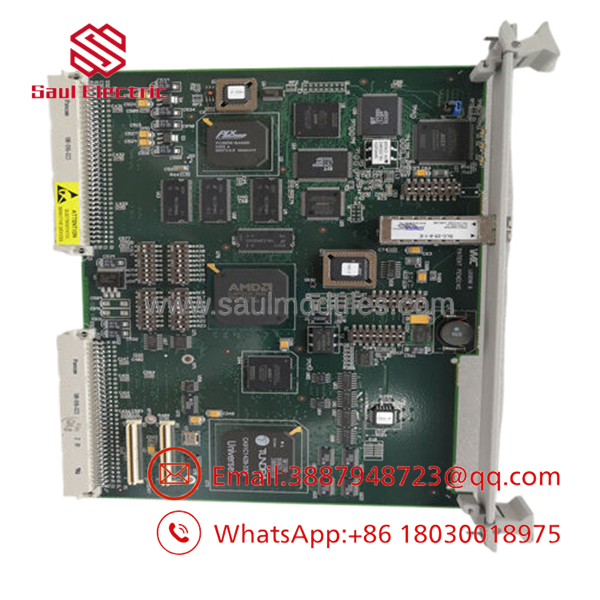
- VMIVME-5565
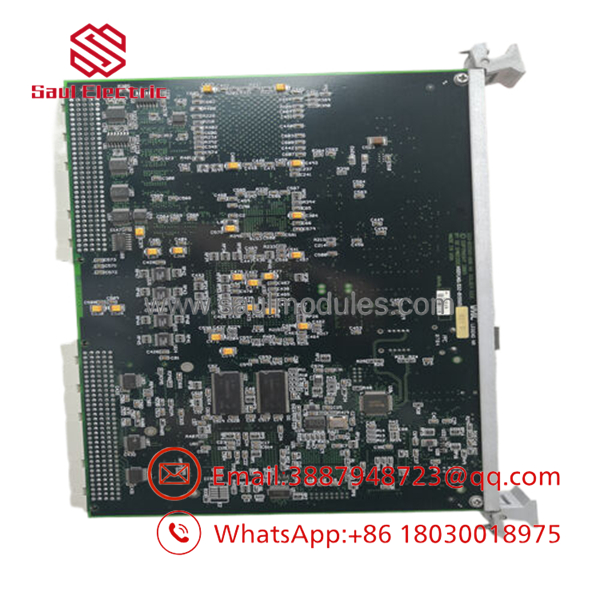
- VMIVME-5565
Firmware/Software Versions & Upgrade Notes
- Record the original firmware version before replacing the hardware.
- Install the same firmware revision whenever practical to maintain deterministic communication behavior.
- Verify compatibility between firmware, reflective memory drivers, and the host operating system before deployment.
- Upgrading firmware without validating every node in the reflective memory ring may introduce synchronization or communication faults.
- Downgrading firmware can disable support for newer driver releases or hardware revisions.
- Back up node IDs, configuration parameters, and driver settings before maintenance to simplify recovery after replacement.
Frequently Asked Questions (FAQ)
Q1. Is this really a new module?
Yes. This is a New Original / New Surplus unit. It is not used, not repaired, and not refurbished. Every module completes serial number verification, electrical inspection, communication testing, firmware documentation, and final ESD-safe packaging before shipment.
Q2. Why is New Surplus more expensive than refurbished products?
New Surplus inventory comes from genuine OEM production channels and preserves the original hardware condition. Although it typically costs more than refurbished equipment, it avoids hidden component aging, previous field stress, and uncertain repair history that can lead to expensive production downtime.
Q3. Is the VMIVME-5565 obsolete?
Yes. The is a mature legacy platform with increasingly limited global inventory. Facilities operating reflective memory networks should maintain 1–2 on-site spare modules, consolidate approved suppliers, and evaluate a last-time-buy strategy before inventory becomes unavailable.
Q4. Can I replace the board while the system is running?
Hot-swapping is generally not recommended. Shut down the VME chassis according to plant maintenance procedures to prevent network interruptions, reflective memory synchronization errors, or backplane damage.
Q5. Will replacing the module erase my application?
Application software normally resides on the host processor rather than the reflective memory card. However, the replacement board must match the original firmware revision, node configuration, and network settings to maintain compatibility.
Q6. What quality verification is performed?
Every New Surplus unit follows a documented SOP that includes:
- OEM serial number traceability
- Anti-counterfeit verification
- Power-on diagnostics
- Fiber-optic communication testing
- DMA functional verification
- Electrical inspection
- Firmware recording
- QC inspector approval
- ESD-safe packaging
- Heavy-duty export shipping preparation
Q7. What inventory strategy provides the lowest TCO?
For plants where reflective memory communication is production-critical, maintain 1–2 spare units on-site as insurance against unexpected failures. Combine buffer stock with vendor consolidation, lifecycle monitoring, cross-site inventory sharing, and planned last-time-buy purchases to reduce lead time variability, minimize stock-out risk, and achieve a lower Total Cost of Ownership (TCO).

 Start Chat


