





Description
Product Introduction & Engineering Value
Field upgrades hit a wall when an operator panel can’t bridge old serial networks with modern Ethernet architectures. The IC754CSX06CTD cuts through that complexity by housing a complete Windows CE runtime engine inside a rugged 6-inch panel-mount housing. It unifies high-resolution visualization and direct PLC communications without taking up precious panel real estate.
Equipped with a bright 640×480 color TFT display and an industrial resistive touchscreen, this module delivers crisp process diagnostics even in dimly lit or high-glare environments. Integrated serial and Ethernet interfaces allow seamless data routing between GE Series 90-30, VersaMax, and third-party controllers, giving maintenance teams a reliable drop-in terminal for legacy machine controls.
Technical Specifications
| Parameter | Specification Details |
| Display Type & Size | 6.0-inch Color TFT LCD with LED Backlight |
| Native Resolution | 640 x 480 pixels (VGA) |
| Touchscreen Interface | Analog Resistive Touch (Finger and Stylus operation) |
| Operating System | Microsoft Windows CE.NET |
| System Memory | 64 MB DRAM, 16 MB OS Flash, 512 KB Battery-Backed SRAM |
| Input Power Voltage | 24 VDC Nominal (Accepts 10.8 to 30.0 VDC range) |
| Power Consumption | < 24 Watts continuous maximum load |
| Serial Ports | COM1 (RS-232/RS-485 configurable), COM2 (RS-232) |
| Network Interfaces | 1x 10/100 Mbps RJ45 Ethernet Port |
| Expansion Capabilities | 1x Type II CompactFlash Card Slot |
| Front Bezel Rating | NEMA 4/12/4X, IP66 (when properly gasket-sealed) |
| Operating Temperature | 0°C to 50°C (32°F to 122°F) |
Field Application & The “Trench” Experience
A high-speed packaging plant in Ohio faced repeated line shutdowns when an aging, monochrome HMI screen failed due to touchscreen dead zones. The panel was tied to both a VersaMax PLC over serial and a plant-wide SCADA network via Ethernet. The maintenance manager pulled a pre-tested IC754CSX06CTD from local stock. After loading the existing Proficy Machine Edition runtime file via CompactFlash, the tech swapped the panel cutout, locked down the bezel clamps, and restored full line control—including recipe downloading and real-time alarm handling—in under 40 minutes.
Niche Application Scenarios:
- Continuous Extrusion Line Control: Serving as a local operator interface monitoring zone temperatures, drive speeds, and melt pressure loops.
- Cleanroom HVAC Management: Monitoring differential pressures and humidity levels with local trending data pushed straight to central historian servers.
- Skid-Mounted Water Purification: Managing pump sequencing and valve actuation over Modbus TCP while withstanding washdown exposure.
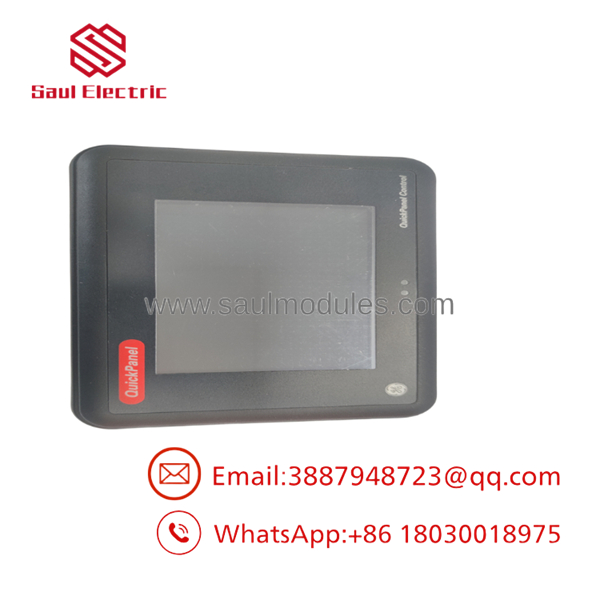
- IC754CSX06CTD
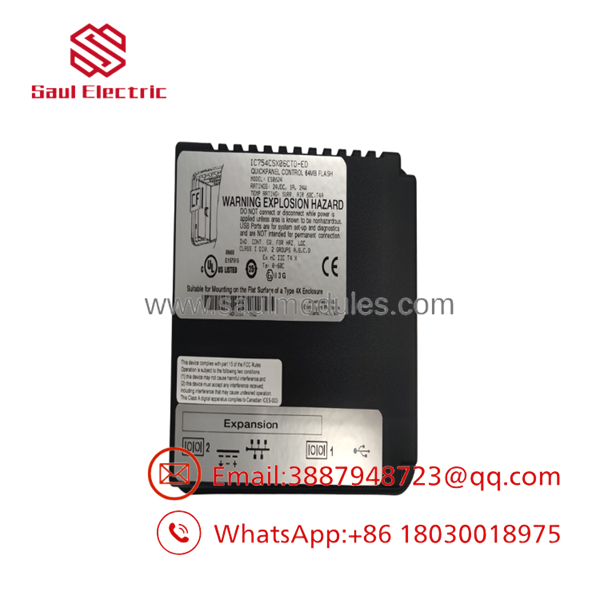
- IC754CSX06CTD
Transparency SOP: QA & Testing
- Bezel & Display Integrity Check: The front housing, gasket seal, and resistive touch glass are inspected for micro-cracks, seal degradation, or backlight dimming.
- 24VDC Power Ramp & Boot Test: Applied supply voltage is swept across the full 10.8–30 VDC operating envelope to confirm clean bootloader execution and stable Windows CE startup.
- Touch Matrix Calibration & Burn-In: Screen alignment is calibrated using multi-point pressure tests, followed by an 8-hour continuous graphical runtime test to check for touch-controller drift.
- Comms Stress Test: Both RS-232/485 serial channels and the 10/100 Mbps Ethernet port undergo active data loopback testing to ensure zero frame dropping or port timing faults.
The Veteran’s Tech Trap Guide
- ⚠️ The CompactFlash Formatting Fail: If you are restoring runtime projects or transferring firmware updates via a CompactFlash card, ensure the card is formatted as FAT16 (or FAT32 for small-capacity cards). High-capacity cards formatted in NTFS or exFAT will fail to mount in Windows CE, leading techs to wrongly assume the card reader is blown.
- PRO TIP (SRAM Battery Life): The 512 KB retentive memory relies on an internal lithium backup battery to retain retentive tags and system clocks. When installing new surplus units that have sat on a shelf for over 2 years, always swap the backup battery before deploying critical recipe parameters to avoid cold-boot memory wipes during power cycles.
- ⚠️ Drawn-Out Clamping Over-Torque: Never over-tighten the mounting bezel clamps during panel installation. Excess torque can warp the outer bezel, causing continuous physical pressure on the analog resistive matrix. This registers as a permanent “phantom press” and freezes screen inputs.
Dynamic FAQ
Q: What programming software is required to download or back up projects on the IC754CSX06CTD?
A: Projects for this QuickPanel model are developed and downloaded using GE Proficy Machine Edition (View/Control runtime).
Q: Can I transfer a runtime file without a direct PC programming cable?
A: Yes. You can export the compiled project to a supported CompactFlash card, insert it into the unit’s CF slot, and copy the project files directly to flash memory using the Windows CE file manager.
Q: How does the unit preserve critical data if power is lost abruptly?
A: The IC754CSX06CTD utilizes 512 KB of onboard, battery-backed SRAM to retain retentive tags, alarm histories, and system logs across unexpected power interruptions.
Q: What is covered under the warranty for New Surplus or Refurbished QuickPanels?
A: All units are fully tested on the bench—including touchscreen calibration, backlighting, and communication ports—and come backed by a standard 12-month replacement warranty.

 Start Chat


