





Description
Product Introduction
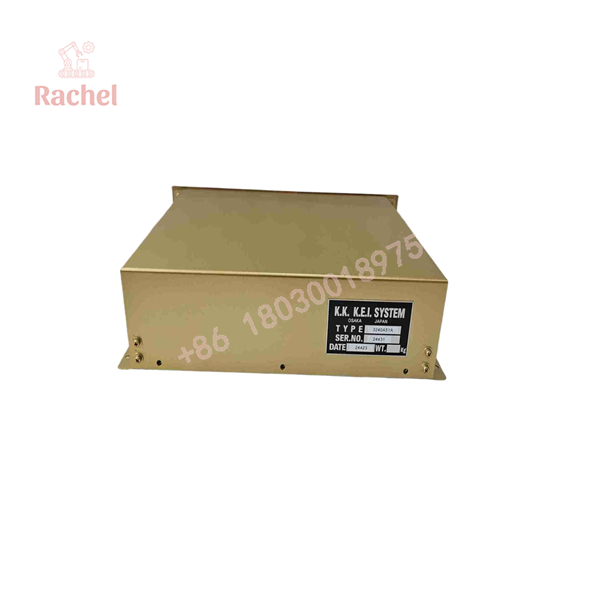
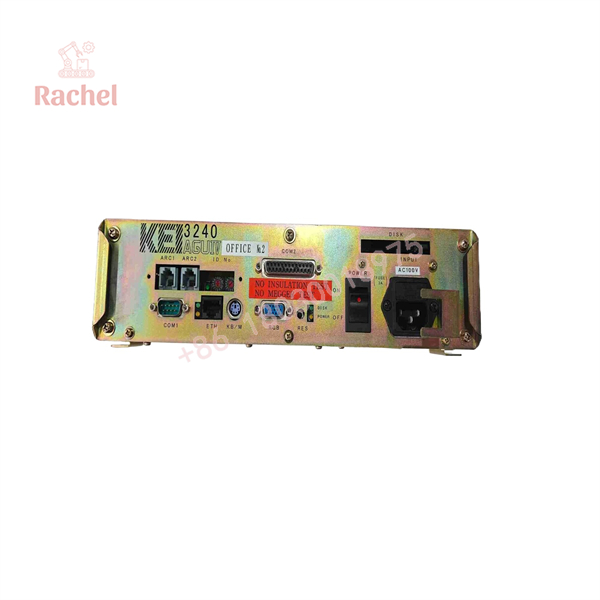
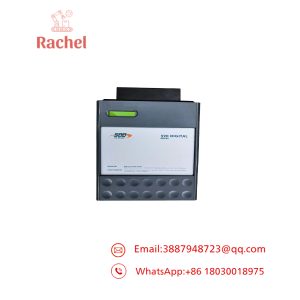
The KK KEI System CPU-AGU 3240A51A is identified in available supplier documentation as an AGU IV host and graphic computer module for the KEI-3240 marine automation platform. It supports operator visualization and machinery-monitoring functions in shipboard automation systems, including engine-room monitoring and cargo or ballast management.
Its role is different from that of a conventional PLC CPU. The AGU serves as a computer-based operator interface and visualization host within a larger system that includes distributed I/O, communication interfaces, displays, and application software. Exact hardware revisions and configuration requirements must be checked before replacement.
Key Technical Specifications
| Parameter | Available specification |
|---|---|
| Manufacturer / Brand | K.K. KEI System |
| Model | CPU-AGU 3240A51A |
| Product Type | AGU IV host / graphic computer module |
| System Platform | KEI-3240 marine automation |
| Associated Configurations | KEI-3240A, KEI-3240A2, KEI-3240D — verify exact compatibility |
| Network | 100 Mbps Ethernet link reported for the main computer and AGU |
| Power Supply | AC 100 V or DC 24 V, depending on host and power-supply configuration |
| Ambient Operating Temperature | 0°C to 55°C reported for AGU host equipment |
| Operator Interface | Compatible KEI LCD display and keyboard, depending on system configuration |
| Application | Marine machinery monitoring, alarm display, data logging, and automation visualization |
| Lifecycle | Legacy equipment; current OEM availability unconfirmed |
| Firmware / Software | Must match the installed KEI-3240 application and hardware configuration |
Technical data is drawn from available supplier listings rather than a verified OEM datasheet for revision 3240A51A. Confirm the nameplate, connector pinout, supply requirements, and vessel-specific type approvals before installation.
Application Scenarios & The “Trench” Experience
A marine automation fault rarely happens at a convenient time. An operator display may stop updating while the underlying local I/O remains active, leaving the crew uncertain whether the problem lies in the AGU computer, the communication network, or the application software. At sea, replacing the wrong component can waste valuable maintenance time and complicate operational monitoring.
The CPU-AGU 3240A51A is relevant to maintenance of compatible KEI-3240 installations.
Application scenarios
1. Marine propulsion — Engine-room monitoring — Supports graphic presentation of engine operating data and alarms through the KEI-3240 automation system.
2. Bulk carriers — Cargo hold monitoring — Can support the operator visualization functions of compatible vessel monitoring installations, subject to the installed application configuration.
3. Ballast systems — Tank status and valve monitoring — Supports the operator-side display and monitoring functions of an integrated marine automation system. Actual valve-control responsibilities depend on the installed control architecture.
4. Marine auxiliary machinery — Alarm supervision — Provides a host platform for operator screens, alarm presentation, and recorded machinery information.
5. Ship automation maintenance — Legacy computer replacement — Offers a potential replacement for a failed AGU host when retaining the existing KEI-3240 platform is necessary.
The KEI-3240 platform is described in marine equipment documentation as comprising an AGU host/graphic computer, an ILS system interface, distributed local units, a keyboard, and LCD display equipment.
Illustrative field case — hypothetical scenario
A vessel’s machinery-monitoring workstation stops refreshing its graphic screens during a maintenance period. Some local indicators continue to show equipment status, but the central operator display is unavailable. The engineer checks the AGU host, network connection, power supply, and application startup logs before concluding that the computer module requires replacement.
The replacement team verifies the complete part number, checks the installed configuration, and confirms that the required application files and system settings are available. After installation, the team validates screen updates, alarm presentation, communications, and relevant monitoring functions before returning the workstation to service.
The important distinction: restoring the display is not the same as validating the entire automation system. Any safety-related or operational control functions must be checked under the vessel’s approved commissioning procedures.
CPU-AGU 3240A51A
CPU-AGU 3240A51A
Transparency SOP: Quality Assurance & Testing
For a legacy marine computer module, testing must cover more than whether the unit powers on. The following is a recommended inspection and acceptance procedure, not a claim that a particular inventory unit has already passed these tests.
1. Inbound Inspection
- Record the complete model designation, part number, serial number, and hardware revision.
- Inspect the PCB, connectors, mounting points, and enclosure for corrosion, impact damage, or unauthorized repairs.
- Photograph the labels and connector arrangement for comparison with the installed module.
2. Live System Testing
- Use a compatible KEI-3240 test setup where available.
- Verify startup behavior, display output, and hardware recognition.
- Check Ethernet link establishment and communication with compatible system interfaces.
- Record any startup faults or diagnostic indicators.
3. Electrical Checks
- Confirm the applicable supply voltage from the module’s nameplate and OEM documentation.
- Check for abnormal current draw, overheating, and unstable operation.
- Inspect power connectors and grounding arrangements.
- Do not apply an unverified AC or DC supply based solely on generic KEI-3240 family specifications.
4. Software and Configuration Verification
- Record identifiable BIOS, firmware, and software revisions where applicable.
- Confirm compatibility with the vessel’s installed KEI-3240 application.
- Verify configuration files and storage media requirements before replacing the original unit.
- Preserve backups of application data and system settings.
5. Final QC and Packaging
- Document the actual test results and test environment.
- Clearly identify the unit as new surplus, used, or refurbished.
- Use ESD-safe packaging and suitable protection against moisture and mechanical impact.
- Supply available inspection records and written warranty terms.
For shipboard use, supplier bench testing does not replace vessel-specific commissioning or any required marine approval checks.
The Veteran’s Tech Trap Guide
⚠️ Trap 1: Ordering by the AGU family name alone
KEI-3240A, KEI-3240A2, and KEI-3240D appear in available family-level descriptions. That does not prove every CPU-AGU revision is interchangeable. Match the full 3240A51A designation and the installed hardware revision before ordering.
❗ Trap 2: Assuming the replacement includes the vessel’s software
A replacement computer may not include the original application project, configuration, alarm settings, or storage media. Back up the original system wherever possible and establish software availability before removing the installed unit.
⚠️ Trap 3: Guessing the power input
AC 100 V and DC 24 V are reported for the wider KEI-3240 system, depending on configuration. They are not interchangeable supply options unless the specific hardware supports them. Read the module nameplate and confirm the approved wiring diagram.
❗ Trap 4: Treating a working screen as proof of system readiness
A screen can display normally while communication to remote I/O or alarm functions remains impaired. Verify network communication, current process values, alarm handling, and applicable control functions using the approved test procedure before returning the equipment to service.
Frequently Asked Questions
Q1. What is the KK KEI System CPU-AGU 3240A51A?
It is identified by available supplier documentation as a KEI-3240 AGU IV host and graphic computer module used in marine automation. Its primary role is operator visualization and machinery monitoring rather than conventional standalone PLC logic execution.
Q2. Which KEI-3240 configurations are compatible?
Supplier documentation associates the AGU IV platform with KEI-3240A, KEI-3240A2, and KEI-3240D configurations. However, compatibility of the exact 3240A51A revision must be confirmed against the installed system and the relevant parts documentation.
Q3. Can the module be replaced while the system is powered?
Do not assume hot-swap capability. Follow the OEM shutdown, isolation, and removal procedure. If the computer participates in operational monitoring or control, establish the required alternative monitoring arrangements before taking it offline.
Q4. Does the replacement include firmware and application software?
Not necessarily. Software, application projects, configuration files, and storage media must be confirmed separately. Obtain written confirmation of what is included with the supplied unit and whether it matches the installed vessel configuration.
Q5. How can I determine whether the module is genuine or refurbished?
Request photographs of the actual unit, including its nameplate, serial number, PCB markings, and connectors. Ask for the stated condition, inspection records, and functional test results. A surplus listing or an OEM-style label alone does not establish authenticity or working condition.
Q6. Does the CPU-AGU 3240A51A come with a 12-month warranty?
That depends on the supplier. Obtain written confirmation of the warranty period, coverage, exclusions, and return procedure. Do not assume that every new-surplus or refurbished unit carries the same warranty.
Q7. Why might this legacy module cost less than a new OEM system?
Secondary-market units may originate from excess inventory, decommissioned vessels, or refurbishment programs. They can be useful for maintaining legacy equipment, but price should be assessed alongside hardware revision, software availability, test documentation, marine approval requirements, and warranty coverage.

 Start Chat


