





Description
Product Introduction & Engineering Value
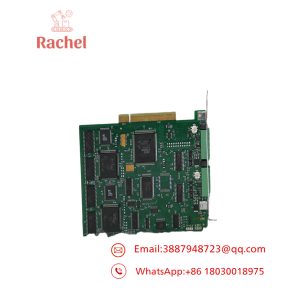
The KUKA KCP-VGA2281A-0 is associated with the KVGA 2.0 video/display hardware used in KUKA KRC2/VKRC2 robot-control systems. The commonly referenced card number is 00-109-040, making that number useful when matching a replacement against an existing controller board.
This is a legacy controller component. Do not treat it as a generic VGA card. Its suitability depends on the KUKA controller architecture, KVGA revision, and installed hardware configuration. Available listings specifically identify the unit as KCP-VGA 2281A-0, rather than merely a standard PC video adapter.
Technical Specifications
| Parameter | Specification |
|---|---|
| Manufacturer | KUKA |
| Part Number | KCP-VGA2281A-0 |
| Related Board | KVGA 2.0 |
| KUKA Card Number | 00-109-040 |
| Documented Version | Version 5 |
| KUKA ID | 10100 |
| Controller Family | KRC2 / VKRC2 |
| Function | VGA/video display interface |
| Installation | Internal KUKA controller electronics |
| Product Generation | Legacy KUKA robot controller |
| Interface Type | VGA/video |
| Replacement Requirement | Match board revision and controller configuration |
A KUKA parts listing specifically identifies “KVGA 2.0-00-109-040 Ver.5, KUKA KCP-VGA2281A-0, KUKA CARD 00-109-040 0018.”
Identification Cross-Reference
The following identifiers have appeared together in industrial listings:
KCP-VGA2281A-0 → KVGA 2.0 → 00-109-040 → KUKA ID 10100
That cross-reference is useful when inspecting an existing board, but it should not be interpreted as proof that every board carrying one of these numbers is interchangeable.
Field Application & the “Trench” Experience
A common problem with an aging KRC2 controller is a display fault that initially looks like a KCP problem. The teach pendant may still communicate with the controller, while the controller’s internal video hardware develops an intermittent fault.
In a maintenance situation where the KUKA cabinet itself remains serviceable, identifying the failed KVGA 2.0 / KCP-VGA2281A-0 board can avoid replacing unrelated controller hardware. The replacement should be matched against the original card number and revision before power is restored.
Typical applications include:
- KRC2 robot welding cells
- VKRC2 automotive production robots
- Legacy KUKA material-handling cells
- KRC2 controller repair and refurbishment
- Production lines where KRC2 hardware remains in service
Current secondary-market listings explicitly connect this board with /VKRC2 equipment.
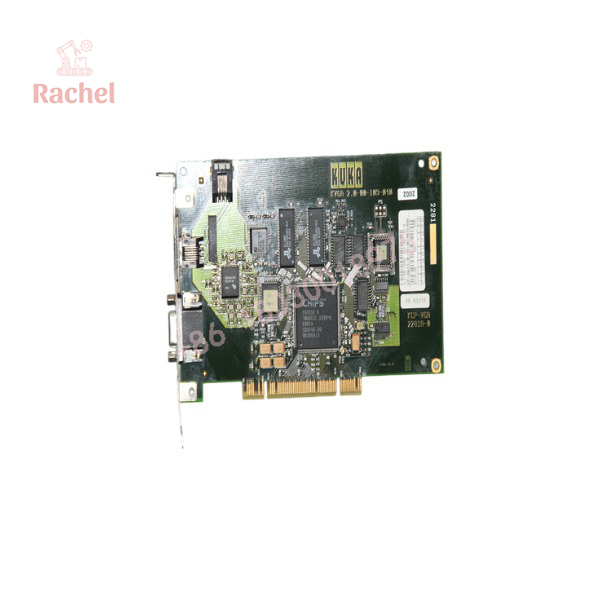
KCP-VGA2281A
Transparency SOP: QA & Testing
For New Surplus or Refurbished KCP-VGA2281A-0 stock, the test procedure should focus on both board condition and controller compatibility.
1. Identification
- Verify
. - Check for
KVGA 2.0. - Confirm
00-109-040. - Record the hardware/version marking.
- Compare the PCB against the removed board.
2. Physical inspection
- Inspect PCB components for oxidation or heat damage.
- Check board connectors and mounting points.
- Inspect the VGA-related circuitry.
- Check for evidence of previous repair or component replacement.
3. Functional test
- Install the board in a compatible KRC2/VKRC2 test controller.
- Power the controller.
- Confirm controller initialization.
- Verify video output.
- Check display stability during extended operation.
- Perform repeated controller restarts.
A proper controller-level test is much more meaningful than simply confirming that the board receives power.
The Veteran’s Tech Trap Guide
⚠️ Trap #1 — Ordering only “KCP-VGA.”
KUKA has multiple generations of controller and video hardware. The exact designation and 00-109-040 card number should be included in the purchase specification.
⚠️ Trap #2 — Ignoring the KVGA revision.
The documented unit is identified as KVGA 2.0, Version 5. A visually similar board from another KVGA generation should not be assumed compatible.
⚠️ Trap #3 — Calling it a standard PC VGA card.
Although VGA is part of its function, this is a KUKA controller-specific board. A generic industrial or PC VGA card is not an acceptable substitute simply because it uses a similar video connector.
PRO TIP: When requesting a replacement, send the supplier a photograph showing KCP-VGA2281A-0, 00-109-040, the revision/version marking, and the complete KRC2 controller identification label.
Dynamic FAQ
What is KUKA KCP-VGA2281A?
It is a KUKA KVGA 2.0 video/display interface board associated with KRC2 and VKRC2 robot-controller systems. Industrial listings identify it with KUKA card number 00-109-040.
Which KUKA controller uses it?
The strongest available references associate / KVGA 2.0 with and controllers.
What is the KUKA card number?
The associated card number is 00-109-040. A documented listing identifies the assembly as KVGA 2.0, Version 5.
Is KCP-VGA2281A-0 a generic VGA card?
No. It is a KUKA controller-specific video/interface board. Generic VGA compatibility does not establish controller compatibility.
Is New Surplus KCP-VGA2281A acceptable?
Yes. For legacy KRC2 equipment, verified New Surplus stock can be valuable because maintaining the existing controller may be preferable to a complete controller migration. The board should be functionally tested in a compatible KUKA controller.
What warranty should I request?
For New Surplus or refurbished stock, request coverage for controller startup, video output, display stability, connector integrity, and extended operation in a compatible KRC2/VKRC2 controller. For refurbished boards, ask whether testing was performed in an actual KUKA controller rather than only on a bench.

 Start Chat


