





Description
Core Product Summary
The Micro Innovation GF1-10TVD-000 is a 10.4-inch operator interface panel from the Micro Panel GF1 series, designed for visualization and operator control in medium- to high-complexity automation systems. It combines a TFT color LCD with VGA 640 × 480 resolution, a touchscreen interface, and an electrically isolated 24 VDC power supply.
The base panel provides two expansion slots (Slot0 and Slot1) for communication modules, so the actual fieldbus or serial connectivity depends on the modules installed. Visualization projects are created with GALILEO engineering software and stored on an external PC Card, which must be prepared before the panel can operate as the intended HMI. The front protection rating reaches IP65 when the panel is installed according to the specified mounting procedure.
Key Technical Specifications
| Parameter | Specification |
|---|---|
| Product type | Operator interface / HMI panel |
| Product family | Micro Panel GF1 |
| Display size | 10.4 in. (264 mm) |
| Display technology | TFT color LCD |
| Resolution | VGA, 640 × 480 pixels |
| Operator input | Touchscreen |
| Supply voltage | 24 VDC, electrically isolated |
| Supply operating range | 20.4–28.8 VDC |
| Maximum power consumption | 40 W |
| Typical current draw | 1 A |
| Project engineering software | GALILEO |
| Runtime system | GRS (Galileo Runtime System) |
| Project storage | External PC Card (PCMCIA Type I/II, Flash linear up to 64 MB; firmware ≥ 1.10 supports ATA Flash) |
| Expansion slots | 2 (Slot0 and Slot1) for communication modules or system expansion |
| Front protection | IP65 when installed with the specified sealing procedure |
| System port | RS-232, 9-pin D-Sub male, non-isolated (pin 2: RxD; pin 3: TxD; pin 5: GND) |
| Power terminal | 3-pole Phoenix MSTB connector (DC version) |
Engineering Selection Highlights
- The -000 suffix defines the power configuration. Within the GF1-10TVD 10.4-inch TFT family, the -000 suffix corresponds to the electrically isolated 24 VDC version. The related GF1-10TVB uses non-isolated 24 VDC, so the suffix must be preserved when specifying or replacing a unit.
- Communication capability is modular, not built into the base panel. The GF1-10TVD-000 provides two expansion slots that accept Micro Innovation communication modules. The fieldbus or serial protocol available in a given installation is determined by the modules fitted to those slots, not by the base HMI model alone.
- The project must be prepared in GALILEO before commissioning. The panel does not contain an embedded engineering environment; visualization projects are created in GALILEO, written to an external PC Card, and loaded into the panel. A replacement or spare unit will not display an application until the correct project data is present.
- PC Card selection has firmware and mechanical implications. The memory-card slot supports JEIDA PCMCIA Type I/II Flash linear cards up to 64 MB. Firmware version 1.10 or later extends support to ATA Flash cards. In vertical installations, an uncompressed card may loosen, so a card-compression method is required to secure the storage media.
- Front IP65 depends on the mounting hardware and procedure. The sealing gasket supplied with the panel and the correct installation method are required to achieve IP65 front protection. An IP65 matching compression frame is available separately (order number 65 20 963100 for the 10-inch size) when the installation arrangement calls for it.
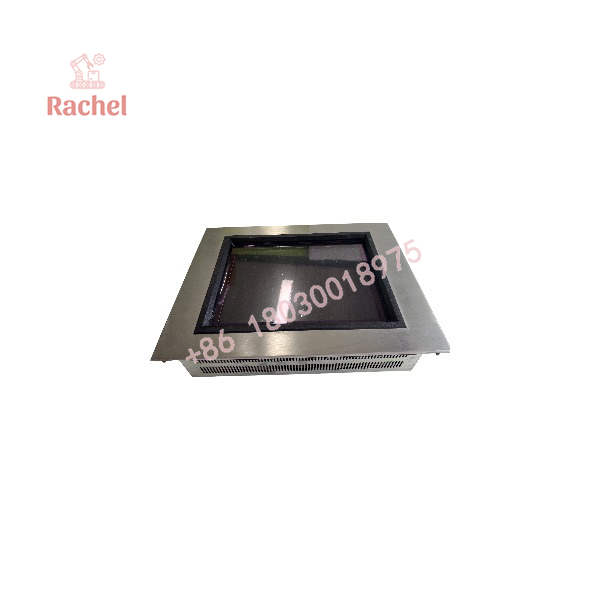
GF1-10TVD-000
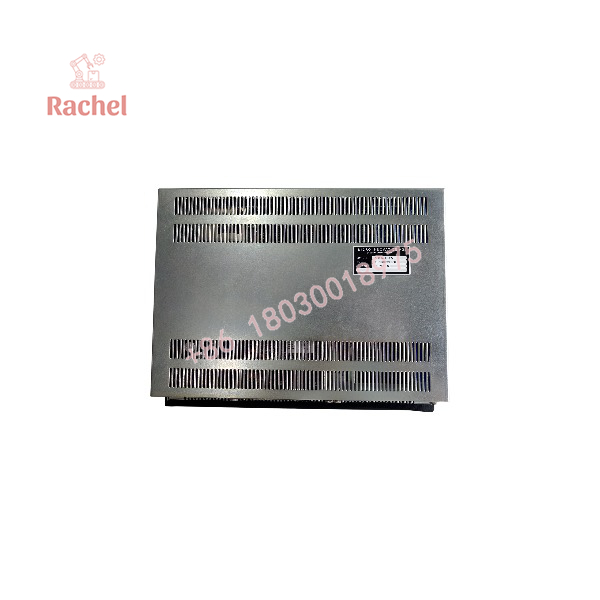
GF1-10TVD-000
System Compatibility & Integration Requirements
| Item / Dependency | Verified Compatibility or Requirement | Practical Note |
|---|---|---|
| Engineering software | GALILEO | Used to create and manage the visualization project; the runtime system is GRS. |
| Project storage medium | External PC Card (PCMCIA Type I/II) | The project must be written to the card and inserted into the panel before operation. |
| Communication modules | Micro Innovation original modules in Slot0 / Slot1 | The base panel does not provide fieldbus or serial protocol connectivity on its own; the installed module determines the available interface. |
| System port | RS-232, 9-pin D-Sub male (non-isolated) | Used for project download from a PC and for serial connection to an upper-level system. |
| Mounting seal | Cabinet installation sealing gasket (supplied) | Required with the specified mounting procedure to achieve IP65 front protection. |
| Optional compression frame | IP65 matching compression frame, order number 65 20 963100 (10-inch size) | Ordered separately when the installation requires this frame configuration. |
Dimensions, Mounting & Connection Notes
- Overall dimensions (10.4-inch GF1-10xxx models): approximately 342 × 270 × 85 mm.
- Weight: approximately 4.8 kg.
- Cabinet opening size: approximately 316 mm × 244 mm.
- Mounting methods: Front-panel installation with four countersunk screws, or backboard bolt installation from the rear of the cabinet. The sealing gasket supplied with the panel supports IP65 front protection when the documented procedure is followed.
- DC power terminal: 3-pole Phoenix MSTB connector. Terminal definitions are +24 V, PE, and 0 V. The supply operating range is 20.4–28.8 VDC, with a maximum surge of 3 A for 2 seconds.
- System port pinout (RS-232, 9-pin D-Sub male): pin 2 = RxD, pin 3 = TxD, pin 5 = GND. Pin 9 can provide +5 V through a motherboard jumper (JP8) for an original accessory; this output has no short-circuit protection.
- Ventilation clearance: leave at least 3 cm of ventilation gap around the enclosure, and maintain a minimum distance of 10 cm between the unit and other heat-generating components inside the cabinet. The heat-dissipation and ventilation paths must remain unobstructed.
- Cable shielding: all data communication cables (RS-232 and expansion-module cables) must use shielded cable with a copper braided shield and a metal connector housing. The shield must be bonded to the D-Sub metal housing with low impedance. The power cable does not require shielding.
Detailed Product Overview
The Micro Innovation GF1-10TVD-000 belongs to the Micro Panel GF1 series, a family of operator interfaces built around a modular communication concept. The panel itself provides the display, touch interface, project-execution hardware, and two expansion slots; the communication interfaces that connect it to the control system are added as separate modules. This separation means that the exact connectivity of a given GF1-10TVD-000 installation is defined by its fitted modules, and that a replacement panel must be matched not only by model number but also by the communication hardware and project data associated with the original unit.
The 10.4-inch TFT display with VGA resolution provides a visualization area suitable for screen layouts that need to present process graphics, tabular data, and alarm information at a readable scale. The touchscreen replaces physical button clusters and small text displays, allowing the operator interface to be reconfigured through the GALILEO project rather than through wiring changes.
The isolated 24 VDC supply is a documented distinction within the GF1-10TVD family. Electrical isolation between the supply and the internal electronics can matter in installations where ground-potential differences or electrical noise are present, and it is the primary reason the -000 suffix must not be substituted with a non-isolated variant without verifying the system’s power architecture.
Project engineering in GALILEO and project storage on an external PC Card introduce a workflow dependency that affects commissioning and spares planning. The panel does not contain a built-in drive for project development; the PC Card is the transfer medium, and the card’s format, capacity, and firmware compatibility must be considered. The documentation identifies JEIDA PCMCIA Type I/II Flash linear cards up to 64 MB as supported media, with ATA Flash support added from firmware version 1.10 onward.
Installation requires attention to both mechanical and electrical details. The front protection rating of IP65 is achieved only when the panel is mounted with the supplied sealing gasket and the specified procedure; the optional IP65 matching compression frame is available for arrangements that require it. Ventilation clearance and cable-shielding practices are documented as installation requirements, not optional recommendations. The RS-232 system port and the expansion-module interfaces use different connector types and serve different purposes: the system port is used for project download and upper-level serial communication, while the expansion slots accept communication modules that determine the fieldbus or additional serial interface present in the installation.
Applications & System Role
The GF1-10TVD-000 operates as the operator visualization and control layer in an automation architecture. It does not perform control logic or I/O processing itself; instead, it provides the graphical interface through which operators view process states, acknowledge alarms, enter setpoints, and issue commands to a connected controller or fieldbus segment.
Its position in the system is between the operator and the control layer. The base panel supplies the display, touchscreen, and project-execution environment, while the expansion slots accept communication modules that connect the HMI to PLCs, drives, or fieldbus networks. Because the communication configuration is module-based, the same base panel can serve different network environments depending on the modules installed.
The panel is suited to fit scenarios where a 10.4-inch VGA color display is required for medium- to high-complexity visualization tasks, and where the project can be engineered in GALILEO and distributed on a PC Card. The dual-slot architecture allows two communication modules to be fitted simultaneously, supporting configurations that require concurrent connections to different network segments or controller interfaces.
FAQ
What is the Micro Innovation GF1-10TVD-000?
It is a 10.4-inch operator interface panel from the Micro Panel GF1 series, with a TFT color LCD, VGA 640 × 480 resolution, a touchscreen, and an electrically isolated 24 VDC power supply.
What is the difference between the GF1-10TVD-000 and the GF1-10TVB?
The documented distinction is the power-supply configuration: the GF1-10TVD-000 uses electrically isolated 24 VDC, while the GF1-10TVB uses non-isolated 24 VDC. Both use the 10.4-inch TFT color/VGA display format.
Does the GF1-10TVD-000 include fieldbus or serial communication interfaces?
The base panel provides two expansion slots for communication modules, but the communication interfaces themselves are supplied by the modules installed in those slots. The available protocol depends on the specific modules fitted.
Which software is used to create the visualization project?
GALILEO is the engineering software used to create the project, and the runtime system is GRS. The project is stored on an external PC Card and loaded into the panel.
Where is the HMI project stored, and what type of card is required?
The project is stored on a JEIDA PCMCIA Type I/II card. Flash linear cards up to 64 MB are supported; firmware version 1.10 or later adds support for ATA Flash cards. In vertical installations, a card-compression method is required to prevent the card from loosening.
What are the panel’s mounting and protection characteristics?
The panel mounts into a cabinet cutout with the supplied sealing gasket and reaches IP65 front protection when the specified procedure is followed. The 10.4-inch model has an overall size of approximately 342 × 270 × 85 mm and a cabinet opening of approximately 316 × 244 mm.
What are the supply-voltage and power-consumption figures for the DC version?
The DC version operates from 24 VDC with a working range of 20.4–28.8 VDC. Maximum power consumption is 40 W, and typical current draw is 1 A.

 Start Chat


