





Description
Product Introduction & Engineering Value
The CP-118U puts eight configurable serial ports on one Universal PCI card. Each port can operate as RS-232, RS-422, or RS-485, with data rates from 50 bps through 921.6 kbps. The card uses a 32-bit Universal PCI bus and supports both 3.3 V and 5 V PCI environments.
For legacy industrial PCs, this matters. A single CP-118U can replace multiple single-port serial adapters while preserving established serial-device connections. Moxa also provides Windows and Linux/UNIX driver support for the CP-118U/138U family.
Technical Specifications
| Parameter | Specification |
|---|---|
| Manufacturer | Moxa |
| Model | CP-118U |
| Series | CP-118U/138U |
| Product Type | Multiport serial communication board |
| Bus Interface | 32-bit Universal PCI |
| PCI Compatibility | 3.3 V / 5 V PCI and PCI-X |
| Number of Ports | 8 |
| Serial Standards | RS-232, RS-422, RS-485 |
| Connector | DB62 female |
| Baud Rate | 50 bps to 921.6 kbps |
| FIFO | 128 bytes |
| Data Bits | 5, 6, 7, 8 |
| Stop Bits | 1, 1.5, 2 |
| Parity | None, Even, Odd, Space, Mark |
| Flow Control | None, RTS/CTS, XON/XOFF |
| Maximum Boards per PC | 8 |
| Operating Temperature | 0°C to 55°C |
| Power Consumption | Approximately 20 mA @ 5 VDC |
| Controller | MU860, 16C550C compatible |
Moxa specifies the CP-118U with a DB62 female connector, eight serial ports, 128-byte FIFO, and a 50 bps–921.6 kbps baud-rate range.
The individual port standards support different signal sets. RS-232 includes TxD, RxD, RTS, CTS, DTR, DSR, DCD, and GND, while RS-422 and RS-485 use differential signaling. Two-wire and four-wire RS-485 configurations are supported.
Field Application & the “Trench” Experience
A legacy supervisory PC was communicating with several PLCs, barcode readers, drives, and instrumentation devices through serial links. One expansion card failed, taking multiple field connections offline at once.
The replacement decision was not simply “find an eight-port serial card.” The maintenance engineer first documented which ports were RS-232 and which were RS-485, recorded baud rates and parity, then checked the PC motherboard for a Universal PCI slot.
A CP-118U was installed, the appropriate Moxa driver was loaded, and the existing COM-port assignments were recreated. Each field device was tested independently before the system was returned to automatic operation.
The trap: serial communication problems often appear to be software faults after a multiport card replacement. Port numbering and interface mode have to be treated as part of the migration.
Useful applications include:
- Legacy PLC communication servers requiring multiple RS-232/RS-485 links
- PC-based SCADA systems communicating with several serial controllers
- Industrial test benches with multiple RS-232/422/485 instruments
- Machine-control PCs connecting simultaneously to PLCs, drives, and operator devices
- Building or utility monitoring systems using multiple Modbus RTU serial links
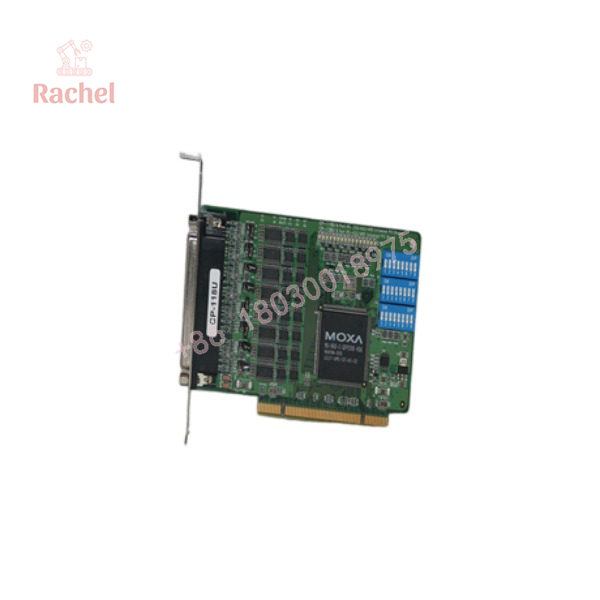
CP-118U
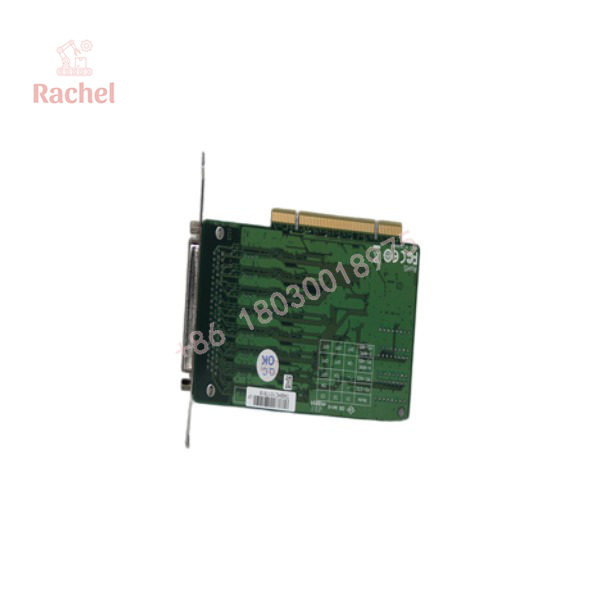
CP-118U
Transparency SOP: QA & Testing
For New Surplus or Refurbished CP-118U inventory, testing should be performed at both the hardware and communication levels.
Inspection
- Verify the Moxa model marking and board revision.
- Inspect the PCI edge connector for oxidation or physical damage.
- Check the DB62 connector and mounting bracket.
- Inspect the PCB for corrosion, contamination, cracked solder joints, or component damage.
Functional test
- Install the card in a compatible Universal PCI system.
- Verify that the operating system detects the board.
- Install the appropriate Moxa driver.
- Confirm all eight serial ports are enumerated.
- Test representative RS-232 communication.
- Test RS-422/RS-485 communication with a suitable serial test device.
- Verify baud-rate and flow-control settings.
- Check sustained data transmission at representative operating speeds.
Moxa currently publishes CP-118U/138U drivers for modern Windows environments, including Windows 10/11 and Windows Server 2016/2019/2022/2025, alongside legacy driver packages.
The Veteran’s Tech Trap Guide
⚠️ Universal PCI is not PCI Express.
The CP-118U uses a 32-bit Universal PCI interface. It is not a native PCIe card. Before ordering, physically inspect the industrial PC’s expansion slots. A PCIe-only replacement PC cannot accept the CP-118U without an appropriate hardware architecture change.
PRO TIP: Photograph the motherboard slot and existing serial-card connector before purchasing a replacement.
⚠️ Do not confuse CP-118U with CP-118U-I.
The CP-118U-I is the isolated version of the family. It uses a different connector arrangement and is intended for applications where serial-port isolation is required. Moxa identifies the standard CP-118U and isolated CP-118U-I as distinct models.
⚠️ Eight ports do not mean eight identical connections.
The CP-118U supports RS-232, RS-422, and RS-485, but the wiring and signal assignments differ. The DB62 connector requires the correct Moxa breakout cable. Do not wire the field device directly from an assumed generic DB62 pinout.
⚠️ COM-port numbering can break legacy software.
Older SCADA and machine-control applications sometimes reference fixed COM numbers. After replacing the card or reinstalling its driver, verify the actual COM assignments before changing application configuration.
Dynamic FAQ
Q1. What is the Moxa CP-118U?
The CP-118U is an 8-port Universal PCI serial communication board supporting RS-232, RS-422, and RS-485. It is designed for PC-based serial connectivity in industrial automation and other multiport applications.
Q2. What is the maximum baud rate?
The maximum specified baud rate is 921.6 kbps, with configurable rates starting at 50 bps.
Q3. Does CP-118U support RS-485?
Yes. It supports both two-wire and four-wire RS-485, in addition to RS-232 and RS-422.
Q4. Is CP-118U an isolated serial card?
The standard CP-118U is not the isolated version. Moxa separately identifies the CP-118U-I as the optically isolated variant. Do not substitute the two without checking the system requirements.
Q5. What connector does CP-118U use?
The CP-118U uses a DB62 female connector for its eight serial ports. A compatible breakout cable is required for field connections.
Q6. Is CP-118U compatible with modern Windows systems?
Moxa’s current support page lists a driver for Windows 10 and later, including Windows 11, as well as Windows Server 2016, 2019, 2022, and 2025. Legacy operating systems are also covered by older driver packages.
Q7. How should New Surplus CP-118U inventory be authenticated?
Confirm the actual Moxa CP-118U model marking, board revision, serial information, PCB condition, and DB62 connector. For critical applications, require evidence that all eight ports were detected and that representative RS-232/422/485 communication was tested.
Q8. What warranty should I request?
For refurbished stock, request a written warranty covering PCI detection and serial-port functionality, not merely power-up. Moxa’s current product documentation provides official technical and driver support, while third-party inventory warranty terms vary by supplier.

 Start Chat


