





Description
Product Introduction & Engineering Value
A production machine does not become obsolete simply because its operator panel does. Many industrial systems continue running for decades because the PLC logic, electrical hardware, and mechanical assemblies remain dependable.
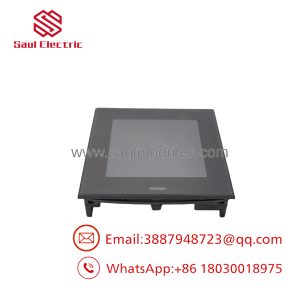
The PRO-FACE GP2600-TC11 was developed for this exact environment. It provides a 12-inch touchscreen interface for monitoring, parameter adjustment, alarms, and operator commands. The unit belongs to the GP2000 family and includes communication options suitable for older PLC architectures, including serial interfaces and Ethernet connectivity.
For replacement planning, the critical identification is GP2600-TC11. The AC power version must not be confused with the DC24V model GP2600-TC41-24V, as the electrical requirements are different.
Technical Specifications
| Parameter | Specification |
|---|---|
| Manufacturer | PRO-FACE |
| Series | GP2000 Series |
| Model | GP2600-TC11 |
| Product Type | Programmable Display HMI |
| Display Size | 12 inch |
| Display Type | TFT Color LCD |
| Resolution | 800 × 600 pixels |
| Display Colors | 256 colors (no blink) / 64 colors (3-speed blink) |
| Backlight | Replaceable CCFL |
| Application Memory | 4 MB Flash FEPROM |
| Data Backup Memory | 256 KB SRAM with lithium battery |
| Touch Panel | Analog resistive type |
| Rated Voltage | AC100–240V |
| Allowable Voltage Range | AC85–265V |
| Power Consumption | 50VA or less (AC100V), 85VA or less (AC240V) |
| Serial Interface | COM1 RS-232C/RS-422, COM2 RS-232C |
| Ethernet | IEEE802.3 10BASE-T |
| Tool Port | 8-pin mini DIN |
| Storage Interface | CompactFlash card slot |
| Expansion Interface | Communication module expansion supported |
| Operating Temperature | 0°C to 50°C |
The GP2600-TC11 specifications include an 800 × 600 TFT display, replaceable CCFL backlight, 4MB Flash FEPROM application memory, RS-232C/RS-422 communication, Ethernet 10BASE-T, and AC100–240V operation.
Field Application & the “Trench” Experience
A machine builder operates a high-speed packaging line installed in the early 2000s. The PLC remains stable, but the operator terminal begins showing intermittent touchscreen failures and reduced display brightness.
The maintenance team identifies the failed device:
PRO-FACE GP2600-TC11
Before replacement, they verify:
- Original GP project backup
- PLC communication driver
- Serial cable pinout
- Ethernet configuration
- Panel cutout dimensions
- AC power wiring
The spare HMI is installed during a planned shutdown. The PLC program remains untouched, avoiding a full control-system migration.
This is a typical repair strategy for long-service automation equipment.
Common applications include:
- Packaging line operator stations
- CNC machine control panels
- Assembly equipment interfaces
- Material handling systems
- Legacy PLC visualization terminals
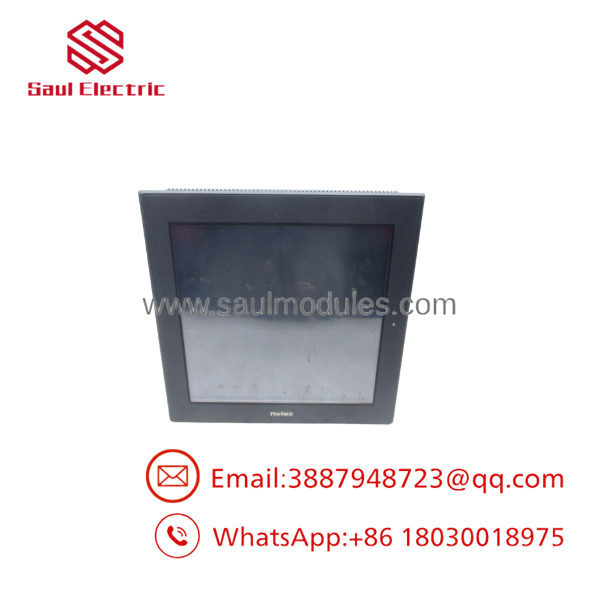
GP2600-TC11
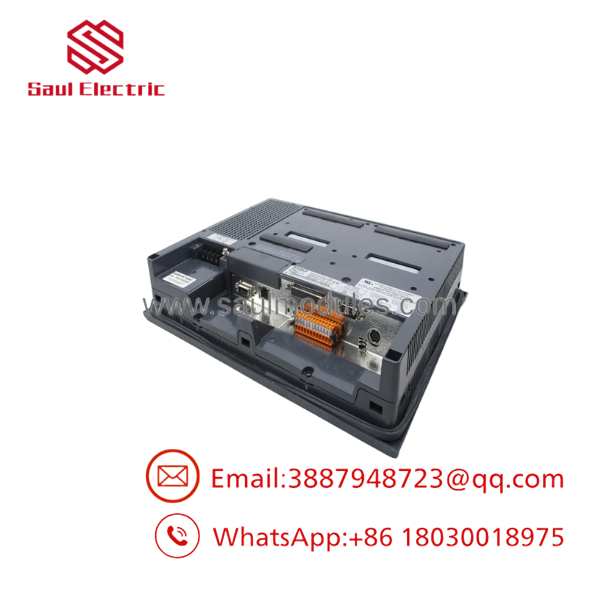
GP2600-TC11
Transparency SOP: QA & Testing
A legacy HMI requires a complete functional check before being returned to service.
Inspection Procedure
1. Model Verification
- Confirm:
- PRO-FACE label
- GP2600-TC11 model marking
- Serial number
- Compare against the removed unit.
2. Display Testing
- Power the HMI.
- Check:
- LCD brightness
- Screen uniformity
- Pixel condition
- Contrast adjustment
3. Touch Testing
- Verify touchscreen response.
- Perform calibration.
- Check accuracy across the entire display area.
4. Communication Testing
- Test:
- RS-232C communication
- RS-422 communication
- Ethernet interface
- Programming connection
5. Memory Verification
- Confirm application memory operation.
- Check battery-backed SRAM retention where applicable.
PRO-FACE lists the as discontinued, with end of sales on February 28, 2011 and end of repair support on November 30, 2017. Replacement options include GP4000 and SP5000 series models depending on application requirements.
The Veteran’s Tech Trap Guide
⚠️ Do not confuse with GP2600-TC41-24V.
The models look similar but use different power systems:
- GP2600-TC41-24V → DC24V
A wrong selection can require electrical redesign.
⚠️ Do not remove the old HMI before saving the project.
Legacy GP2000 applications may depend on older GP-PRO/PB software files. Without the project backup, screen recreation can become a time-consuming engineering task.
⚠️ PRO TIP: Check communication settings before replacement.
Older installations often use fixed parameters:
- PLC protocol
- Baud rate
- Station number
- Cable wiring
A hardware swap without configuration verification can result in a working display with no PLC communication.
⚠️ Backlight condition matters.
The uses a replaceable CCFL backlight. A dim screen may indicate backlight aging rather than a complete HMI failure.
Dynamic FAQ
Q1. What is the PRO-FACE ?
The PRO-FACE is a 12-inch GP2000 Series programmable HMI with TFT color LCD display and touchscreen operation.
Q2. What is the display resolution?
The display resolution is:
800 × 600 pixels (SVGA)
using a TFT color LCD panel.
Q3. What power supply does require?
The unit requires:
AC100–240V
with an allowable range of approximately AC85–265V.
Q4. What communication interfaces are available?
The supports:
- RS-232C
- RS-422
- Ethernet 10BASE-T
- CompactFlash storage interface
Q5. Is still manufactured?
No. PRO-FACE lists the as discontinued. The model ended sales on February 28, 2011, with repair support ending November 30, 2017.
Q6. Can be replaced with a newer PRO-FACE HMI?
Yes, but it requires engineering review. Recommended replacements include GP4000-series and SP5000-series products depending on power supply, communication needs, and touch requirements.
Q7. Is New Surplus available?
Availability depends on industrial spare inventory. Because the GP2000 series is a legacy platform, buyers typically source new old stock, refurbished units, or tested used HMIs.
Q8. How should buyers verify a replacement ?
Request:
- Actual unit photographs
- Model label confirmation
- Power-on test evidence
- Touchscreen test results
- Communication verification
- Warranty conditions
For discontinued HMIs, verified operating condition is more important than appearance alone.

 Start Chat


