





Description
Product Introduction & Engineering Value
The 62K-NHC0-DH is a 10-inch industrial touchscreen terminal built around a Cortex-A8 processor and Windows Embedded CE 6.0 Core. Its 1024 × 768 TFT display, 256 MB working memory, 128 MB user memory, serial interfaces, USB-A, and dual Ethernet ports made it suitable for machine-level visualization and operator control.
This is now a legacy HMI. VIPA USA explicitly lists the unit as obsolete and identifies the 62M-JID0-CB TP 612C as its replacement. That does not automatically make the newer panel a drop-in substitute; the existing application project, runtime, communications, mounting, and cabinet cutout still need to be evaluated.
Technical Specifications
| Parameter | 62K-NHC0-DH |
|---|---|
| HMI Type | TP 610LC Touch Panel |
| Display Size | 10 inches |
| Display Technology | TFT color |
| Colors | 64K colors |
| Resolution | 1024 × 768 pixels |
| Aspect Ratio | 4:3 |
| Processor | Cortex-A8, 1000 MHz |
| Operating System | Windows CE 6.0 Core |
| Application Runtime | Movicon 11 CE Basic |
| Working Memory | 256 MB |
| User Memory | 128 MB |
| Usable User Data Memory | 40 MB |
| SD/MMC Slot | Yes |
| Serial Interfaces | RS232; RS232/RS422/RS485 |
| USB | USB-A |
| Ethernet | 2 × RJ45 |
| MPI/PROFIBUS-DP | Optional interface available |
| Backlight MTBF | 50,000 hours at 25°C |
These figures come from VIPA/Yaskawa documentation rather than generic reseller specifications. The archived manual identifies the panel as a 10-inch TP 610LC with 1024 × 768 resolution, Cortex-A8 1000 MHz CPU, Windows CE 6.0 Core, Movicon 11 CE Basic, 256 MB working memory, and 128 MB user memory.
Communications
The standard interface arrangement is particularly useful when replacing an HMI in an older PLC cabinet:
Serial: RS232 plus configurable RS232/RS422/RS485 capability.
Ethernet: Two RJ45 Ethernet interfaces.
USB: USB-A.
Legacy PLC networks: MPI/PROFIBUS-DP connectivity could be added through the optional 961-0MP0 interface.
Environmental / EMC Information
The archived technical documentation specifies industrial EMC compliance including EN 61000-6-2 immunity and EN 61000-6-4 emissions. It also documents ESD, radiated RF, conducted RF, burst, and surge test conditions.
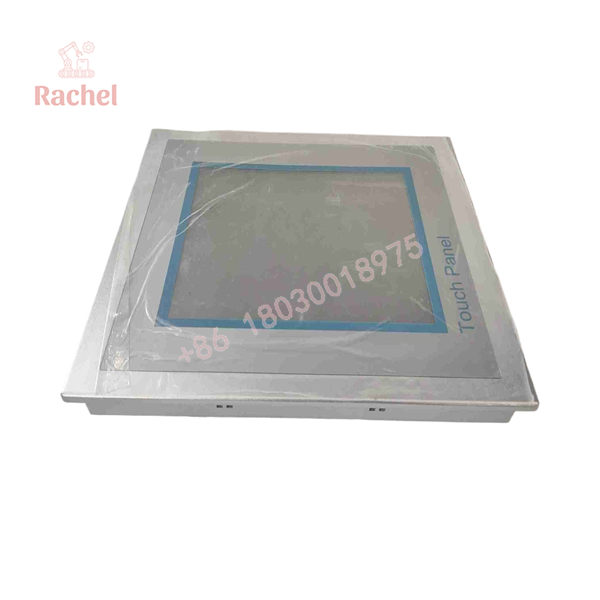
62K-NHC0-DH
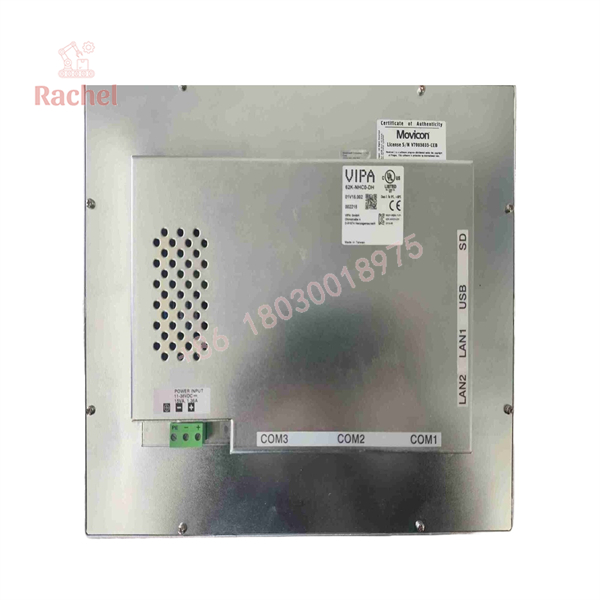
62K-NHC0-DH
Field Application & the “Trench” Experience
A machine builder has a packaging line that has been operating for years with a VIPA TP 610LC. The PLC is healthy. The field I/O is healthy. The problem is the operator terminal: the display intermittently stops responding, and eventually the HMI fails to boot.
The maintenance team finds a replacement labeled 62K-NHC0-DH. That is the easy part.
The difficult part comes next.
The original application was created for the Windows CE/Movicon environment. Before installation, the technician needs to verify that the project backup, Movicon runtime, communications driver, and PLC connection settings are available. Installing a physically compatible panel without the original application data does not restore the machine’s operator interface.
That is the reality with obsolete HMIs. The hardware is only half the spare. The application environment is the other half.
Specific Application Scenarios
- Packaging-machine operator stations using legacy PLC/HMI architectures.
- Conveyor and material-handling control panels requiring a replacement 4:3 touchscreen.
- Process-skid local operator interfaces communicating with legacy PLCs through Ethernet or serial links.
- Machine-builder equipment installed before migration to modern VIPA/Yaskawa HMI platforms.
Transparency SOP: QA & Testing
For a used or surplus 62K-NHC0-DH, I would use the following receiving checklist:
Hardware identification
- Confirm
62K-NHC0-DH. - Verify TP 610LC identification.
- Photograph the rear label and serial number.
- Record hardware revision where available.
Display test
- Check the complete LCD for dead pixels, discoloration, uneven illumination, and backlight problems.
- Test touchscreen response across the entire active area.
Interface test
- Verify Ethernet ports.
- Test serial interfaces where appropriate.
- Check USB operation.
- Confirm SD/MMC functionality if required by the application.
Boot test
- Power the HMI and confirm that Windows Embedded CE starts normally.
- Check for abnormal boot delays, filesystem errors, or repeated restarts.
Application test
- Where a compatible project is available, load the customer’s actual application or a representative test project.
- Verify touchscreen input, screen changes, alarms, PLC communications, and data display.
Classic Automation currently categorizes its 62K-NHC0-DH inventory as Used/Refurbished and states that its surplus parts undergo a testing procedure before shipment. Its listing also distinguishes factory-new, new-sealed, opened-package, and refurbished condition categories.
The Veteran’s Tech Trap Guide
⚠️ Trap #1 — Confusing the DH and CB versions
The 62K- is the TP 610LC running Windows CE 6.0 Core with Movicon Basic. The related 62K-NHC0-CB is the TP 610LC+ version with Windows CE 6.0 Professional and Movicon CE Standard. Those are not simply cosmetic suffixes.
PRO TIP: Match the suffix to the original panel before purchasing.
⚠️ Trap #2 — Forgetting the application project
A replacement HMI with the correct hardware does not necessarily contain the customer’s machine application. Preserve the original project files, runtime information, communication configuration, and any required licenses before the old panel becomes completely inaccessible.
⚠️ Trap #3 — Assuming the newer replacement is mechanically identical
VIPA USA states that the obsolete 62K-NHC0-DH has been replaced by the 62M-JID0-CB TP 612C. That is useful for lifecycle planning, but do not assume identical panel dimensions, connectors, software, or cutout requirements.
⚠️ Trap #4 — Treating Ethernet as the only communication path
The original panel supports serial communications and can use an optional MPI/PROFIBUS-DP interface. If the machine relies on one of those legacy links, replacing the HMI with a modern Ethernet-only terminal can turn a simple display replacement into a controls retrofit.
Dynamic FAQ
What is VIPA 62K-NHC0-DH?
It is the VIPA TP 610LC 10-inch industrial touch panel, part number 62K-NHC0-DH. It uses a Cortex-A8 1000 MHz processor, Windows Embedded CE 6.0 Core, and Movicon 11 CE Basic.
What is the display resolution?
The TP 610LC uses a 1024 × 768 pixel TFT display with a 4:3 aspect ratio. The documented diagonal size is 10 inches.
Does the 62K-NHC0-DH have Ethernet?
Yes. The documented configuration includes two RJ45 Ethernet interfaces, in addition to RS232, RS422/485, and USB-A connectivity.
Is the 62K-NHC0-DH obsolete?
Yes. VIPA USA currently identifies it as obsolete and names the 62M-JID0-CB TP 612C as the replacement product.
Can I replace it with the 62K-NHC0-CB?
Do not assume so. The DH and CB versions use different Windows CE editions and Movicon runtime configurations. If the existing application depends on specific runtime functionality, the suffix must be matched carefully.
Is New Surplus 62K-NHC0-DH genuine?
Condition must be established from the actual unit and packaging. “New Surplus,” “New in Original Package,” “New Without Package,” and “Used/Refurbished” are materially different inventory classifications. Request actual photographs, the nameplate, serial number, and packaging condition before treating a unit as unused surplus. Classic Automation explicitly separates these condition categories in its inventory policy.
What warranty should I request?
Warranty depends on the supplier and condition. As one reference point, Classic Automation states that its surplus parts and repairs carry a 1-year warranty, while other secondary-market suppliers may offer different coverage. The purchase order should specify the exact warranty rather than relying on a generic “tested” statement.

 Start Chat


