





Description
Product Introduction & Engineering Value
The Yokogawa AIP831-101 is a dedicated operator-interface component rather than a generic USB keyboard. Its eight-loop control arrangement is intended for CENTUM VP Desktop Type HIS stations where operators need direct interaction with multiple control-loop faceplates.
The “-101” configuration matters when replacing an existing unit. Yokogawa’s suffix documentation defines “-1” as the version with a mode-selection switch, while the following “1” identifies the specified operation-confirmation key type. The exact suffix and option configuration should therefore be matched against the keyboard nameplate and existing HIS configuration before ordering.
Technical Specifications
| Specification | AIP831-101 |
|---|---|
| Operation | Eight-loop simultaneous operation |
| System | Yokogawa CENTUM VP Desktop Type HIS |
| Keyboard Type | Flat keyboard |
| Loop Control Keys | 8 |
| Touch Sensor | Bare-hand touch sensing |
| PC Connectors | 2 × USB Type-A |
| Keyboard USB | USB 2.0, full-speed, bus-powered |
| Sound USB | USB 1.1, full-speed, bus-powered |
| Input Voltage | 5 V ±5% |
| Maximum Consumption | 1 A |
| Operating Temperature | 5 to 40 °C |
| Storage/Transport Temperature | -20 to 60 °C |
| Humidity | 20–80% RH, non-condensing |
| Weight | Approx. 2.0 kg without VESA bracket; 2.5 kg with VESA bracket |
| Installation Category | IEC 61010-1 Class I |
These specifications are documented by Yokogawa for the AIP831 family. Both USB connectors are required to remain directly connected to the PC; they are not simply interchangeable peripheral ports.
AIP831-101 Configuration
Yokogawa’s model code defines:
- AIP831-0 — without mode-selection switch
- AIP831-1 — with mode-selection switch
- 0 — operation confirmation key Type A
- 1 — operation confirmation key Type B
- /VESA — VESA bracket option
- /EIM — English instruction manual
- /JIM — Japanese instruction manual
Therefore, AIP831-101 should be treated as a configuration-specific ordering code, not merely an alternate spelling of the base AIP831 model.
Field Application & “Trench” Experience
A typical application is a CENTUM VP control-room workstation handling several regulatory loops from one Desktop Type HIS. An operator can use the dedicated eight-loop controls while the corresponding instrument faceplate is highlighted through the touch-sensor function.
Three practical scenarios are particularly relevant:
- Process-unit operator stations — direct access to several loops without relying exclusively on mouse navigation.
- Existing CENTUM VP workstation replacement — useful when an original AIP831 keyboard develops failed keys, USB faults, or degraded touch sensing.
- Control-room hardware refurbishment — retaining the existing Yokogawa operator-interface architecture instead of redesigning the HIS workstation around a generic keyboard.
Yokogawa documentation also states that only one AIP831 keyboard can be used per Desktop Type HIS.
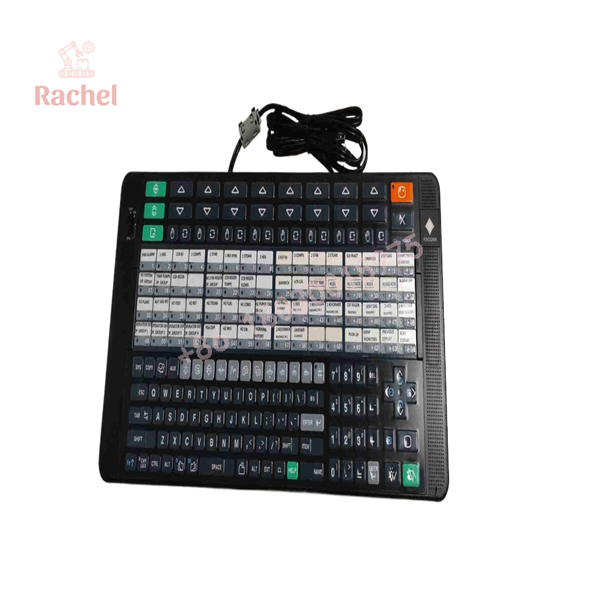
AIP831-101
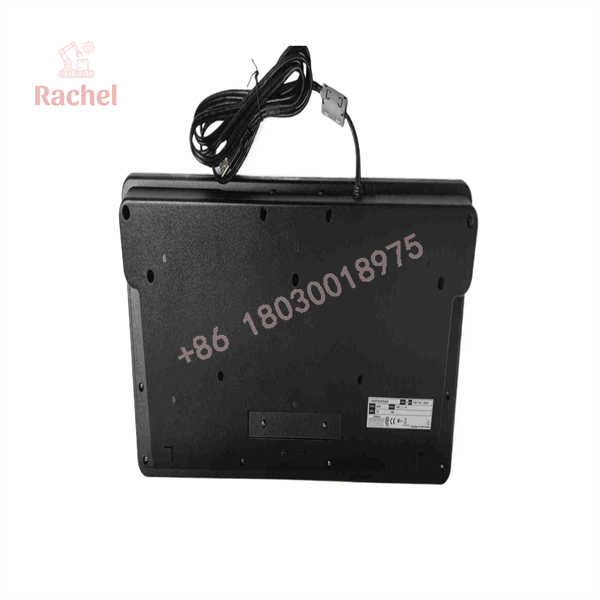
AIP831-101
Transparency SOP: QA & Testing
For New Surplus AIP831-101 inventory, a practical receiving and inspection procedure should include:
- Nameplate verification — confirm AIP831-101 and compare the complete suffix/options with the customer’s required configuration.
- Physical inspection — check keyboard housing, keys, USB cables/connectors, mounting hardware, and VESA interface if supplied.
- USB verification — test both USB connections independently and confirm that the keyboard and sound functions enumerate correctly.
- Key-function test — verify loop-control keys, mode-selection function, and operation-confirmation functions against the applicable configuration.
- Touch-sensor test — confirm bare-hand touch detection.
- Alarm/sound test — verify the USB speaker and electronic buzzer functions where the test environment supports them.
- Burn-in/functional test — operate the unit continuously before shipment when required by the customer’s QA procedure.
New Surplus authenticity should be established from the physical Yokogawa identification and documentation, not simply from a seller’s “new” label. For refurbished units, request the refurbishment/test report and clearly distinguish replaced components from original hardware.
Veteran’s Tech Trap Guide
⚠️ Trap #1 — Buying the base AIP831 instead of the required suffix.
The AIP831 family has distinct suffix codes for the mode-selection switch and operation-confirmation key. Match the complete ordering code before approving a replacement.
⚠️ Trap #2 — Connecting only one USB cable.
The AIP831 uses two USB Type-A connections: one for keyboard operation and one for the sound function. Yokogawa specifies that both connectors must be connected directly to the computer.
⚠️ Trap #3 — Ignoring the software package.
The hardware alone does not establish the eight-loop operating function. Yokogawa specifies an associated Eight-loop Simultaneous Operation Package; the applicable package depends on the CENTUM VP release. For older systems, Yokogawa documented LHS1140 with the standard operation/monitoring function; later CENTUM VP Release 6 documentation identifies VP6H1140.
Dynamic FAQ
What is the Yokogawa AIP831-101 used for?
It is an operation keyboard for eight-loop simultaneous operation on a Yokogawa CENTUM VP Desktop Type HIS. It provides eight dedicated loop-control keys and touch sensing for instrument faceplate highlighting.
Is a DCS I/O module?
No. It is an operator-interface keyboard, not an FCS I/O module, controller, or communication card. Its interface to the workstation is through USB.
Does AIP831-101 require two USB connections?
Yes. The keyboard function uses USB 2.0 full-speed, while the sound function uses USB 1.1 full-speed. Yokogawa specifies two USB Type-A connections and requires both to be connected directly to the PC.
Can I replace an AIP831 with any AIP831 variant?
Not without checking the complete code. The AIP831 family uses suffixes for the mode-selection switch and operation-confirmation key, plus optional VESA and documentation codes. Verify the existing nameplate before substitution.
What should I verify when purchasing New Surplus AIP831-101?
Request clear photographs of the Yokogawa nameplate, complete ordering code, connectors, and physical condition. For a New Surplus unit, confirm that the hardware has not been represented as refurbished, repaired, or re-labeled. Functional USB, key, touch-sensor, and sound testing should also be available upon request.
What warranty should apply to a New Surplus AIP831-101?
Warranty terms depend on the supplier rather than Yokogawa’s generic hardware specification. A purchase quotation should explicitly state the warranty period, return conditions, and whether the warranty covers key functions, USB interfaces, touch sensing, and sound operation.

 Start Chat


