





Description
Key Technical Specifications
| Parameter | Value |
|---|---|
| Manufacturer | ABB |
| Part Number | 3BHE037864R0107 |
| Alternate Name | UFC911B107 |
| Functional Name | CVMI2B / main control board / measurement board |
| Reported Supply Voltage | 24 V DC |
| Reported Input Range | 20.4 V DC to 28.8 V DC |
| Reported Digital Inputs | 8 channels |
| Reported Analog Inputs | 4 channels |
| Reported Communications | Ethernet, RS-485, PROFIBUS-DP |
| Reported Protection | IP20 |
| Reported Operating Temperature | 0 C to +55 C |
| Warranty Seen in Market Listings | 1 year |
Product Introduction & Supply Chain Strategy
ABB 3BHE037864R0107 is a control board used in ABB industrial automation and drive-related systems. Public listings describe it as a main control board, analog output board, or CVMI2B measurement board, so it should be matched to the exact installed application before replacement.
Buying this as New Surplus is a smart TCO decision when the installed platform is aging. It helps avoid stock-outs, supports last-time-buy planning, and reduces the risk that a low-cost alternative fails under lead time variability or field conditions.
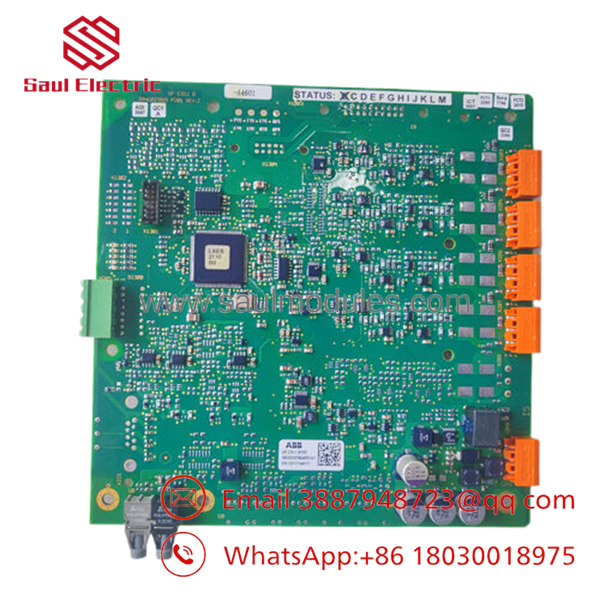
- 3BHE037864R0107
Installation & Configuration Guide
Stage 1: Pre-Installation
- Apply lock-out/tag-out and verify zero energy.
- Wear an ESD strap and use insulated hand tools.
- Photograph the board, connectors, DIP switches, and wiring terminations.
- Record the existing firmware, parameter set, and cabinet labeling.
Stage 2: Removal
- Remove power and confirm discharge before touching the module.
- Release any retaining screws or latches.
- Pull the board straight out to protect backplane pins.
- Inspect the slot and connector edges for contamination or damage.
Stage 3: Installation
- Verify the replacement part number and revision.
- Duplicate DIP and jumper settings exactly.
- Reconnect wiring to the documented terminals only.
- Seat the module fully and secure all retaining hardware.
Stage 4: Power-On & Testing
- Check 24 V rails for shorts before energizing.
- Power up and confirm normal LED behavior, especially RUN and ERR.
- Verify communication with the controller and field devices.
- Download logic or parameters only after the hardware passes basic checks.
Firmware/Software Versions & Upgrade Notes
A verified public firmware baseline for 3BHE037864R0107 was not available in the reviewed sources, so the safest rule is to preserve the existing site firmware and configuration.
Do not mix firmware versions during a hardware swap unless the ABB system documentation explicitly allows it, because version mismatches can create protocol faults or startup problems.
If you must change firmware, treat it as a controlled maintenance event, not a routine spare-part swap.
Frequently Asked Questions (FAQ)
Is this part really new? Market listings for this model describe it as new original inventory or original package, which is the correct condition target for a critical spare.
Why is it cheaper than OEM new but higher than a refurb-style offer? New Surplus usually sits between OEM list pricing and low-trust inventory because it preserves genuine OEM condition while avoiding full factory pricing.
Is it obsolete or EOL? It appears mainly in spare-part channels rather than active product catalogs, so treat it as lifecycle-sensitive and plan buffer stock plus a last-time-buy strategy.
Can I hot-swap it? Do not assume hot-swap capability. Isolate power, verify discharge, and follow the original ABB replacement procedure for the cabinet.
Will the configuration carry over automatically? Not always. Back up parameters, wiring references, and any site-specific settings before removal.
What warranty should I expect? Public market listings commonly show a 1-year warranty, but the exact term depends on supplier and channel.
How many should I stock? For a critical installed base, keep 1 to 2 units on-site and coordinate vendor consolidation or cross-site sharing if multiple plants use the same platform.

 Start Chat


