





Description
Key Technical Specifications
- Model: TU830V1
- Product ID: 3BSE013234R1
- Manufacturer: ABB
- Product type: Extended module termination unit
- System family: ABB S800 I/O
- Signal terminals: 2 x 16
- I/O channels: Up to 16
- Rated voltage: 50 V
- Maximum current per channel: 2 A
- Process voltage groups: 2 isolated groups
- Fuse rating: 6.3 A per group
- Mounting: DIN rail
- Protection class: IP20
- Operating temperature: 0 to +55°C
- Weight: About 0.2 to 0.28 kg
Product Introduction
ABB TU830V1 3BSE013234R1 is an extended module termination unit for ABB S800 I/O systems. It provides the field wiring interface, distributes the ModuleBus, and supports up to 16 I/O channels with two isolated process voltage groups.
This is a passive cabinet component, so the main job is clean field termination and correct mechanical fit. The mechanical keying, fuse protection, and 50 V rating make it a standard choice for ABB S800 I/O panel work where installed-base compatibility matters.
Installation & Configuration Guide
Stage 1: Pre-Installation Preparation
- Notify operations and isolate the cabinet. Lock out/tag out the supply and wait at least 5 minutes for capacitor discharge.
- Gather tools: ESD strap, PH1 screwdriver, multimeter, wire labels, and a smartphone for photos.
- Back up the running configuration, record terminal numbers, and photograph the existing wiring, keying, and any jumper positions.
- Confirm the exact model and suffix before opening the panel.
Stage 2: Removing the Old Module
- Remove the front cover or access bezel.
- Label every wire before disconnecting it.
- Release the locking tabs and pull the unit out straight.
- Inspect the mounting base, terminals, and bus contacts for dust, bent pins, or heat damage.
- Keep the old unit available until the replacement is fully tested.
Stage 3: Installing the New Module
- Put on the ESD strap and verify the part number matches exactly.
- Match the mechanical keying exactly. That is the detail people miss when they are trying to move fast.
- Install the unit and confirm it is fully seated and latched.
- Reconnect field wiring using the original labels and terminal plan.
- Verify the checklist: [] keying matched, [] wiring secured, [] latch locked.
Stage 4: Power-On & Testing
- Use a multimeter to verify the relevant supply rail is free of shorts before energizing.
- Power the cabinet up in stages.
- Confirm the host I/O module recognizes the MTU and the channel mapping is correct.
- Run a dry functional check on the connected I/O points.
- Time estimate: 5–10 minutes for swap, 10–15 minutes for verification.
- ⚠️ If the module is not recognized, check seating, keying, and field wiring first.
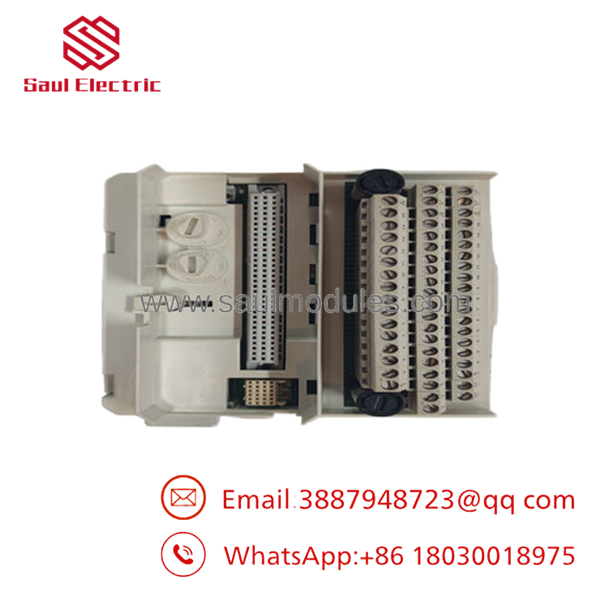
- TU830V1
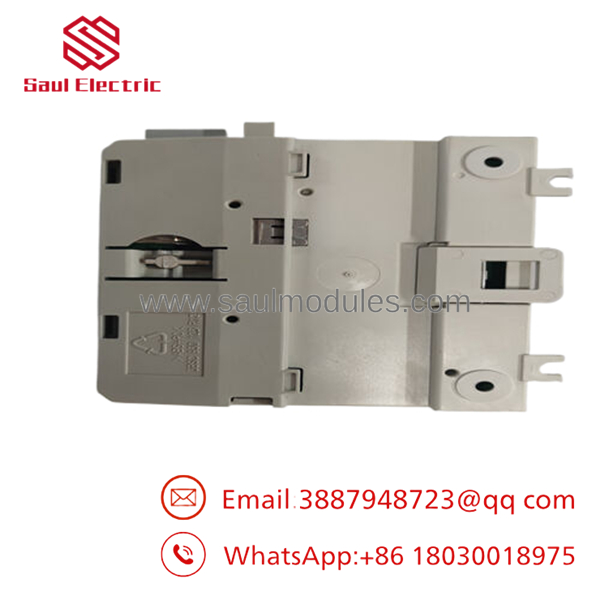
- TU830V1
Frequently Asked Questions
Q: Can I hot-swap the TU830V1?
A: I would not treat it as a hot-swap part. It is passive, but the surrounding I/O and field wiring still deserve a full power-down before you touch it.
Q: Is this model obsolete?
A: Treat it as legacy ABB S800 I/O hardware. Stock is typically limited, so the exact suffix and condition matter.
Q: What does TU830V1 actually do?
A: It terminates the field wiring for ABB S800 I/O modules and distributes the ModuleBus. In practice, it is the cabinet-side connection point for the I/O module.
Q: Is a direct replacement for TU810V1?
A: No, not automatically. The is an extended MTU, so you must verify the module family, keying, and wiring layout before swapping it in.
Q: Why is surplus pricing lower than OEM list price?
A: Because surplus is usually old stock, not current factory production. Lower price is fine only if the seller can prove identity and physical condition.
Q: What should I check before ordering?
A: Confirm the exact suffix, the I/O family, the 50 V rating, and the key position. If any one of those is wrong, you can waste a shift on rework.
Q: Is it new or refurbished?
A: Ask for that in writing. I would only accept New Original, New Surplus, or tested refurbished if the seller provides photos and traceability.

 Start Chat


