





Description
Key Technical Specifications
- Model: ABB UNITROL1020
- Manufacturer: ABB
- Product Category: Automatic Voltage Regulator (AVR)
- Application: Synchronous generator excitation systems
- Control Type: Digital excitation controller
- Rated Supply Voltage: 24 V DC control supply
- Communication Interfaces: Ethernet, Modbus RTU/TCP (configuration dependent)
- Control Functions: Voltage regulation, reactive power control, power factor control
- Configuration Software: ABB UNITROL commissioning tools
- Operating Temperature: Typically −20 to +55 °C (verify exact hardware variant)
- Standards: Designed for industrial generator control applications; verify project-specific IEC requirements
- Mounting: Industrial cabinet installation
Product Introduction
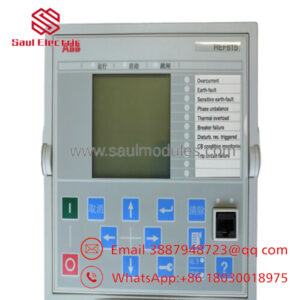
ABB UNITROL1020 is a digital Automatic Voltage Regulator (AVR) and excitation controller designed for synchronous generator excitation applications. It manages generator terminal voltage, reactive power, and power factor control in power generation systems, including industrial plants and utility applications.
The UNITROL1020 provides configurable excitation control, communication integration, and commissioning functions required for modern generator systems. In field replacement projects, engineers should verify firmware revision, I/O configuration, and excitation system parameters before installation to avoid commissioning delays.
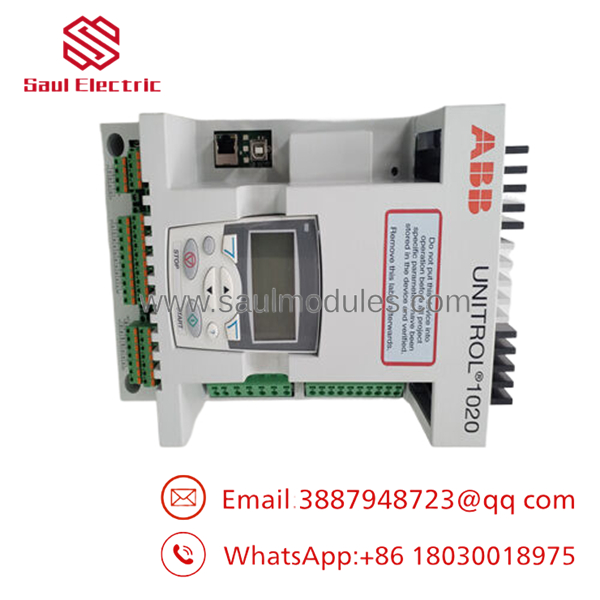
- UNITROL1020
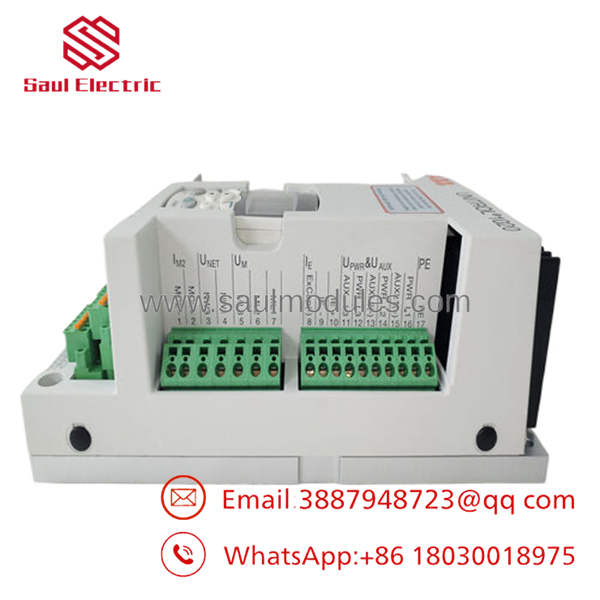
- UNITROL1020
Installation & Configuration Guide
Stage 1: Pre-Installation Preparation (Approx. 10 minutes)
⚠️ Safety First:
- Notify plant operations about the planned shutdown window.
- Verify generator is in a safe condition.
- Apply lockout/tagout (LOTO) to control and excitation power sources.
- Wait at least 5 minutes for capacitor discharge before touching terminals.
Tools Required:
- ESD wrist strap
- PH1 screwdriver
- Multimeter
- Wire labels
- Smartphone/camera for wiring documentation
Data Backup:
- Export existing UNITROL configuration if communication is available.
- Record controller firmware version.
- Photograph all terminal wiring and parameter settings.
- Document communication settings, IP address, and control mode.
Stage 2: Removing the Old Module (Approx. 10 minutes)
- Remove the front cover or cabinet access panel.
- Label all wires before disconnecting. Do not pull terminals by force.
- Disconnect excitation, sensing, communication, and auxiliary wiring carefully.
- Release mounting clips or rack locking hardware.
- Pull the controller straight out to protect connectors.
⚠️ Note: Keep the removed UNITROL1020 available until the replacement unit completes commissioning. Wiring references are often needed during startup.
Stage 3: Installing the New Module (Approx. 10 minutes)
- Wear ESD protection before handling the controller.
- Verify the replacement model and hardware version match the original unit.
- Configuration Clone (Critical):
- Copy original parameter settings.
- Verify voltage sensing configuration.
- Confirm communication parameters.
- Match protection and control limits.
- Install the controller into the cabinet/rack. Ensure full mechanical seating.
- Reconnect wiring using correct terminal torque.
Self-Checklist:
[ ] Model number verified
[ ] Firmware compatibility checked
[ ] Wiring confirmed
[ ] Communication settings restored
[ ] Mounting hardware secured
Stage 4: Power-On & Testing (Approx. 20–30 minutes)
Pre-Power Check:
- Check 24 V DC supply polarity.
- Verify no short circuit on control power.
- Confirm sensing wiring is correct.
Power-On Steps:
- Energize the controller supply only.
- Check LED indicators and startup sequence.
- Connect commissioning software.
- Verify firmware version and parameter upload.
- Restore saved configuration.
- Perform excitation simulation or controlled startup test.
- Verify:
- Generator voltage regulation
- Reactive power response
- Communication status
- Alarm history
⚠️ Troubleshooting Note:
If communication fails, check IP configuration, fieldbus parameters, and firmware compatibility. If excitation output is incorrect, verify sensing polarity and control mode before changing parameters.
Frequently Asked Questions (FAQ)
Q1: Can ABB be hot-swapped under power?
No. The should normally be replaced with power removed. Disconnecting or inserting control hardware under power can damage electronic circuits and create unexpected excitation behavior. Always follow the plant shutdown procedure.
Q2: Is ABB an obsolete controller?
ABB is an established excitation controller platform. Availability depends on regional stock and project requirements. For replacement projects, confirm exact hardware revision, firmware version, and excitation configuration before ordering.
Q3: Will I lose the generator control parameters when replacing the ?
The controller hardware does not automatically preserve your site configuration after replacement. Export the existing configuration before removal whenever possible. If no backup exists, parameters may need to be rebuilt from commissioning records.
Q4: What should I check before ordering a replacement ?
Verify:
- Exact model designation
- Hardware revision
- Firmware version
- Communication interface
- Terminal wiring
- Excitation transformer and generator ratings
A similar-looking controller may not be a direct replacement without configuration verification.
Q5: Why is surplus stock priced lower than OEM list price?
New surplus units are typically unused inventory from previous projects, discontinued stock, or excess procurement. Condition must be verified through inspection, serial number checks, and functional testing before installation.
Q6: What quality checks should be performed on a used or surplus ?
A proper inspection should include:
- Serial number verification
- Visual inspection for corrosion or physical damage
- Power-up test
- Communication test
- I/O simulation
- Firmware identification
- Functional load testing where applicable
A test report with photos and measured results should be requested before purchase.
Q7: What is the most common replacement mistake with UNITROL controllers?
Firmware and parameter mismatch. I have seen generator projects lose commissioning time because a replacement controller powered up correctly but rejected the existing configuration. Always document the original settings before removal.

 Start Chat


