





Description
Product Introduction & Engineering Value
The Allen-Bradley 1756-DHRIO is a ControlLogix communication module designed to bridge legacy Data Highway Plus (DH+) and Remote I/O (RIO) networks into a ControlLogix architecture. It is particularly valuable in plants where newer ControlLogix controllers must continue communicating with established PLC-5, SLC, or RIO-based equipment.
The module provides two DH+ ports and two Remote I/O ports, allowing a migration to ControlLogix without immediately replacing every legacy device on the plant floor. Rockwell identifies the 1756-DHRIO as a discontinued product, with the 1756-DHRIO/B listed as the replacement version.
Technical Specifications
- Manufacturer: Allen-Bradley / Rockwell Automation
- Catalog Number: 1756-DHRIO
- Product Family: ControlLogix 1756
- Module Type: DH+/RIO communication interface
- DH+ Ports: 2
- Remote I/O Ports: 2
- Backplane: ControlLogix chassis
- Network 1: Data Highway Plus
- Network 2: Remote I/O
- Primary Function: Communication between ControlLogix and legacy Allen-Bradley networks
- Configuration: Software-configured through the ControlLogix system
- Status: Discontinued
- Replacement: 1756-DHRIO/B
Network architecture matters
The 1756-DHRIO is useful specifically because it allows a ControlLogix system to coexist with older Allen-Bradley infrastructure. It should not be confused with an EtherNet/IP communication module such as the 1756-EN2T or 1756-ENBT.
Its value is in legacy network integration.
Field Application & the “Trench” Experience
A plant has migrated its main PLC from an older platform to ControlLogix, but several remote I/O drops and legacy drives still depend on Remote I/O. Replacing the entire field network would require rewiring, engineering changes, downtime, and validation.
Instead, the maintenance team installs a 1756-DHRIO in the ControlLogix chassis and maintains the existing RIO architecture.
That is the practical reason this module remains useful in legacy modernization projects. It provides a controlled transition between the newer ControlLogix controller and older plant-floor infrastructure.
Specific application scenarios
- PLC-5 migration projects — Maintaining communication with legacy PLC-5 equipment while the supervisory/control layer moves to ControlLogix.
- Remote I/O retrofit — Keeping existing 1771 Remote I/O architecture operational during a phased controls upgrade.
- Legacy DH+ network integration — Allowing ControlLogix to exchange data with established DH+ devices during a migration period.
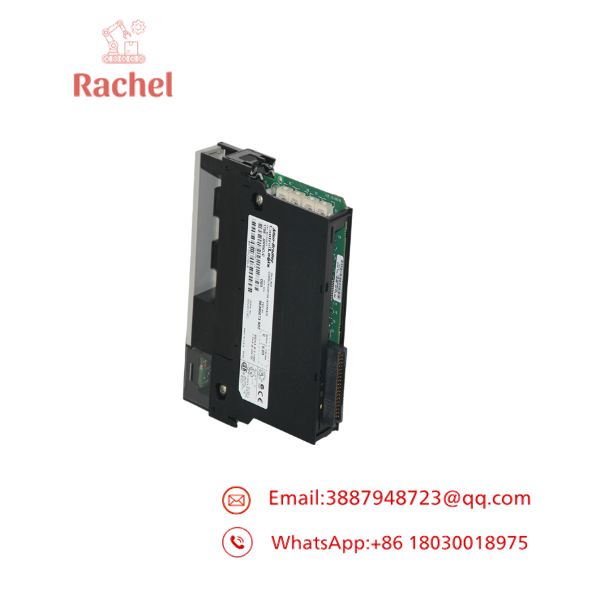
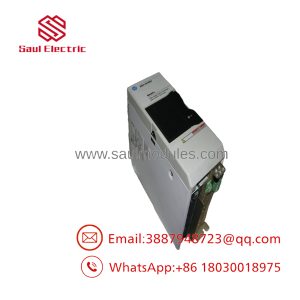
1756-DHRIO
Transparency SOP: QA & Testing
A proper 1756-DHRIO test should verify network communication, not merely module power-up.
- Catalog verification — Confirm the module is marked 1756-DHRIO and document its series/revision.
- Visual inspection — Check the chassis connector, network connectors, housing, and front-panel indicators.
- Backplane test — Install the module in a compatible ControlLogix chassis and verify recognition.
- DH+ test — Connect to a known-good DH+ network and verify communication.
- RIO test — Verify Remote I/O communication with a compatible scanner/adapter configuration.
- Status diagnostics — Check module status indicators and controller diagnostics for communication faults.
- Extended operation — Allow the module to communicate continuously before releasing it as a production spare.
- Record results — Document firmware/revision, tested network functions, and final condition.
For a refurbished unit, ask whether both DH+ and RIO functions were tested. A power-up test alone is insufficient.
The Veteran’s Tech Trap Guide
⚠️ Trap #1 — Confusing DH+ with EtherNet/IP.
The 1756-DHRIO is not an Ethernet communication module. If the application requires EtherNet/IP, a different ControlLogix communication module is required.
PRO TIP: Document every existing network before modernization: DH+, RIO, EtherNet/IP, node addresses, baud rates, and termination arrangements.
⚠️ Trap #2 — Assuming the 1756-DHRIO and 1756-DHRIO/B are identical for every application.
Rockwell identifies the 1756-DHRIO/B as the replacement for the discontinued 1756-DHRIO. For a legacy system, verify firmware, configuration, and application compatibility before substitution.
⚠️ Trap #3 — Forgetting RIO configuration.
Remote I/O systems depend on rack addressing and communication configuration. Replacing the module without documenting the existing RIO setup can turn a simple hardware replacement into a troubleshooting exercise.
⚠️ Trap #4 — Testing only the DH+ side.
A module may communicate correctly on DH+ while an RIO application has a separate configuration or wiring issue. Test the actual function required by the plant.
Dynamic FAQ
What is Allen-Bradley 1756-DHRIO?
The 1756-DHRIO is a ControlLogix communication module providing two DH+ ports and two Remote I/O ports for integration with legacy Allen-Bradley networks.
What networks does 1756-DHRIO support?
It supports Data Highway Plus (DH+) and Remote I/O (RIO). It is intended for ControlLogix systems that need to communicate with legacy Allen-Bradley infrastructure.
Can 1756-DHRIO connect a ControlLogix PLC to a PLC-5?
Yes. One of its principal applications is integrating ControlLogix systems with legacy PLC-5/DH+ and Remote I/O architectures, subject to the specific network configuration.
Is 1756-DHRIO discontinued?
Yes. Rockwell lists the original 1756-DHRIO as discontinued and identifies 1756-DHRIO/B as its replacement.
What should I verify before purchasing new-surplus 1756-DHRIO?
Confirm the catalog number, series/revision, firmware compatibility, and actual testing of the required DH+ and/or RIO interfaces. Request photographs of the actual module rather than relying exclusively on stock images.
Is refurbished stock suitable for a production ControlLogix system?
It can be, provided the module has been properly tested. For a critical legacy network, request documented backplane, DH+, and RIO functional testing and a written warranty.
What warranty should I expect?
Warranty is supplier-specific. For new-surplus or refurbished 1756-DHRIO inventory, obtain the warranty period, test coverage, and return conditions in writing before purchase.

 Start Chat


