





Description
Product Introduction
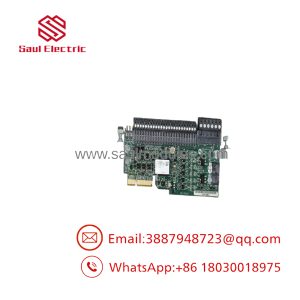
The Allen-Bradley 1784-PCIC is a PCI-bus communication card designed to bridge industrial PCs, HMI workstations, and SoftLogix controllers directly to a ControlNet network. Placed into a standard PCI slot on an industrial computer chassis, it allows supervisory software to perform high-speed control data transfers, programming, and real-time data collection across ControlNet media.
Featuring dual BNC coax connectors, the 1784-PCIC supports media redundancy across ControlNet Trunk line A and B. It also incorporates a front-facing Network Access Port (NAP) for temporary connection with a portable PC running RSLinx. This card enables legacy IPC-based control architectures to maintain deterministic, real-time communication with PLC-5, SLC 500, and ControlLogix systems without requiring external gateway hardware.
Key Technical Specifications
| Parameter | Value |
| Host Interface | 32-bit Universal PCI Bus (Fits 3.3V and 5V PCI slots, PCI Rev 2.2 compliant) |
| Network Protocol | ControlNet (Deterministic 5 Mbps CAN-based protocol) |
| Physical Network Media | RG-6 Quad-Shield Coaxial Cable |
| Connectors | Dual BNC Coax Ports (Channel A & B Redundancy) + 1 RJ45 NAP (Network Access Port) |
| System Power Consumption | 0.8 A @ 5VDC (Supplied directly from PCI slot backplane) |
| Operating Temperature | 0°C to 60°C (32°F to 140°F) |
| Operating Systems | Windows NT 4.0, Windows 2000, Windows XP, Windows 7 32-bit |
| Supported Software | RSLinx Classic, Studio 5000 / RSLogix 5000, SoftLogix 5800, FactoryTalk View SE/ME |
| Max Network Distance | Up to 1,000 meters (3,280 ft) per coax segment without repeaters |
Application Scenarios & The “Trench” Experience
The Trench Story
During an emergency downtime call at an automotive paint booth, an old Windows XP industrial PC running SoftLogix 5800 fails to connect to its remote ControlLogix 1756-CNBR I/O racks. Diagnostics in RSLinx show the 1784-PCIC card is no longer recognized on the PCI bus due to a failed onboard controller chip. Replacing the 1784-PCIC card with a bench-tested replacement, re-installing the 1784-PCIC driver in Device Manager, and re-configuring the ControlNet MAC ID in RSLinx restores 5 Mbps deterministic I/O scanning to the paint line without altering ladder logic or PLC code.
Specific Applications
- SoftLogix 5800 Controllers: Serves as the primary real-time I/O scanner interface for PC-based SoftLogix control systems running on industrial PCs.
- SCADA & HMI Workstations: Enables high-speed data acquisition from ControlLogix and PLC-5 processors to FactoryTalk View SE or Wonderware InTouch nodes.
- PC-Based Quality Control & Vision Processing: Transmits real-time inspection data and pass/fail triggers between vision inspection PCs and field controllers over ControlNet.
- Engineering Workstations: Provides a permanent high-bandwidth desktop connection for commissioning and managing large ControlNet schedules via RSNetWorx for ControlNet.
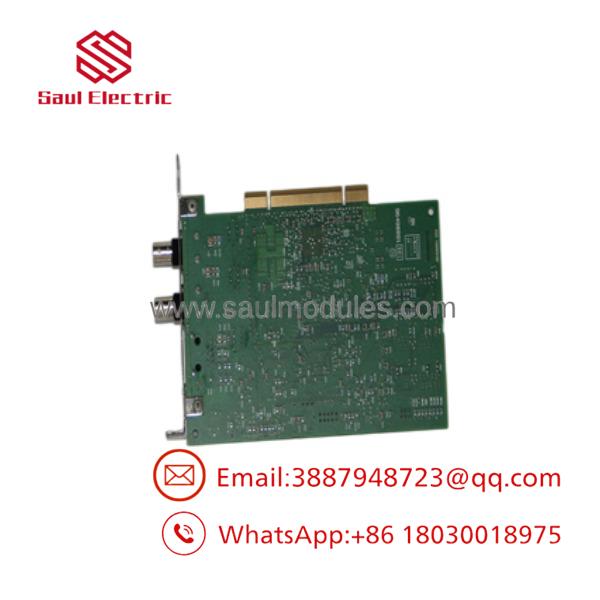
- 1784-PCIC
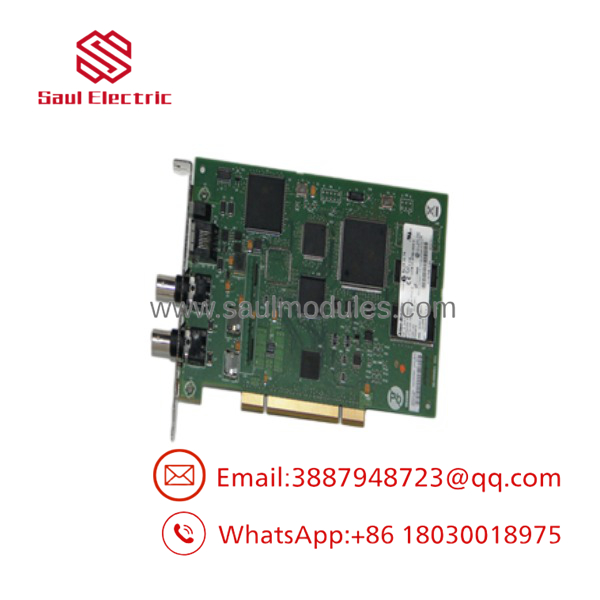
- 1784-PCIC
Transparency SOP: Quality Assurance & Testing
Every 1784-PCIC card undergoes full hardware detection and active network stress testing before joining our active inventory:
- PCI Gold Finger & Bracket Inspection: We clean and inspect PCI edge connector contacts for wear or scratches, verify bracket alignment, and inspect surface-mount capacitors.
- PC Bus Enumeration: The card is installed in a legacy industrial PC test rig to verify Windows Device Manager recognition, PCI IRQ assignment, and driver initialization.
- Dual-Channel Active ControlNet Test: The card is connected to a live ControlNet network loop (using RG-6 coax with 75\,\Omega BNC terminators) to test both Channel A and Channel B communication stability.
- RSNetWorx & RSLinx Pass-Through Test: We browse the ControlNet network tree in RSLinx, verifying active node scanning, packet transfer rates, and network keeper synchronization.
- NAP Port Test: The front RJ45 Network Access Port is verified using a 1784-PCC or 1784-RJC cable to ensure diagnostic connectivity.
The Veteran’s Tech Trap Guide
- ⚠️ Strictly 32-Bit Windows OS Compatibility: The 1784-PCIC driver architecture relies on 32-bit system drivers. It is NOT supported on 64-bit operating systems (such as Windows 10/11 64-bit or Windows Server 64-bit). If you are upgrading your PC to a modern 64-bit OS, you must replace the card with an Ethernet-based gateway (like the 1756-EN2T/1756-CN2B bridge or ProSoft gateway).
- ❗ Requires Universal / Legacy PCI Slots: The 1784-PCIC is a standard PCI card, NOT a PCI Express (PCIe) card. It will not fit into PCIe slots (x1, x4, x16). Ensure your industrial computer motherboard has a physical PCI expansion slot available.
- ⚠️ Always Install 75\,\Omega BNC Terminators: Like all ControlNet coax networks, both end points of the trunk segment MUST have 75\,\Omega BNC termination resistors installed. Operating the 1784-PCIC on an unterminated coax link causes signal reflection, packet drops, and intermittent “Bus Off” network errors.
- ❗ Match ControlNet MAC ID & Baud Settings: When replacing a card, always set the card’s ControlNet node address (MAC ID) correctly in RSLinx. If the replacement card defaults to a duplicate Node ID already active on the network, it will be blocked from joining the ControlNet keeper schedule.
Frequently Asked Questions
Q: What is the main difference between the 1784-PCIC and the 1784-PCICS?
- 1784-PCIC: Standard PCI ControlNet communication card used for data acquisition, HMI connectivity, and basic SoftLogix messaging.
- 1784-PCICS: Sub-model optimized specifically for high-performance SoftLogix deterministic I/O control with enhanced onboard buffer memory.
Q: Can I install the 1784-PCIC into a PCI Express (PCIe) slot using an adapter?
While physical PCI-to-PCIe adapters exist, Rockwell Automation does not support them for the 1784-PCIC. Driver timing constraints and IRQ latency through third-party adapters often cause communication dropouts on deterministic networks.
Q: Which driver is required in RSLinx for the 1784-PCIC card?
In RSLinx Classic, configure the driver under Configure Drivers -> 1784-PCIC/PCICS for ControlNet devices.
Q: What physical cable is used to connect the 1784-PCIC to ControlNet?
The card connects using standard RG-6 quad-shield coaxial cable terminated with BNC connectors, plugging into Channel A and/or Channel B ports on the card bracket.
Q: What NAP cable is used with the 1784-PCIC front connector?
The NAP port uses the 1784-RJC cable to connect a secondary computer or programming terminal directly to the card’s front access port.
Q: What warranty covers your surplus and refurbished 1784-PCIC cards?
Every 1784-PCIC communication card we ship includes our full 12-month replacement warranty. If a hardware fault or communication failure occurs under normal operating conditions within 365 days of purchase, we replace the unit immediately from stock or issue a full refund.

 Start Chat


