





Description
Product introduction and engineering value
The BB-ESR902 provides a practical migration path for equipment that still communicates through serial ports but needs to be accessed over an Ethernet LAN or WAN. Its two serial ports can be configured independently for supported interface modes and serial parameters, making it useful where replacing established instruments, controllers, or monitoring devices would require unnecessary changes to the control system.
The unit supports direct IP, virtual COM port, and paired communication approaches. These options can help integrate legacy devices with supervisory software, remote maintenance workstations, and data-collection applications. Actual compatibility depends on the host software, network architecture, and the serial protocol used by the connected equipment.
Technical specifications
| Parameter | Specification |
|---|---|
| Model | BB-ESR902 |
| Serial ports | 2 |
| Serial connector | DB-9 male, per port |
| Serial operating modes | RS-232, RS-422, RS-485 half-duplex, RS-485 full-duplex |
| Ethernet port | 1 × RJ45 female |
| Ethernet speed | 10/100 Mbps auto-detect |
| Supported network protocols | TCP/IP, UDP, ARP, DHCP, Telnet, HTTP, ICMP |
| Serial baud rate | 110 bps–230.4 kbps |
| Data bits | 5, 6, 7, or 8 |
| Parity | None, even, odd, mark, or space |
| Stop bits | 1, 1.5, or 2 |
| Power input | 9–48 VDC or 8–24 VAC |
| Power consumption | Approximately 340 mA at 12 VDC |
| Power connection | Removable four-terminal screw block |
| Serial buffer | 8 KB per port |
| Network memory | 48 KB |
| Operating temperature | −10°C to +80°C |
| Storage temperature | −20°C to +85°C |
| Humidity | 5–98% RH, as stated in the manual |
| Enclosure protection | IP30 |
| Approvals listed in manual | CE, FCC |
| Dimensions | Approximately 44.6 × 155.2 × 104.6 mm |
| Configuration methods | VLINX ESP Manager, embedded web interface, Telnet, or serial console |
The technical values above are based on the ESR90x manual, which covers the ESR902 alongside related models. Check the product label and the applicable revision documentation before finalizing a replacement specification.
Field applications and engineering context
Illustrative field scenario — legacy instrument access: A facility has serial instruments installed inside a control cabinet, while technicians need to retrieve readings from a maintenance workstation elsewhere on the plant network. An ESR902 can provide the Ethernet connection while preserving the instruments’ existing serial interfaces, provided the application protocol and serial settings are compatible.
Other potential applications include:
- Industrial instrumentation: Network access to compatible serial meters, analyzers, and monitoring instruments.
- Building and facility systems: Connecting supported legacy controllers to a supervisory computer over an IP network.
- Remote equipment diagnostics: Giving maintenance software access to serial devices through a virtual COM port or direct TCP/UDP connection.
The ESR902 is a serial-to-network transport device. It does not automatically translate an arbitrary field protocol into another industrial protocol such as PROFINET or EtherNet/IP. Protocol compatibility must be established separately.
QA and testing SOP
For a replacement or spare-parts purchase, use an inspection process that distinguishes physical condition from proven functionality.
- Identity check: Confirm the BB-ESR902 model marking, serial number, connector arrangement, and hardware revision.
- Visual inspection: Check the housing, DB-9 connectors, Ethernet jack, power terminals, LEDs, and mounting features for damage or corrosion.
- Power-up test: Apply a supply within the documented range and check the power and ready indicators.
- Ethernet test: Verify link negotiation and confirm that the unit can be discovered or reached using its configured network settings.
- Serial-port test: Test both ports independently with compatible equipment or a suitable serial test setup.
- Configuration test: Verify interface mode, baud rate, data bits, parity, stop bits, flow control, and TCP/UDP settings.
- End-to-end test: Confirm data exchange using the intended host application and connected device.
A seller’s visual inspection alone does not establish that both serial ports work. Ask for a functional test report if the unit will be installed in a production-critical system.
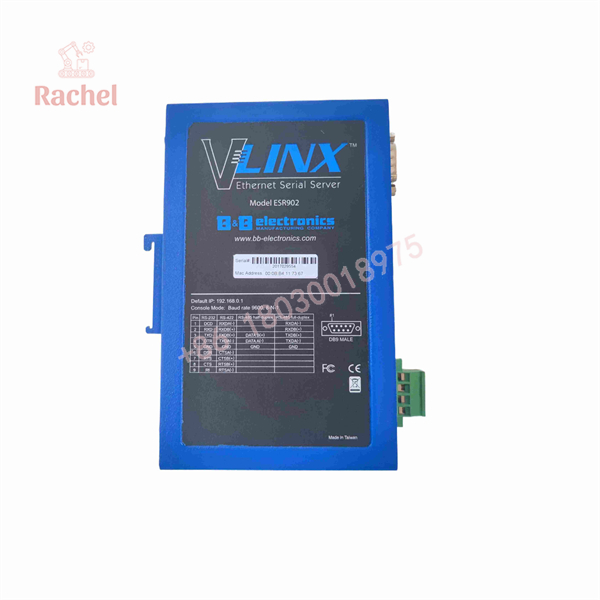
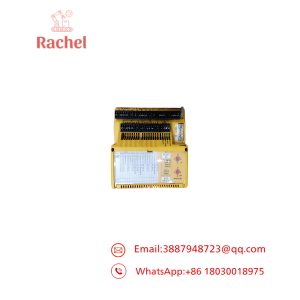
BB-ESR902
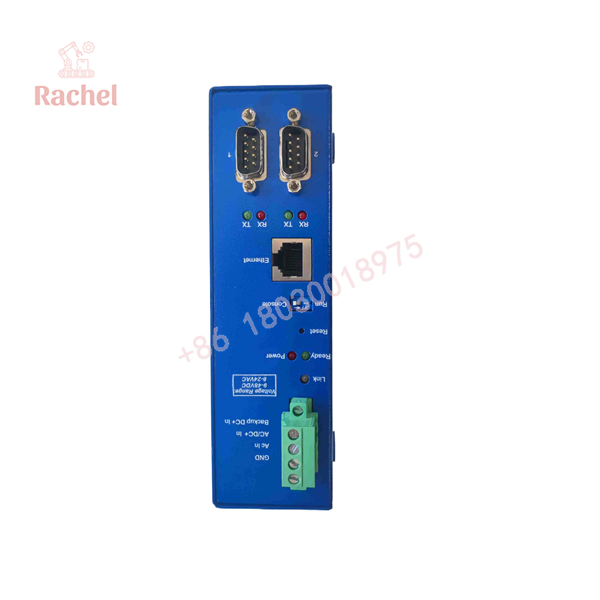
BB-ESR902
Veteran’s tech-trap guide
Trap 1: Assuming the serial cable is interchangeable
The presents its serial interfaces through DB-9 connectors. Connector shape alone does not establish cable compatibility. Confirm the target device’s DTE/DCE arrangement, pinout, and handshaking requirements before selecting a straight-through or null-modem cable.
Trap 2: Matching the IP address but not the serial settings
Network connectivity does not prove serial communication. Baud rate, parity, data bits, stop bits, interface mode, and flow control must match the attached device. Configure and test each port separately.
Trap 3: Overlooking legacy software support
The manual lists older Windows versions for the original configuration and virtual COM utilities. If the host computer uses a modern operating system, verify driver availability and compatibility before committing to the unit. Do not assume that an old virtual COM driver will install or operate correctly on a current workstation.
Frequently asked questions
Q1: What does the BB- do?
It connects two serial devices or serial interfaces to an Ethernet network, allowing supported host applications to communicate with them over TCP/IP or UDP/IP.
Q2: Can the BB- replace another serial device server?
Potentially, but compare the number of ports, serial modes, DB-9 pinout, power supply, network functions, configuration settings, and software compatibility before substitution.
Q3: Does it support RS-485?
Yes. The documentation specifies both two-wire half-duplex and four-wire full-duplex RS-485 operation. Wiring and interface settings must match the connected device.
Q4: What power supply does it require?
The documented range is 9–48 VDC or 8–24 VAC. The manual lists approximately 340 mA at 12 VDC for the . Confirm the input markings on the specific unit before energizing it.
Q5: How can I verify a new-surplus unit?
Request clear photos of the actual unit and its label, confirmation of the condition classification, and a functional test report. “New surplus” generally describes unused inventory outside a current factory supply channel; it should not be treated as proof of manufacturer authorization or authenticity by itself.
Q6: What warranty applies?
Warranty coverage depends on the seller’s written terms and the condition sold. Confirm the coverage period, return window, DOA procedure, and whether the warranty covers both serial ports and Ethernet communication before ordering.

 Start Chat


